A
L
B
E
D
O
T
e
l
e
c
o
m
-
J
o
a
n
d
’
À
u
s
t
r
i
a
,
1
1
2
-
B
a
r
c
e
l
o
n
a
-
0
8
0
1
8
-
w
w
w
.
a
l
b
e
d
o
t
e
l
e
c
o
m
.
c
o
m
User Guide
264
9. Enable the wander generator by configuring Wander generator to On.
An small W is displayed on the top of the screen to show that the wander genera-
tor has started working.
10. Set the Modulation waveform to Sinusoidal
Note: Sinusoidal is the only waveform currently available for the wander modulat-
ing signal.
11. Configure the frequency and amplitude of the wander modulating signal.
Note: Maximum amplitude depends on the frequency. Check the maximum ampli-
tude allowed for the current frequency before setting the Amplitude field.
10.6.Operation in IP Through Mode
You can use the test unit to forward and impair the Ethernet frequency in pass-through
mode. Specifically, xGenius is capable of forwarding synchronization and traffic
between port A and B and adding frequency offset to the signal forwarded to port A.
The procedure to do that is as follows:
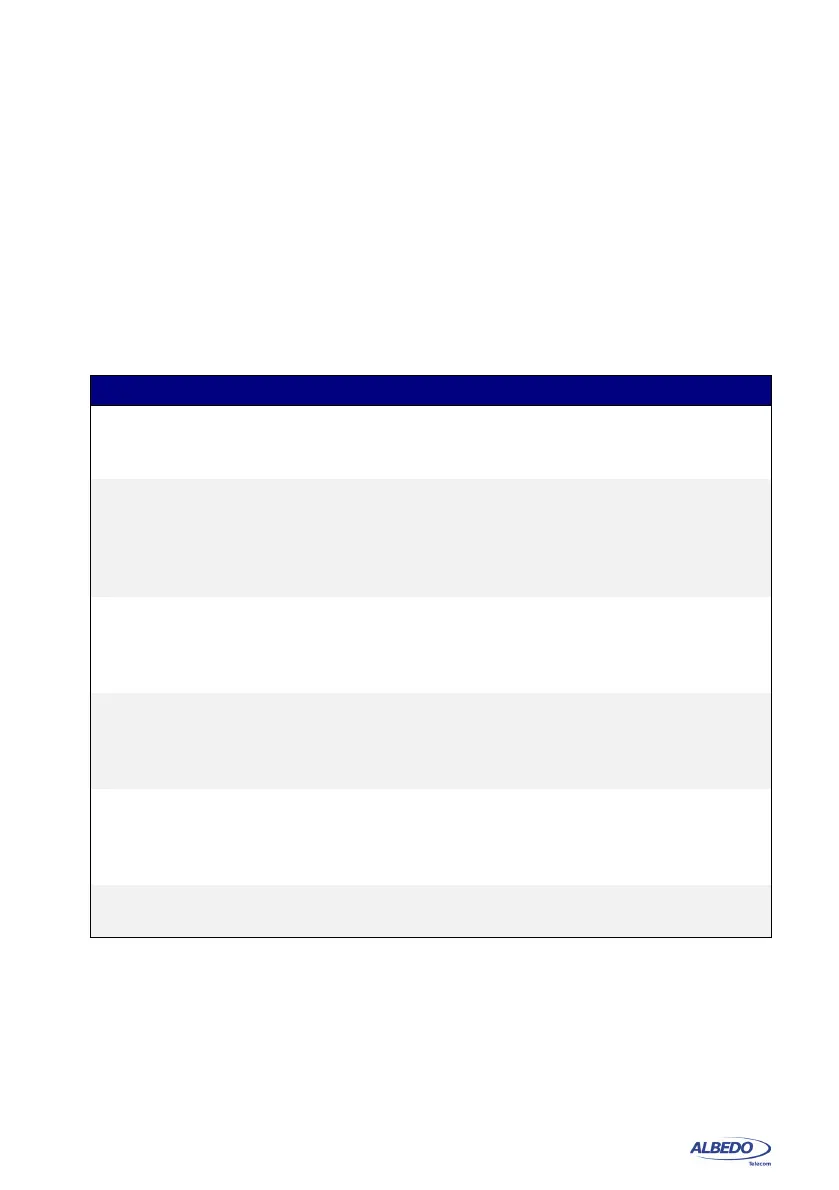
Table 10.2: Wander generation settings
Setting Description
Frequency deviation
(ppm)
Frequency offset applied to the transmitter clock within the
range of ±125 ppm. This feature is useful to stress the DUT /
SUT.
Wander generator Enables or disables the wander generator. If the generator is
disabled, the Port A transmit signal will not contain any wan-
der phase modulation. If it is enabled, the phase will be mod-
ulated by the signal specified by the Modulation waveform,
Amplitude (pp) and Frequency controls.
Modulation waveform Modulating signal to be applied to the phase of the test signal
generated by the tester. The only one possible configuration
for the modulating waveform is currently Sinusoidal, that sets
an harmonic modulating signal.
Amplitude (pp) Sets the peak-to-peak amplitude of the modulating signal in
time units. The maximum allowed value for this field depends
on the Frequency. You can configure higher amplitude values
if the frequency is smaller.
Max. amplitude (pp) This is an informative field that can not be set by the user. It
displays the maximum peak-to-peak amplitude, expressed in
time units, allowed for the Amplitude (pp) field. The maximum
amplitude depends on the value of the Frequency field.
Frequency Sets the frequency of the phase modulating signal in Hz,
mHz or Hz.



 To Next Page