Introduction
11
Configuration panels are usually selection lists. Sometimes you can select only one
simultaneous item in the list and sometimes selection of several items at the same time
is possible. Keyboards are available if selection through lists is not possible. There is
one keyboard for numeric settings and one for alphanumeric settings. These
keyboards are also used to enter data types with a well defined formatting such as IP
or MAC addresses.
1.3.3. The Summary and LEDs Tabs
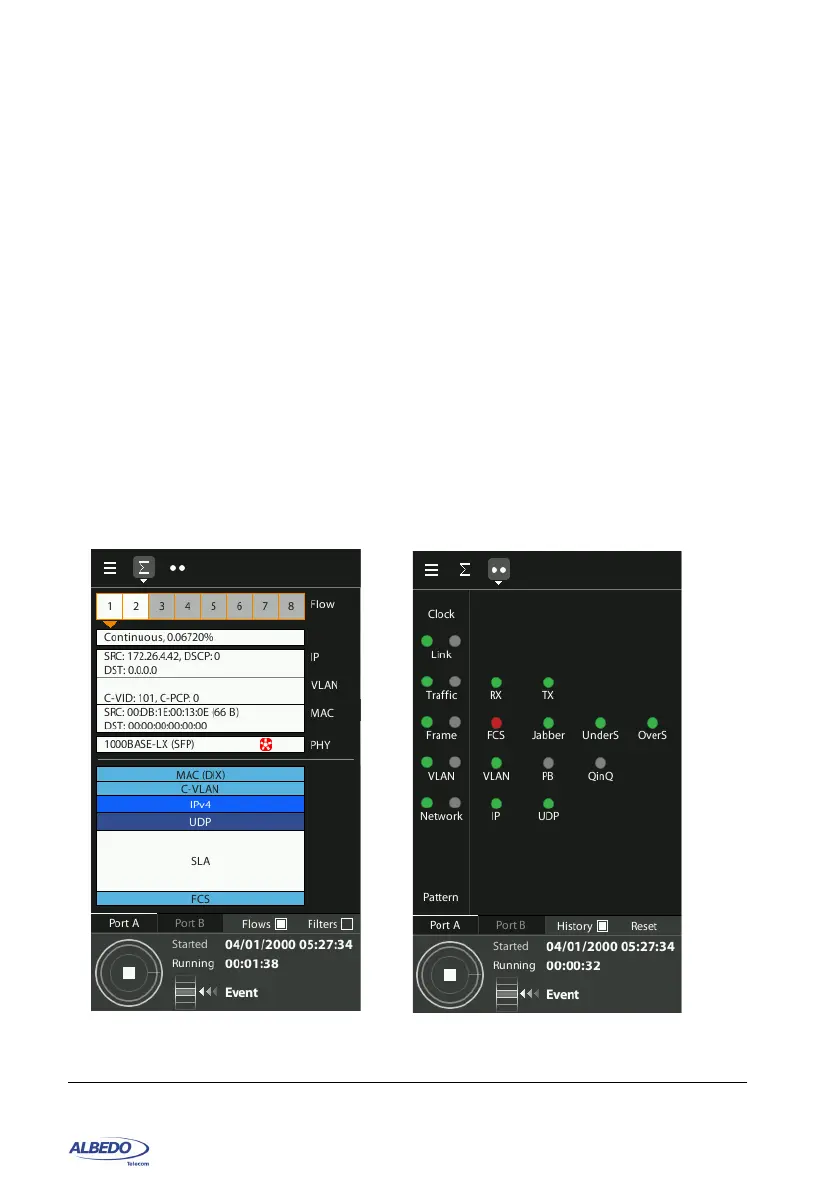
The test signal status can be checked from the LEDs tab on the top left corner of the
screen. The Softleds from the LEDs panel are always active, even when there is no test
running. The LEDs may display real time information but they can be also configured
in History mode to store details about past events. They are organized in rows and
columns each row usually includes LEDs with a related meaning. Typically (but not
always), events displayed in the same row correspond with the same protocol layer. For
each row, there is a summary LED, which aggregates the result for all items in the same
row. The results from the same summary column are also aggregated in a single
hardware port summary LEDs.
Figure 1.8: Special panels: (a) Summary panel, (b) LEDs panel.
(a)
(b)



 To Next Page