A
L
B
E
D
O
T
e
l
e
c
o
m
-
J
o
a
n
d
’
À
u
s
t
r
i
a
,
1
1
2
-
B
a
r
c
e
l
o
n
a
-
0
8
0
1
8
-
w
w
w
.
a
l
b
e
d
o
t
e
l
e
c
o
m
.
c
o
m
User Guide
12
The Summary tab provides some details about the current configuration and results.
There is not a fixed structure for this tab, which has its own layout depending on the
currently selected operation mode.Typically, this panel has graphical information about
traffic flows, protocol stack, filters, signal processing blocks, etc.
1.3.4. Recently Used Panel and Menu Tree
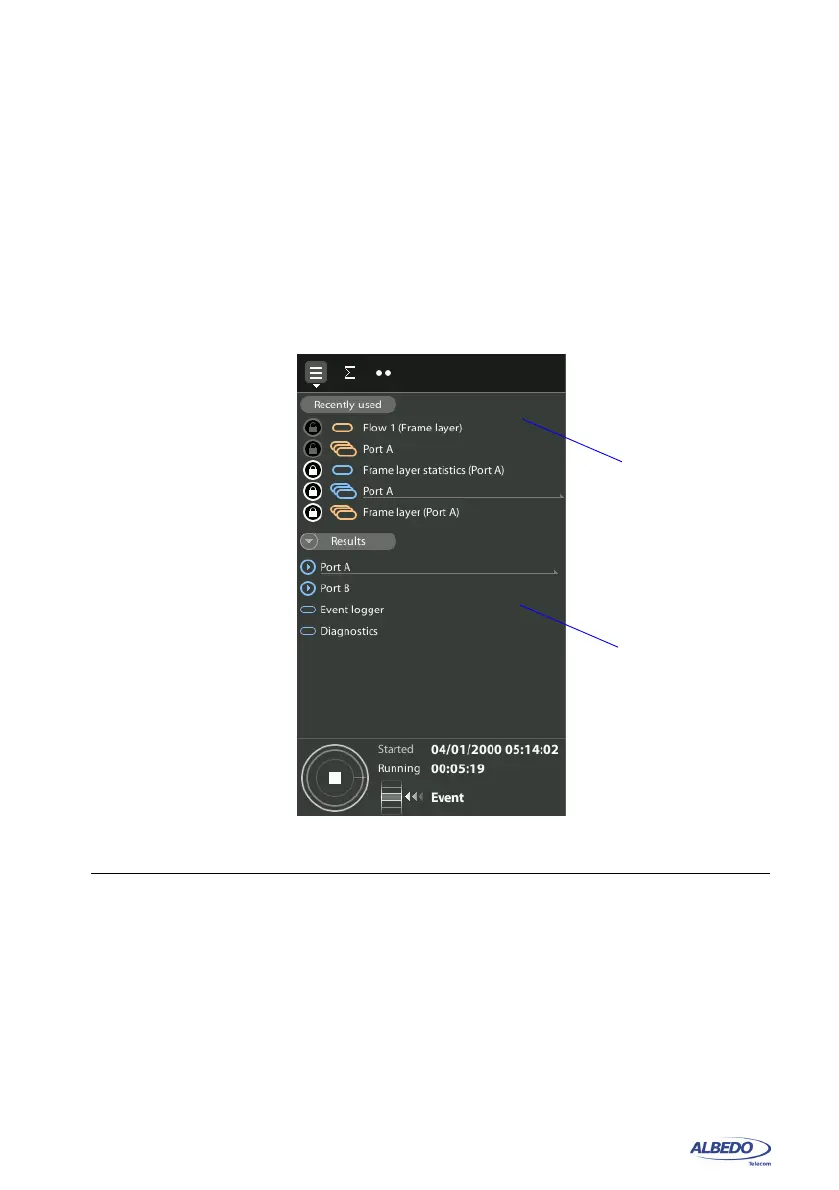
The Summary tab has two differentiated areas. The Recently Used area provides quick
access to important screens, the Menu tree contains the TEST, CONFIG or RESULTS
menu trees with a general view of the choices available to users.
• Recently Used panel: Each new screen visited by the user is listed in the Recently
Used panel. New screens replace the older screens so that the oldest in the list is
deleted when a newer one is visited. The Recently Used panel may contain up to
five screens. To avoid any of the listed screens to be deleted from the list, users
may lock them by pressing the lock button on the left of each screen. Locked
screens can be unlocked by pressing the lock button a second time.
• Menu Tree: Contains the list of all sub-menus available in each of the TEST, CON-
FIG and RESULTS panel. Menus and sub-menus can be opened to display lower
Figure 1.9: The Summary tab contains a Menu tree and the Recently Used panel.
Recently used
panel
Menu
tree



 To Next Page