A
L
B
E
D
O
T
e
l
e
c
o
m
-
J
o
a
n
d
’
À
u
s
t
r
i
a
,
1
1
2
-
B
a
r
c
e
l
o
n
a
-
0
8
0
1
8
-
w
w
w
.
a
l
b
e
d
o
t
e
l
e
c
o
m
.
c
o
m
User Guide
104
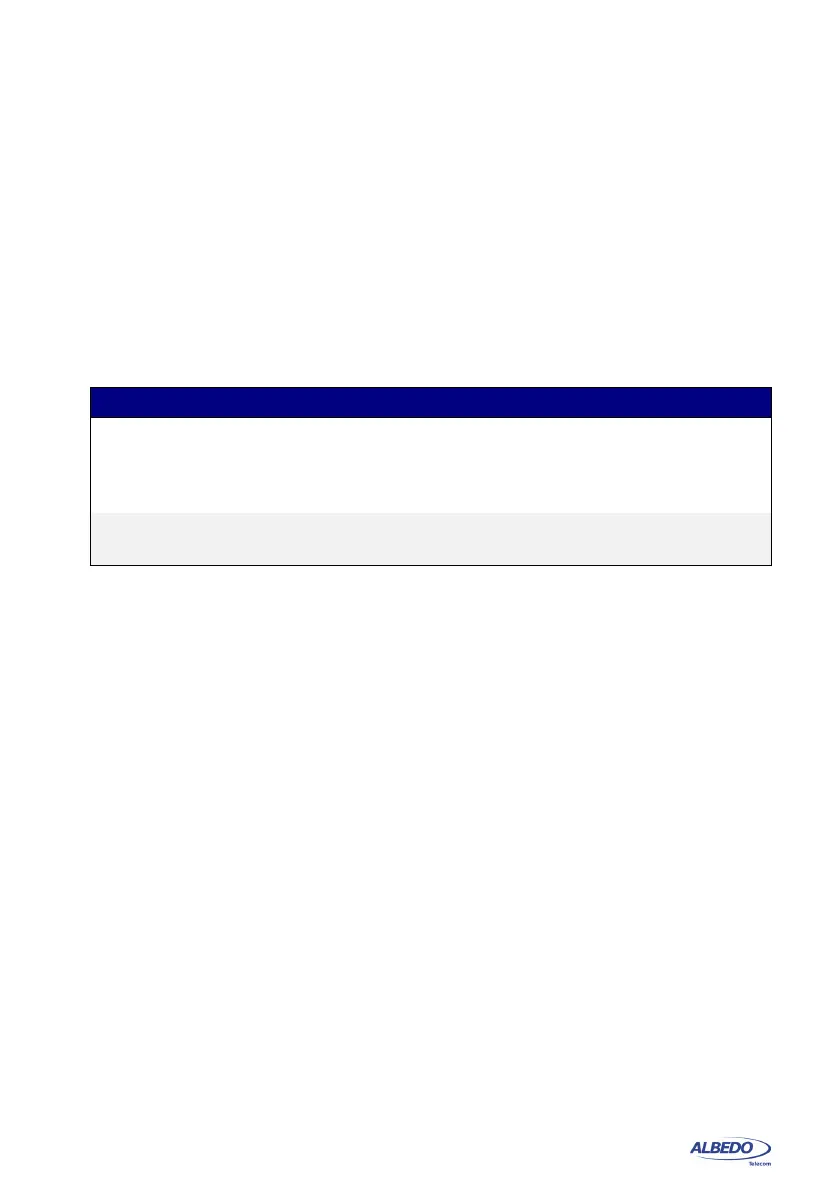
broadcast packets when this happens. MPLS test results are limited to an indication of
the presence of MPLS in the received traffic and some statistics about the MPLS stack
size. To display the MPLS statistics follow these steps:
1. From the Home panel, go to RESULTS,
The test port results panel is displayed.
2. Select either Port A or Port B to enter in the port specific results.
3. Enter in MPLS statistics.
4. Check the MPLS labels per packet (min.) and MPLS labels per packet (max.)
counters.
5.2.Using the Network Search Capability
Network Search is an optional monitoring tool for the test unit that reports the top MAC,
IPv4 and IPv6 addresses found in the network. Also, if you are connected to a tagged
interface, the network search can be configured to collect the most viewed VLANs.
Network search can be used to look for an specific traffic flow in your network or maybe
as a preliminary analysis tool before filtering the interesting traffic flows and getting
detailed statistics about them. In fact, the Network Search capability is prepared to be
used as a preliminary analysis tool: Once the traffic search has finished the user can
choose which filters to configure following the results of the network search. All this is
done by a simple key press. Network Search is used in the following way:
1. From the Home panel, go to CONFIG,
The test port settings panel is displayed.
2. Select either Port A or Port B to enter in the port specific configuration.
3. Go to Search network by and define your search field: Source MAC address, Des-
tination MAC address, VLAN, Source IPv4 address, Destination IPv4 address,
Source IPv6 address, Destination IPv6 address.
Note: Source IPv4 / IPv6 addresses and Destination IPv4 / IPv6 addresses are
available only if you are working in an IP mode (IP endpoint or IP through). You
can configure VLAN even if you are not connected to a tagged interface but you
will not collect any VLAN information when you start the measurement. In order to
disable the network search in the current port set Search network by to Off.
Table 5.5: MPLS statistics
Metric Description
MPLS labels per
packet (min.)
Minimum number of MPLS labels per packet found in the
received traffic from the beginning of the test. If it has been
received at least one frame without MPLS labels, this result
will be set to 0.
MPLS labels per
packet (max.)
Maximum number of MPLS labels per packet found in the
received traffic from the beginning of the test.



 To Next Page