A
L
B
E
D
O
T
e
l
e
c
o
m
-
J
o
a
n
d
’
À
u
s
t
r
i
a
,
1
1
2
-
B
a
r
c
e
l
o
n
a
-
0
8
0
1
8
-
w
w
w
.
a
l
b
e
d
o
t
e
l
e
c
o
m
.
c
o
m
User Guide
270
text or PDF files from the USB slave connector and they can be exported through the
USB master port, the SD card reader or the web interface.
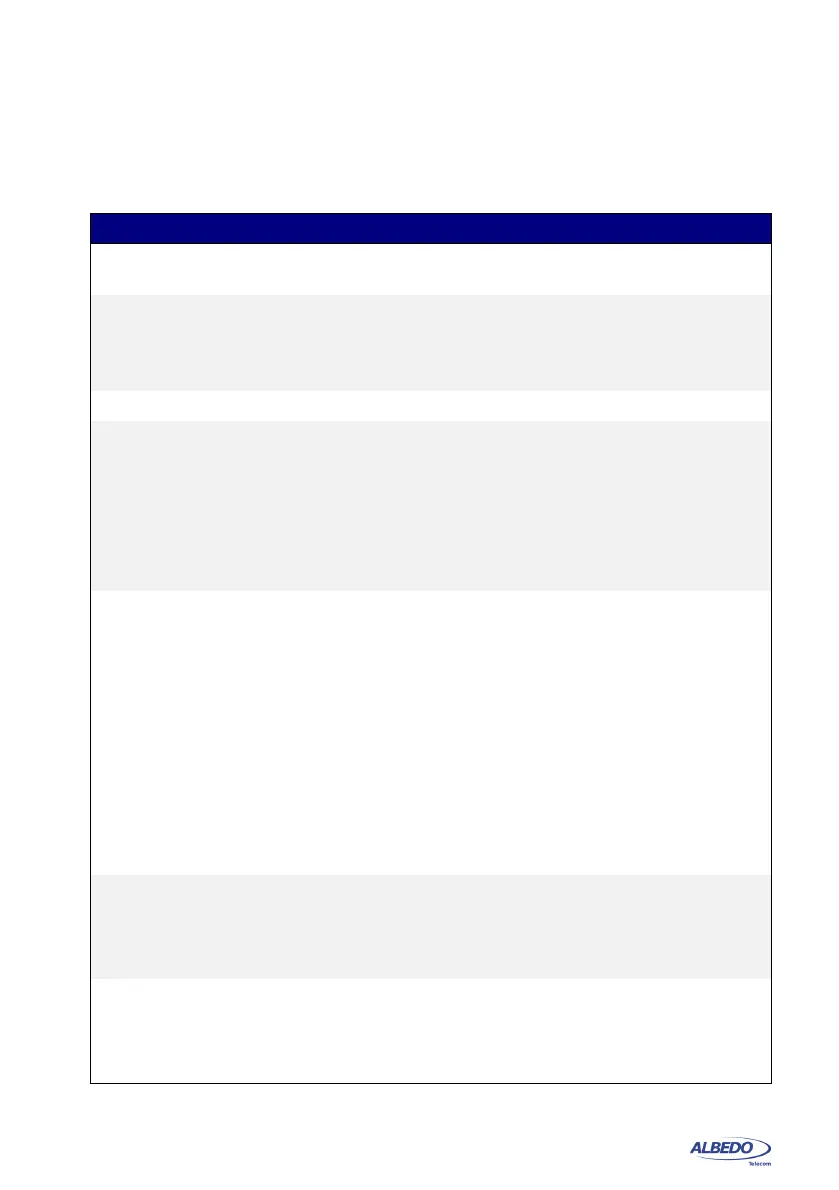
Table 11.1: Report Files Panel
Setting Description
Internal memory Displays report files stored in the internal tester memory. The
test unit stores up to 50 report files.
External devices Displays report files stored in external devices (micro SD
memory card, USB memories or drives) connected to the
tester. The amount of files stored in an external device is only
limited by the device capacity.
Generate reports Enables / Disables report generation.
Report format Selects the report format for future reports.
• PDF: Reports are generated using the portable document
format (PDF). Use this configuration if you want to make
difficult for anyone to modify the report.
• Plain text: Reports are text documents which can be edited
with any text editor. Use this configuration if you want to
modify the report or include it in a wider document.
Report named after This control enables the user to choose between different
templates for the report name. There are three different tem-
plates to choose:
• Start time: The report is identified by a time stamp that
contains both data and time with the following format:
yyyy-MM-dd-hhmmss.
• User ref. + sequence: The report name is set to a user
configurable string plus a sequence number that is incre-
mented for each new test.
• Serial no. + sequence: The report name is set to the tester
serial number plus a sequence number that is incremented
for each new test.
User reference This could be any alphanumeric string containing upper case
letters, lower case letters and numeric digits.
This field makes sense only if the report name format is User
ref. + sequence.
Next sequence Displays and configures the sequence number that will be
assigned to the next report to be generated.
This field makes sense only if the report name format is User
ref. + sequence or Serial no. + sequence.



 To Next Page