A
L
B
E
D
O
T
e
l
e
c
o
m
-
J
o
a
n
d
’
À
u
s
t
r
i
a
,
1
1
2
-
B
a
r
c
e
l
o
n
a
-
0
8
0
1
8
-
w
w
w
.
a
l
b
e
d
o
t
e
l
e
c
o
m
.
c
o
m
User Guide
290
6. Use the keyboard or the mouse to browse the instrument panels, start measure-
ments, insert events or any other action.
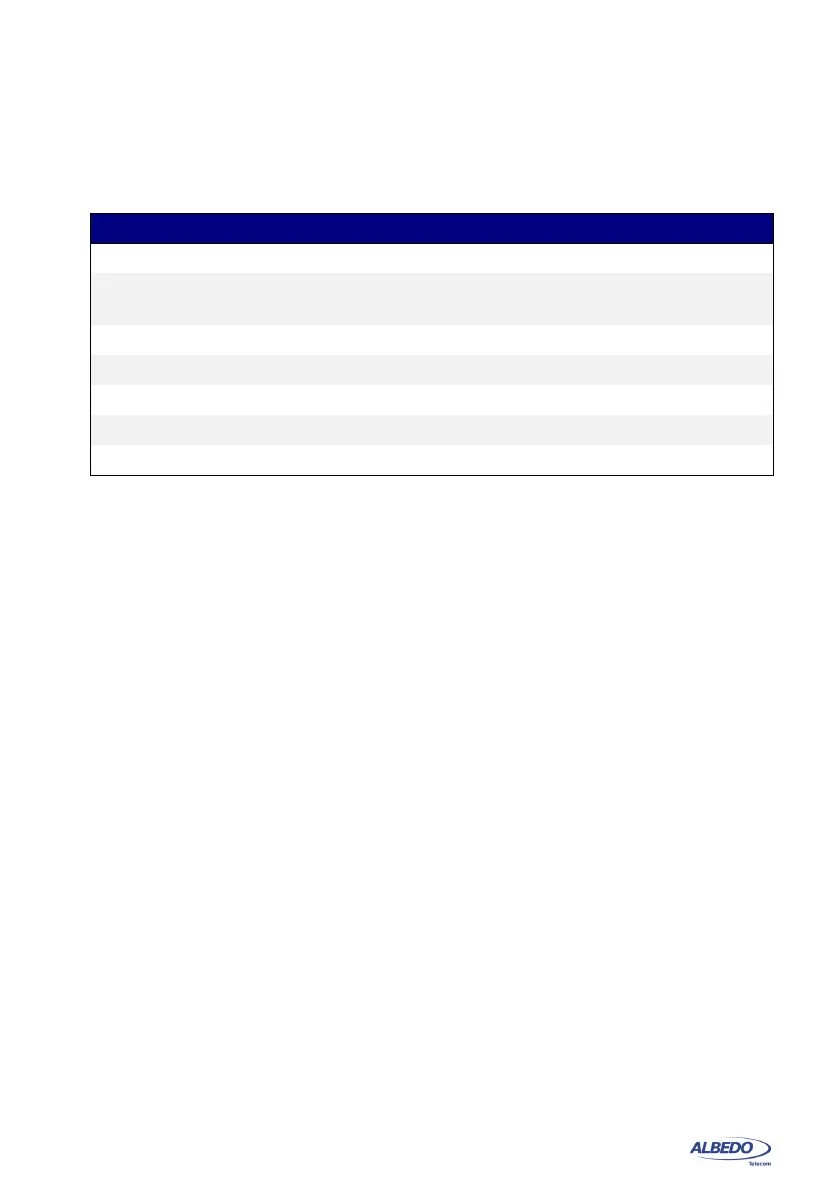
Table 11.10: Remote Control Keys
Key Description
Home It is equivalent to the HOME key. It displays the Home panel.
Esc It is equivalent to the Esc key. It leaves the current panel and
displays the previous one in the panel hierarchy.
Enter It is equivalent to the ENTER key. It confirms settings.
Ctrl+L It is equivalent to LEDS. It displays the Leds panel.
Ctrl+S It is equivalent to SUM. it displays the Summary screen
Ctrl+R It is equivalent to RUN. It starts / stops a measurement
Ctrl+E It is equivalent to EVENT. It starts / stops event insertion



 To Next Page