Getting to know your telephone
8AL91446ENAA ed02 38 /113
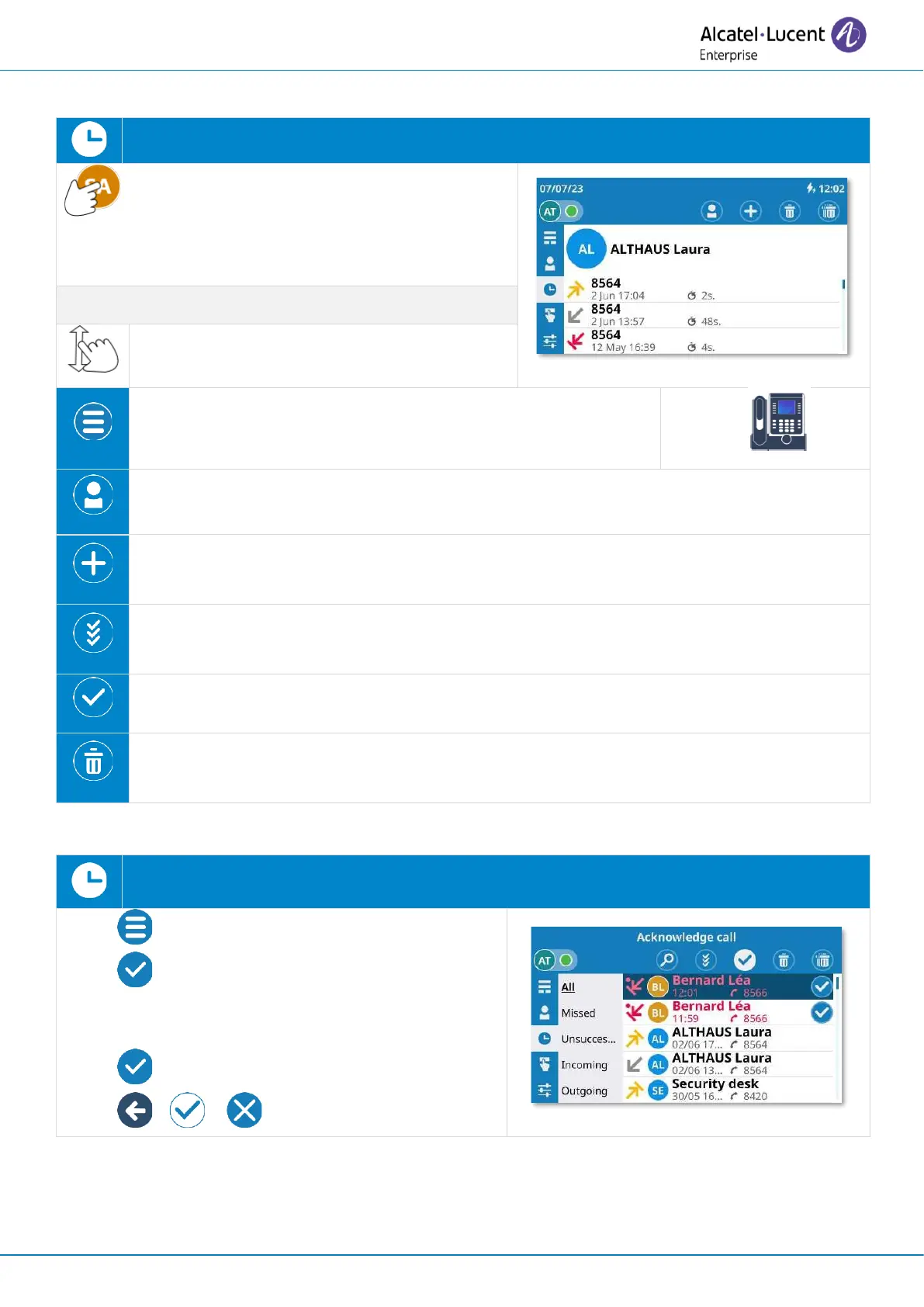
2.13.1 Open the log details
Open the user local menu: Call log.
Open log details by selecting the avatar (left
side ). All call logs associated with the selected contact
are displayed with an icon showing the type of call.
Scroll the page to display the rest of the list
(touch screen or navigation keys).
Open the context menu to access the following actions (ALE-
300 only).
Detail
Open the contact card of the contact.
Add contact
Add this contact in your local directory if it is not already there.
Acknowledge all
Acknowledge all missed calls for this contact.
Mark as read
Acknowledge the selected missed call.
Delete entry
Delete entries in the call log of this contact.
2.13.2 Acknowledge the selected missed call
Open the user local menu: Call log.
• Open context menu (ALE-300 only).
• Mark as read
Enter in acknowledge mode (the icon remains
selected).
• Mark certain logs as read.
• or or Exit acknowledge mode.


 To Next Page