Transfer To transfer (with oral presentation to the second party) the first party
to the second party
Broker To switch between the first party and the second party (the party
which is not in conversation is automatically put on hold)
Cancel To cancel the consultation call and continue the conversation with the
party which is not in conversation when the Cancel softkey is
pressed
Release To release both the conversation with the first party and the consulta-
tion call
DTMF on To activate DTMF calling transparency. After having activated DTMF
calling transparency, DTMF off softkey is used to deactivate it
Conference To put the first party, the second party and the attendant in confer-
ence, see Initializing a Three-Party Conference
2.7.2 Consultation Call to an External User
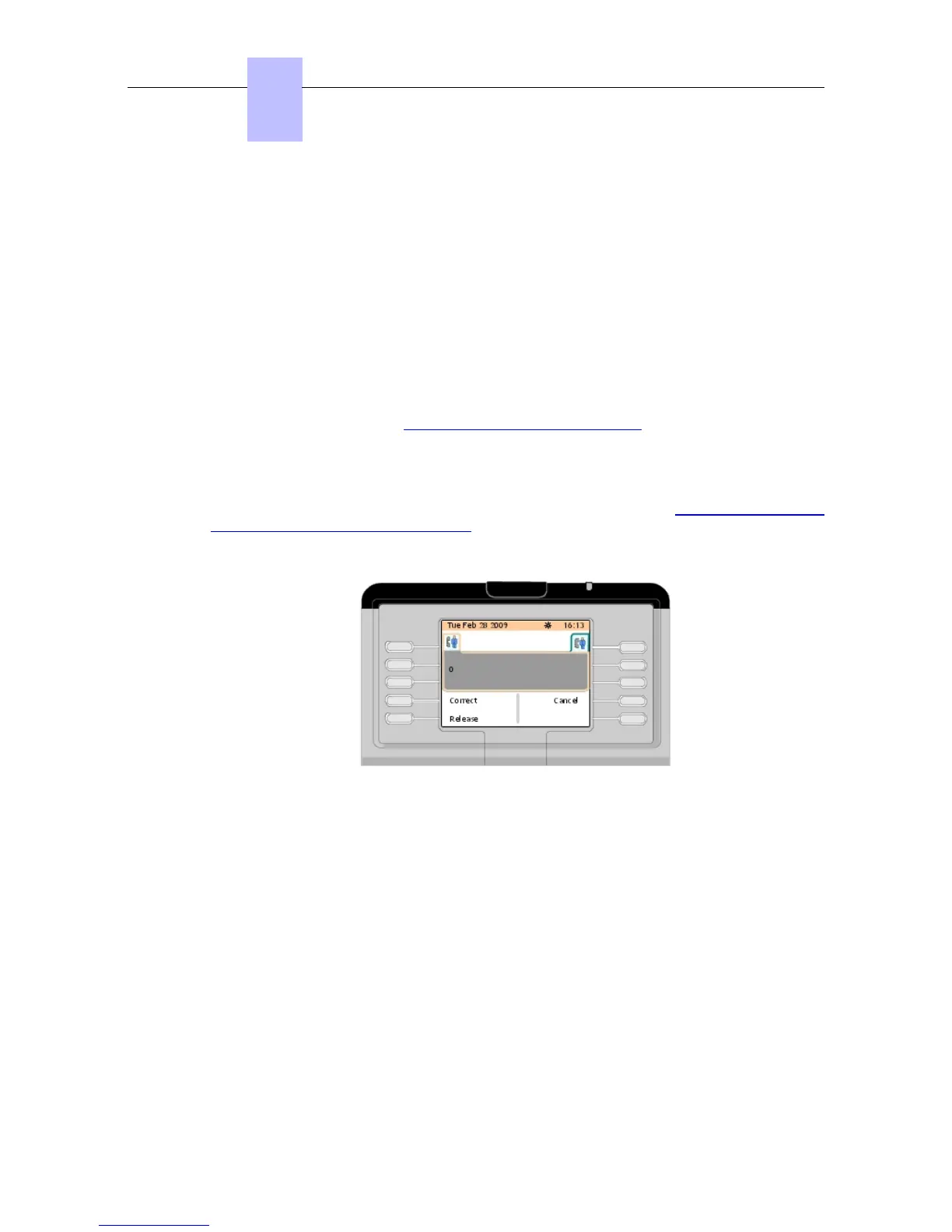
A consultation call is activated from the conversation screen (shown in figure: Telephone Area
Example (Internal Call in Conversation) ). The attendant dials the external access prefix and
the first digit of the desired external number. As soon as the first digit has been dialed, a
second telephone tab appears in the telephone area:
Figure 2.42: Telephone Area Example (Dialing External Number in Conversation)
The following softkeys are available:
Correct To correct the last digits dialed in case of dialing mistake
Cancel To cancel the consultation call and continue the conversation with the
first party
Release To release the current call
When all the digits of the external number have been dialed, the screen displays:
Chapter
2
#$ %!#
2-24
! "













 To Next Page