Identifier GUID-1F5023F5-9868-4AAF-A9F5-BFB400CD890A
Status Translated
装回内存模块
警告: 拆装计算机内部组件之前,请阅读计算机附带的安全信息,并遵循拆装计算机内部组件之前中的步骤。拆装计算机
内部组件之后,请遵循 拆装计算机内部组件之后中的说明。有关其他最佳安全操作信息,请参阅 www.dell.com/
regulatory_compliance 上的 Regulatory Compliance(管制标准)主页。
Identifier GUID-E70198A2-4778-424E-81B2-C4A5A40AC7BA
Status In Translation
Procedure
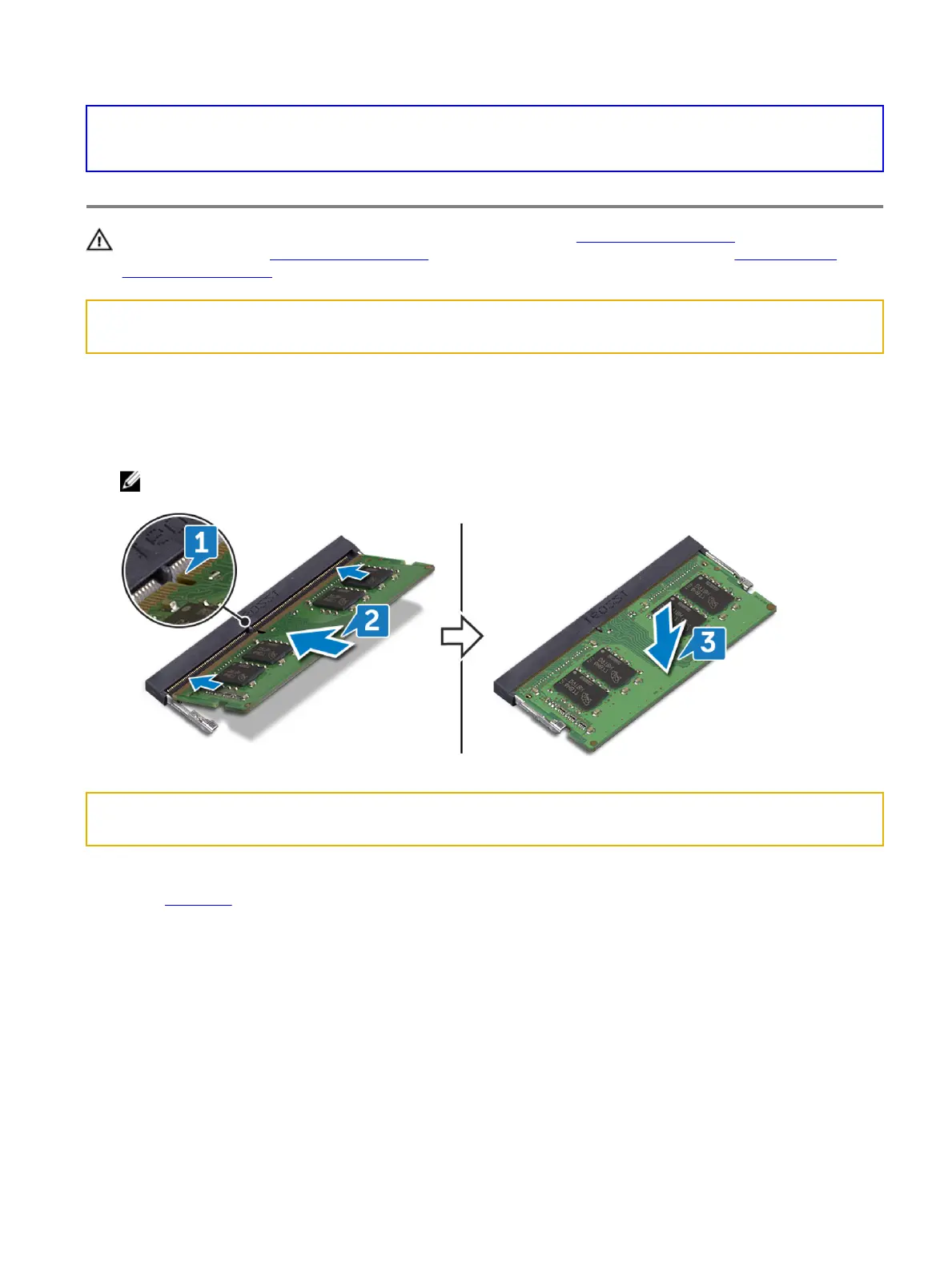
1 Align the notch on the memory module with the tab on the memory-module slot.
2 Slide the memory module rmly into the slot at an angle.
3 Press the memory module down until it clicks into place.
注: If you do not hear the click, remove the memory module and reinstall it.
Identifier GUID-FB4A0598-CC04-47AC-97EA-1A2BDE31A1FD
Status In Translation
Post-requisites
Replace the base cover.
26















 To Next Page