Identifier GUID-6C27350D-3EC5-48CB-87D0-972F35808095
Status Translated
卸下 I/O 后护盖
警告: 拆装计算机内部组件之前,请阅读计算机附带的安全信息,并遵循拆装计算机内部组件之前中的步骤。拆装计算机
内部组件之后,请遵循 拆装计算机内部组件之后中的说明。有关其他最佳安全操作信息,请参阅 www.dell.com/
regulatory_compliance 上的 Regulatory Compliance(管制标准)主页。
Identifier GUID-A01821F4-5286-47E9-BE73-4FB22D51FE82
Status In Translation
Prerequisites
Remove the base cover.
Identifier GUID-D56D31E3-2C92-4EC6-99A2-AE7C08CD824D
Status In Translation
Procedure
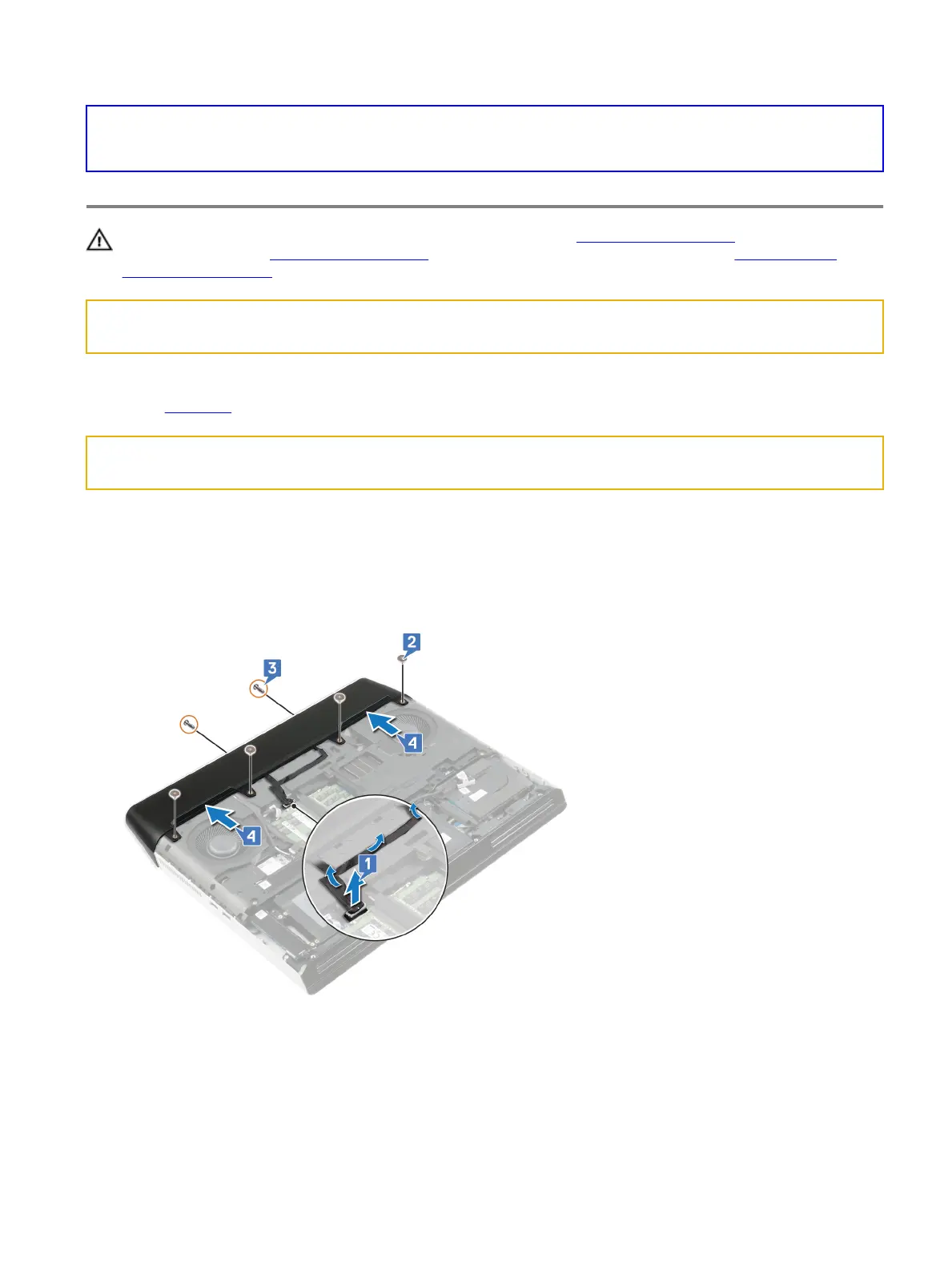
1 Disconnect the tron-light cable from the system board and peel it o from the computer base.
2 Remove the four screws (M2.5x2.5) that secure the rear I/O cover to the computer base.
3 Remove the two screws (M2.5x7) that secure the rear I/O cover to the palm-rest assembly.
4 Push the rubber feet on the rear I/O cover to remove it from the palm-rest assembly.
43















 To Next Page