Installation & Systems Manual RUBIDIUM SERIES
Page 33
2.2.2 Plug-In a Module
All modules of RUBIDIUM SERIES can be “hot swapped”. To plug-in a module, please pro-
ceed as follows:
Remove the solid rear panel cover plate for the slot where the module should be
installed: Unscrew both the collar screws, so that the rear panel cover plate can be
easily removed. Retain the cover plate for possible future use.
Remove the module from its anti-static packing material. Hold the module by the
edges or the rear plate, please do not touch the electronic components, strip
conductors or pins. Retain the packing material for possible future use.
ATTENTION:
Observe precautions for handling electrostatic-sensitive devices. See “Electro
Static Discharge (ESD) Precautions” at chapter A5 for details.
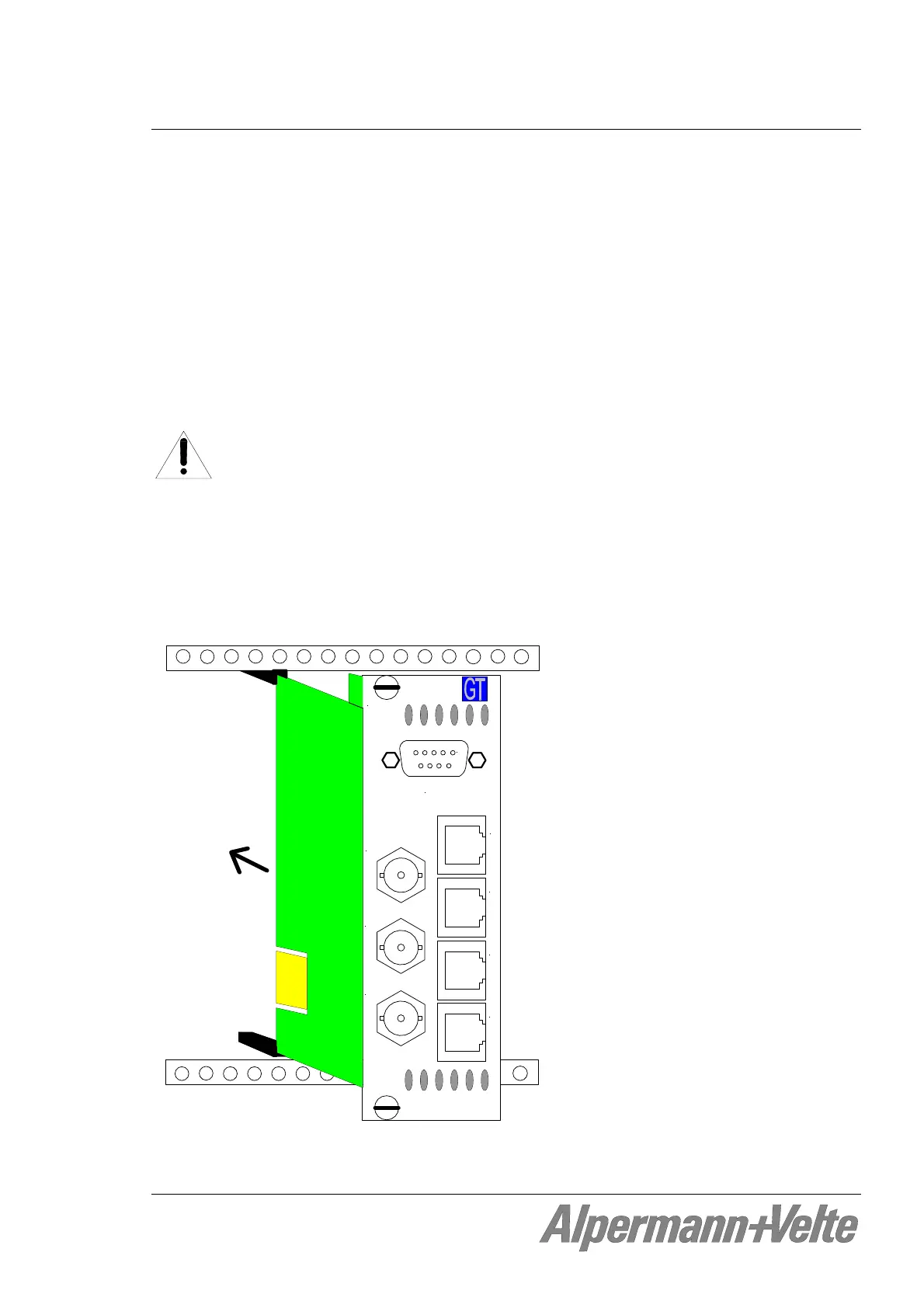
The connector pads of the circuit board of the module fit into the socket receptacles
inside the slot. In case the module consists of two boards this board is located on the
left side viewed from the rear of the module. Insert this board into the appropriate
slotted card guides. With sufficient pressure push the module until it engages into the
front socket receptacle.
Alpermann+Velte
1
VIDEO OUT
VIDEO IN
LOOP OUT
GPI B
GPI AREF IN
MTD
MTD
In order to fasten the module: Fasten both the collar screws of the rear plate.


 To Next Page