Installation & Systems Manual RUBIDIUM SERIES
Page 77
4.1.5 Overview of Tab Functions
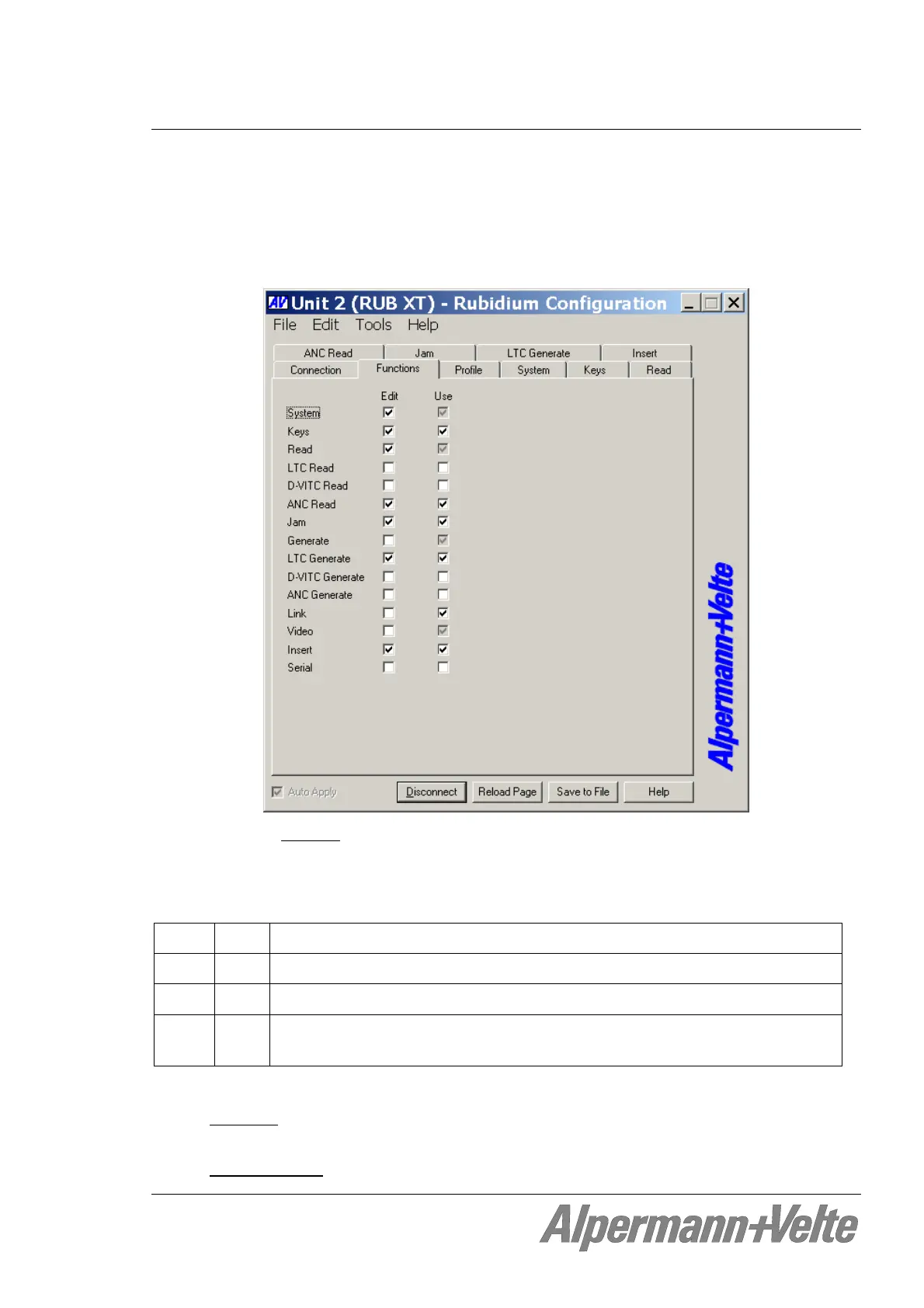
The program RUBIDIUM CONFIGURATION works with tab cards. With one click on button
Configure all those tabs will be displayed which are presently enabled for the selected
module. Click on the Functions tab to see all available tabs in a list. At the “Functions” tab,
you can enable and disable all tabs which are available for the selected module. Example:
A tab reflects a function
of the module. The columns Edit and Use determine whether the
function in the module is activated or deactivated, and whether a set-up of that specific
function is allowed or not.
Click on the applicable Edit and/or Use check-boxes to activate/deactivate a function:
Edit Use
Function is deactivated, the tab is not visible.
Function is activated, the tab is visible, and set-up is possible.
Function is activated but the tab not visible, and therefore it is currently not
possible to change the set-up.
We suggest that you deactivate the Use checkboxes of all functions you are presently
not using
.
We suggest that you deactivate the Edit checkboxes of all functions you are presently
not configuring
. That avoids unintentional operating and malfunctions.


 To Next Page