Installation & Systems Manual RUBIDIUM SERIES
Page 83
4.2.2 IP Configuration
To configure the IE module, it is necessary that both the module and the computer are
connected to the same network as shown above. If you have a firewall running, please disable
it or make the UDP port 8001 available for incoming and outgoing traffic.
The Rubidium Config program is part of the delivery or available at:
http://www.alpermann-velte.com/serv_e/softw
are_e/software_e.html.
Please copy this program to your computer.
Turn on the power of all units.
Start the "Rubidium Config.exe" program.
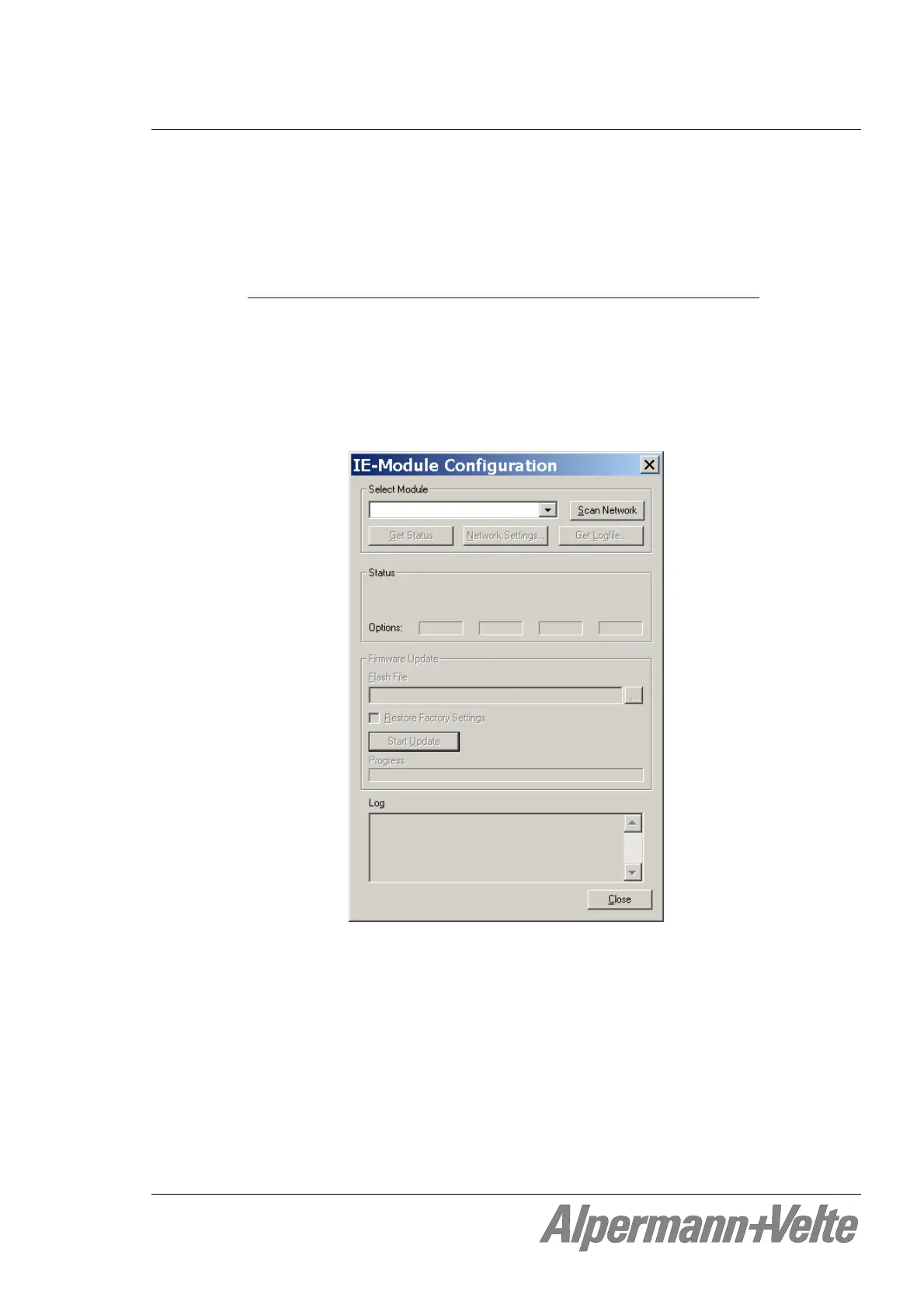
Now choose "IE Module Configuration..." from the "Tools" menu. The following screen
will appear:
Press "Scan Network" to search for IE modules. All IE modules in the local network
will be listed in the select box.
Now choose the module from the list, click on "Network Settings…", and adjust the
parameters like IP Address, Network Mask, Gateway, and DHCP. Then click “Config“
to store this set-up.
The IP configuration now is complete.
Close the "IP Configuration" dialog. A new network scan is started automatically and
the configured IP address will be shown in the list.
Now you can close all dialogs.


 To Next Page