Installation & Systems Manual RUBIDIUM SERIES
Page 85
4.2.5 Accessing a Configurable Module
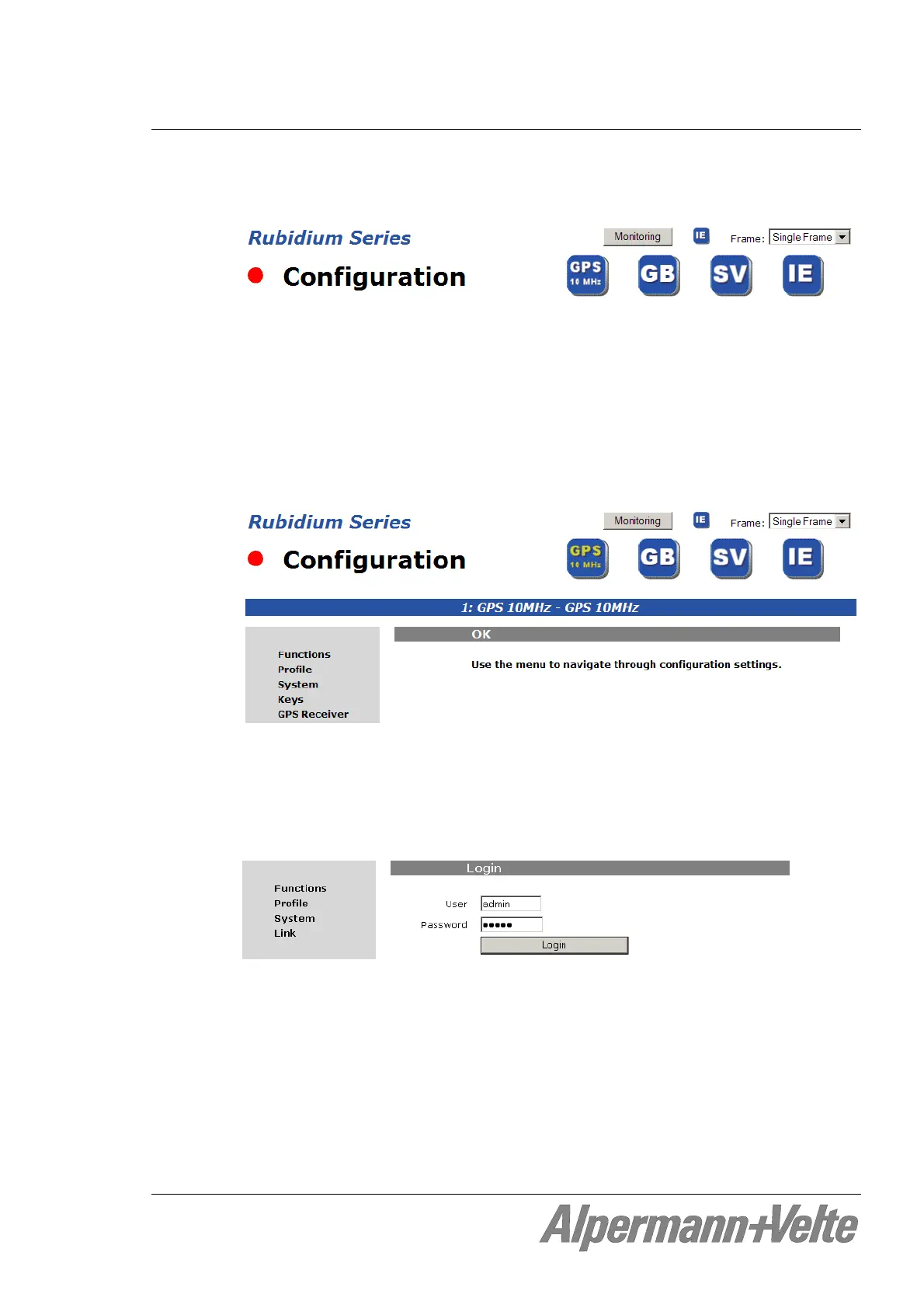
Click on “Configuration“ at the RUBIDIUM homepage to open the Configuration page.
1
st
step: Drop-down list Frame: select the frame number. Please notice chapter
“Identification of Modules in a RUBIDIUM System”.
All configurable modules found will be indicated by its type in the blue buttons.
Example: Module of type GPS 10 MHz as “unit 1“, GB as “unit 2“, SV as “unit 3“.
Numbering front view - left to right. RUB1 frames have four units at maximum,
RUB3 frames 21 units.
2
nd
step: Click on a blue button to establish a communication to this single module. It opens
a page with a list of all the links which correspond to all the available functions.
3
rd
step: Click on any item on this list, e.g. “Functions”. This will open a page showing the
current parameters. You can check the parameters and change if needed.
If it is the first time that you click on a link to a specific function, you have to pass
the LOGIN:
The password of the “admin” user (administrator) is “admin“.
You can add, modify or delete users. For more information, please refer to the operating
manual of the IE module.
A click on
Rubidium Series terminates the connection to the module and returns to the
RUBIDIUM homepage.


 To Next Page