Installation & Systems Manual RUBIDIUM SERIES
Page 89
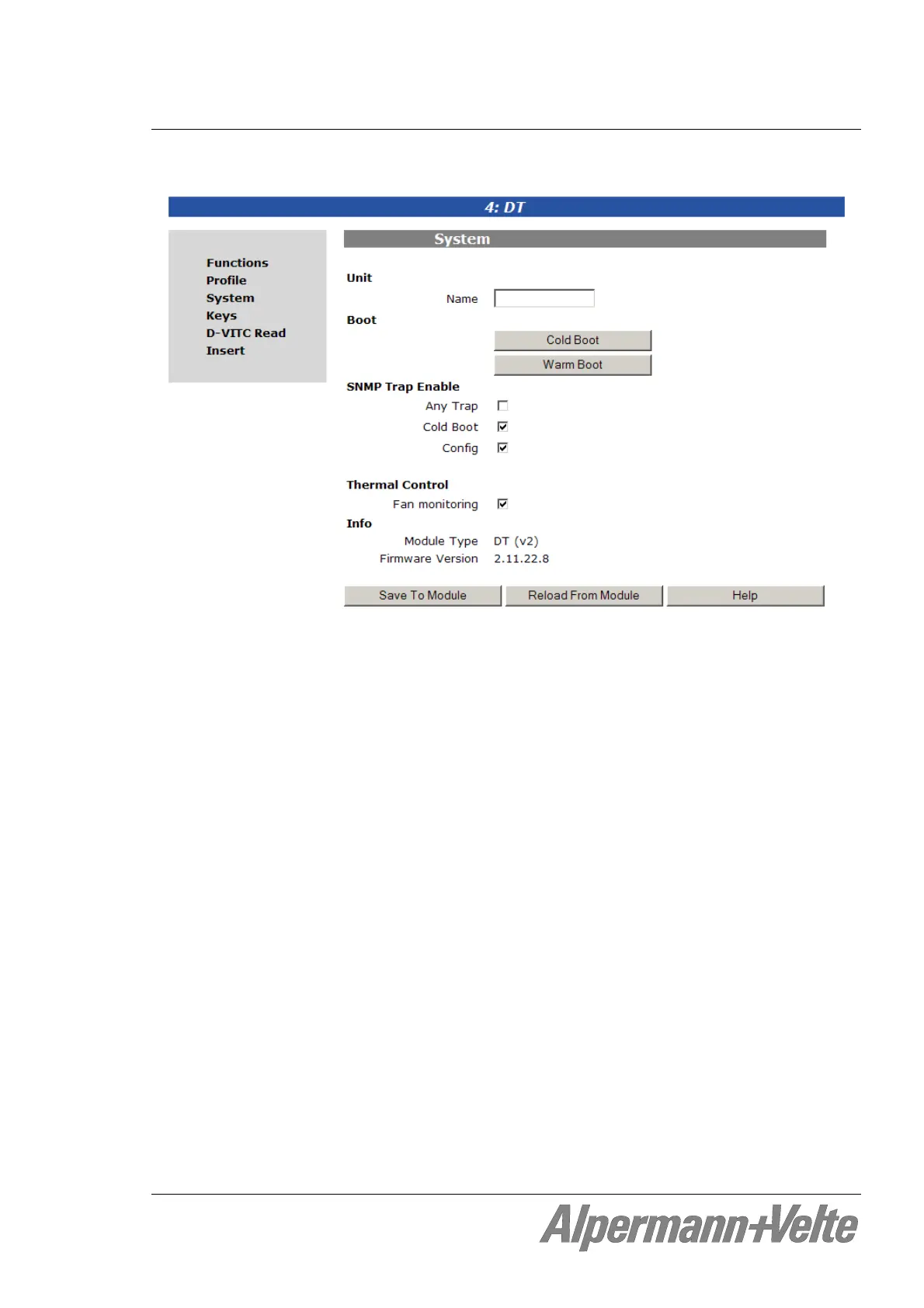
4.2.8 The “System“ Page: Module Identification, Reset, SNMP, Fan Control
Unit: The connected module can get a name. You may enter, change or verify this
name at the “Name” entry. After a change click on button Save To Module to
transfer the new name to the module. With a click on button Reload From
Module the “Name” entry gets an update with the current name of the module.
Cold Boot: Do a cold boot of the module.
Warm Boot: Do a warm boot of the module.
SNMP Trap Enable: Activate the “Any Trap” check box to enable the SNMP feature. If this
check box is not activated no SNMP trap will be generated.
The individual traps can be enabled/disabled by a click on the
corresponding check box.
Thermal Control: One module of each frame should be responsible for a fan module
initialisation and monitoring. At the same time this module monitors
the power supplies of this frame. Activate the “Fan monitoring” check
box to select these features for this module.
Info: Displays module’s status information: module type and firmware version.


 To Next Page