Installation & Systems Manual RUBIDIUM SERIES
Page 80
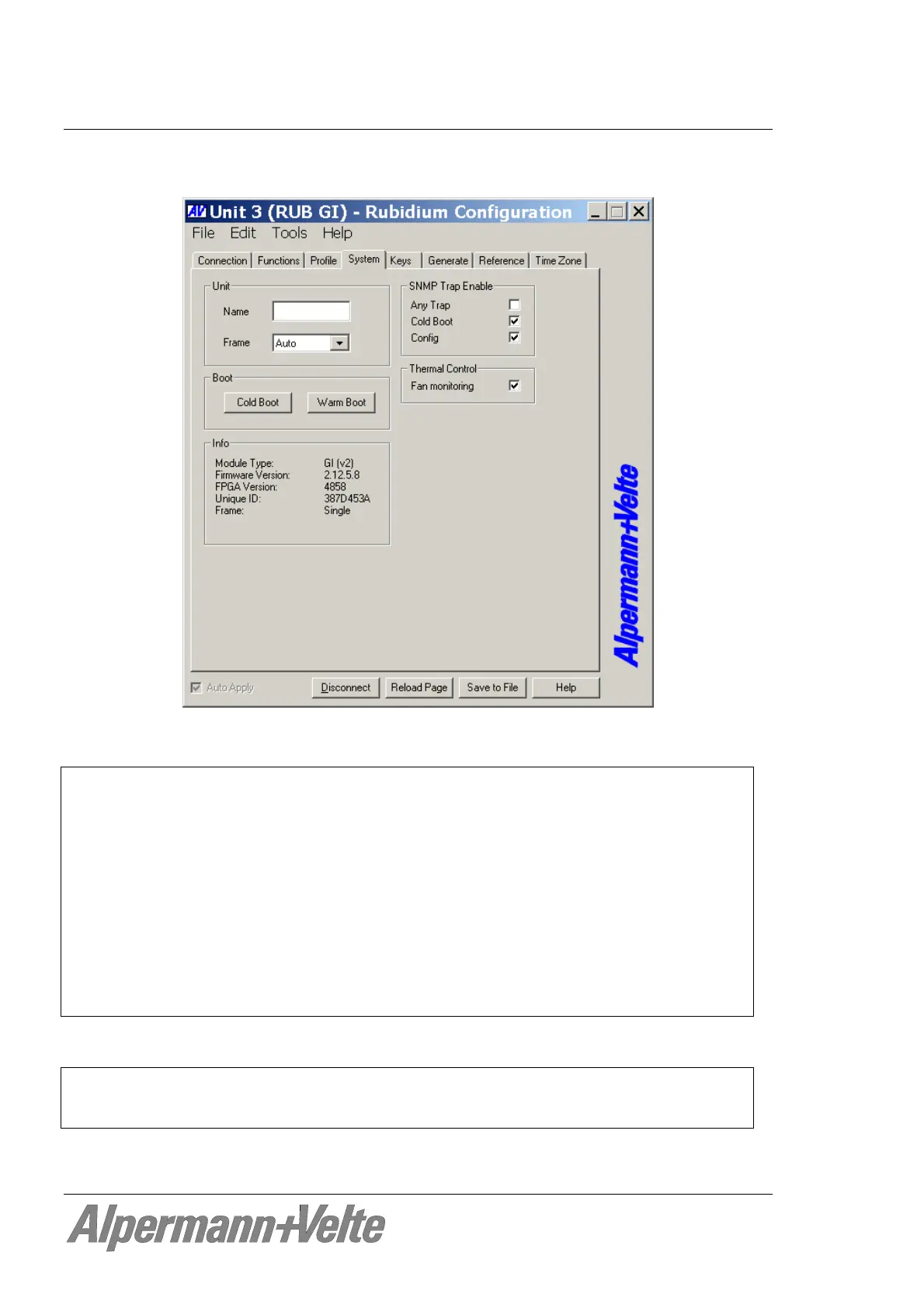
4.1.8 The “System” Tab: Module Identification, Reset, SNMP, Fan Control
Unit
Name The connected module can get a name. You may enter, change or verify this
name at this window. After a change press the tabulator key at the PC’s
keyboard.
Frame Frame denotes the (RUB1 or RUB3) chassis. The window shows “Single” if
only one frame is connected. If a system is built-up of more than one frame
you need the module’s position in the frame as well as the number of the
frame to uniquely identify a module in an Ethernet network. In this case the
frame’s number will be stored on the module and is shown at this window.
You can change this number if necessary – e.g. if modules have been
exchanged. If you select “Auto” the module will request the frame number –
which is set by the rotary switch placed on the fan module - automatically.
Boot
Cold Boot Do a cold boot of the module.
Warm Boot Do a warm boot of the module.


 To Next Page