49
Installation, Operation & Maintenance Manual
OXYvisor Optical Oxygen Analyzer
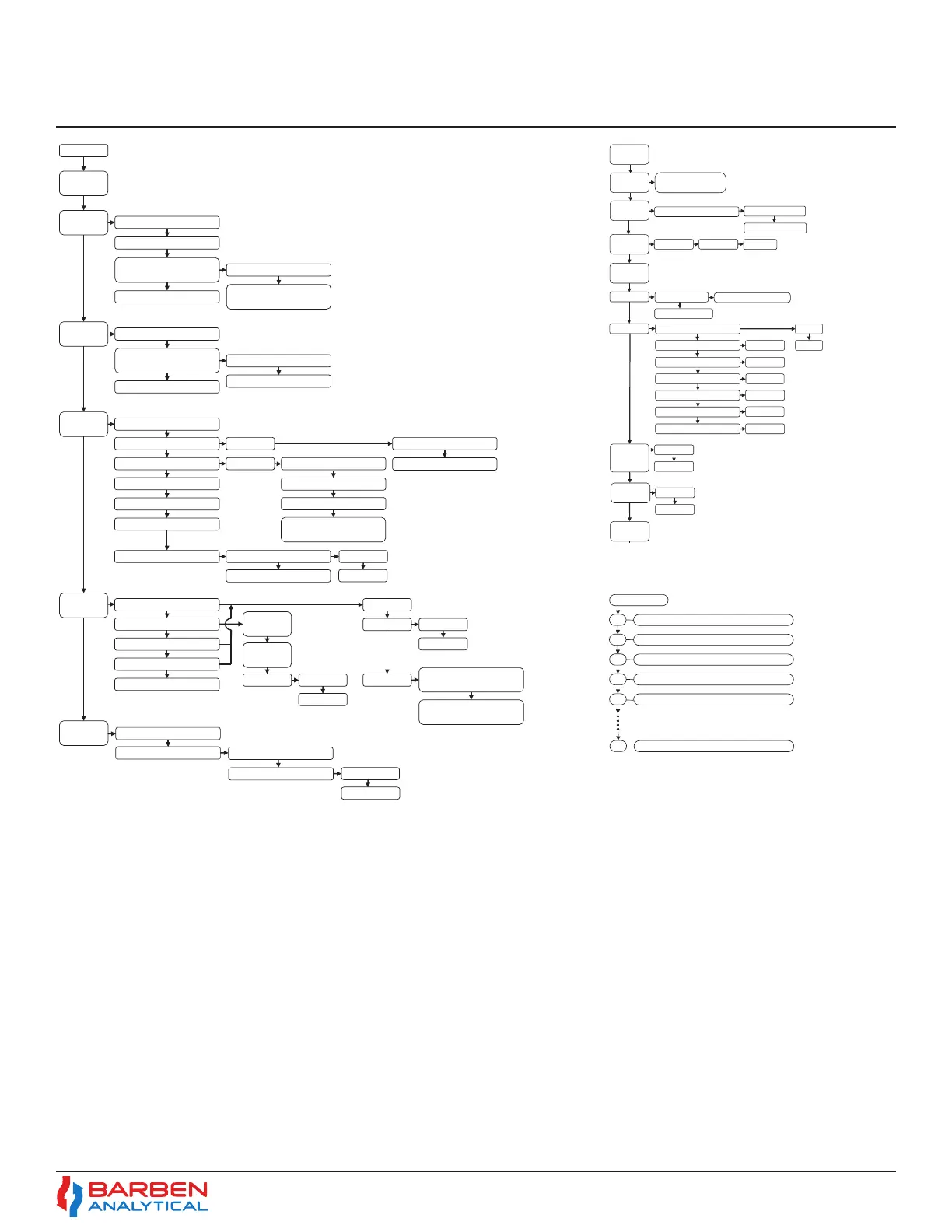
Input Output
Output Hold
Action
Temperature
Input
PT100 Sensor (4 Wire)
PT1000 Sensor (2 Wire)
Temperature –
External Analog Input
Ambient Pressure Sensor
Pressure – External Analog
Input
Pressure
Sensor Input
Pressure – Manual Input
Oxygen
Enter 4mA Temperature Value
Enter 20mA Temperature
Value
Analog
Output (1&2)
Digital Output
(1 to 4)
Temperature – Manual Input
Enter 4mA Pressure Value
Enter 20mA Pressure Value
Process Temperature
Phase Angle
Intensity
Process Pressure
Output Signal Critical Fault
Enable Analog Output
Linear
Bi-Linear
Enter 4mA O2 Value
Enter 20mA O2 Value
Enter 4mA O2 Value
Enter 20mA O2 Value
Bi-Linear Point (mA)
Bi-Linear Point Oxygen
Reading
Fault Direction
Enable NAMUR Signaling
High (20mA)
Low (4mA)
Error Code
Process Pressure
Process Temperature
Auto Cal – (Relays 1,2,3)
Oxygen Set-Point
Normal State
Deadband
Open
Closed
Actuate on Low Oxygen /
Temperature / Pressure
General Error
Code
Specific Error
Code
Normal State Open
Closed
Actuate on Low Oxygen /
Temperature / Pressure
DO1 - Zero Gas
DO2 - Span Gas
Remote
Digital Input
Digital Input 2 - Test Gas Insert
Digital Input 1 - Auto Cal
Time period for Test Gas
Define which output
Test Gas
Insert
Set Date /
Time
Initiate Test Gas Insert
Display
Contrast
Diag Test Security Submenu
Backlight
Security
Datalogging Submenu
Input / Output Submenu
Reset to
Factory
Defaults
Diag-Test
Security
Start Test Gas Insert
Stop Test Gas Insert
Set Date
Backlight time-out
Backlight brightness
Set Time
10s, 30s, 60s, 5min, never
AM / PM
All Submenus
Measurement & Unit Submenu
HMI Lock-Out
Enter Code
Calibration Submenu
Enter Code
Enter Code
Enter Code
Enter Code
Enter Code
Enable
Disable
Analog
Output Trim
(1&2)
4mA Out
20mA Out
Relay
(1 to 4) Test
Relay
(1 to 4) Test
Close
Open
System
Overview
S/N, Model#, FW Version
MFG Date, E-mail
X11 Signal intensity too low. Check process gas.
Help Error Codes
X22 Signal intensity too high. Turn LED down.
N25 Ambient Pressure reading is out of range
N42 Zero phase angle is out of allowed limits. Check..
N43 Span phase angle is out of allowed limits. See ....
N54 Analog Output 2 is open. Check wiring. Note...
Section 5
Operations


 To Next Page