69
Installation, Operation & Maintenance Manual
OXYvisor Optical Oxygen Analyzer
Installation of the Junction Box:
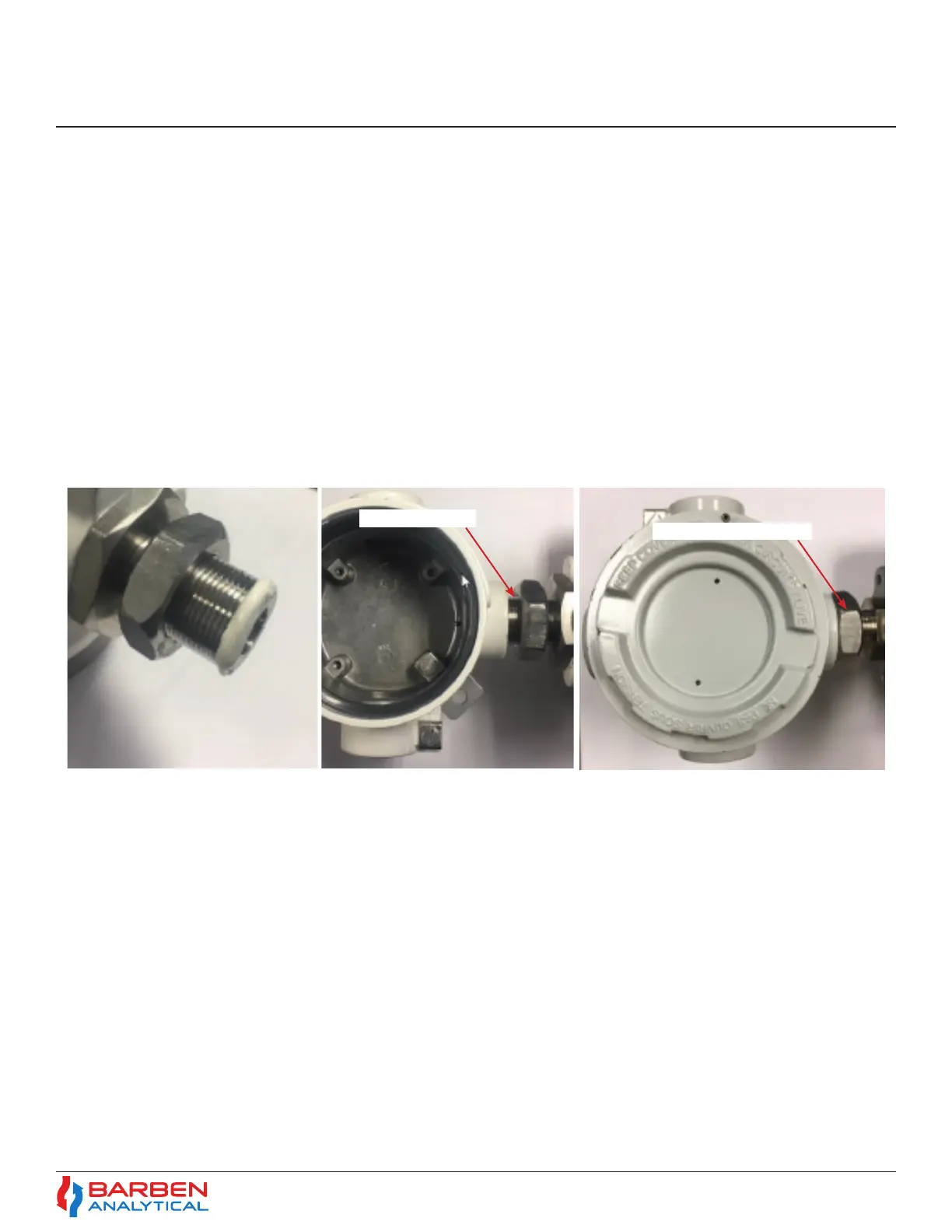
1. Put the jam nut (B4711-1004) about 2/3 of the distance onto the exposed bushing threads. Apply a small
bead of Loctite 577 (B8008-1014) thread sealant to the rst two threads on the bushing around the full
perimeter. A nger may be used to smear the sealant to fully cover the rst two threads.
2. Carefully thread the junction box onto the bushing without damaging the ber optic cable or the RTD cable,
if applicable. If a sensor wand is used, fully extend the wand and gently thread it through the junction
box M24 hole and opposite 1/2” NPT hole. Screw the Junction Box onto the bushing with 5 to 7 full turns.
Leave the junction box opening facing the same direction as the opening of the big compartment on the
main enclosure. Apply a small drop of Loctite 577 thread sealant, or use excess from previous, to the rst
couple of exposed threads beyond the junction box interface. Secure the jam nut to the junction box and
tighten to approximately 25 foot-pounds of torque.
Apply Sealant
Secure Jam Nut
Figure 37 - Installation of Junction Box


 To Next Page