59
Installation, Operation & Maintenance Manual
OXYvisor Optical Oxygen Analyzer
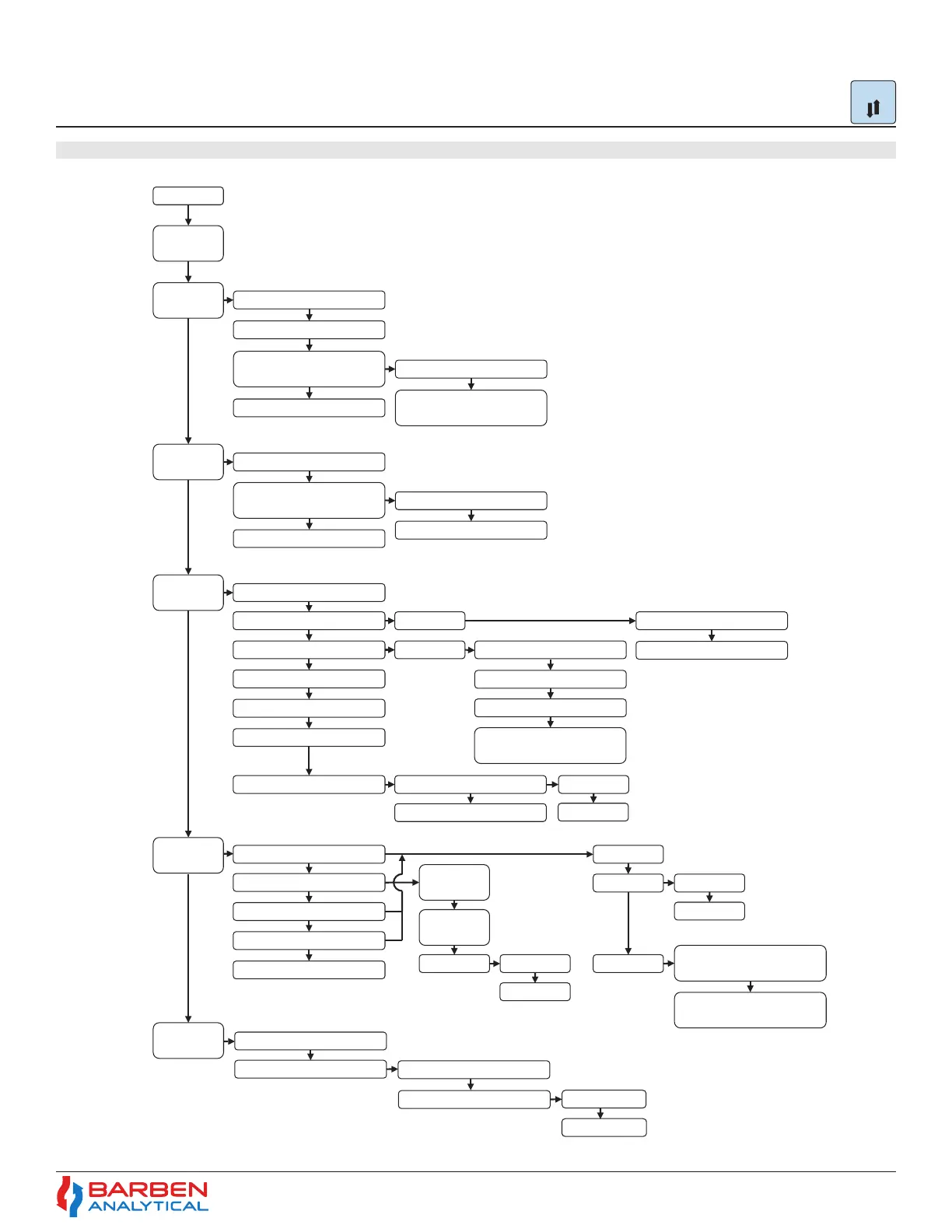
5.13 Sub-Menu - Input / Output Flowchart
Input Output
Output Hold
Action
Temperature
Input
PT100 Sensor (4 Wire)
PT1000 Sensor (2 Wire)
Temperature –
External Analog Input
Ambient Pressure Sensor
Pressure – External Analog
Input
Pressure
Sensor Input
Pressure – Manual Input
Oxygen
Enter 4mA Temperature Value
Enter 20mA Temperature
Value
Analog
Output (1&2)
Digital Output
(1 to 4)
Temperature – Manual Input
Enter 4mA Pressure Value
Enter 20mA Pressure Value
Process Temperature
Phase Angle
Intensity
Process Pressure
Output Signal Critical Fault
Enable Analog Output
Linear
Bi-Linear
Enter 4mA O2 Value
Enter 20mA O2 Value
Enter 4mA O2 Value
Enter 20mA O2 Value
Bi-Linear Point (mA)
Bi-Linear Point Oxygen
Reading
Fault Direction
Enable NAMUR Signaling
High (20mA)
Low (4mA)
Error Code
Process Pressure
Process Temperature
Auto Cal – (Relays 1,2,3)
Oxygen Set-Point
Normal State
Deadband
Open
Closed
Actuate on Low Oxygen /
Temperature / Pressure
General Error
Code
Specific Error
Code
Normal State Open
Closed
Actuate on Low Oxygen /
Temperature / Pressure
DO1 - Zero Gas
DO2 - Span Gas
Remote
Digital Input
Digital Input 2 - Test Gas Insert
Digital Input 1 - Auto Cal
Time period for Test Gas
Define which output
Figure 34 - Sub-Menu Input/Output Flow Menu
Input Output


 To Next Page