26
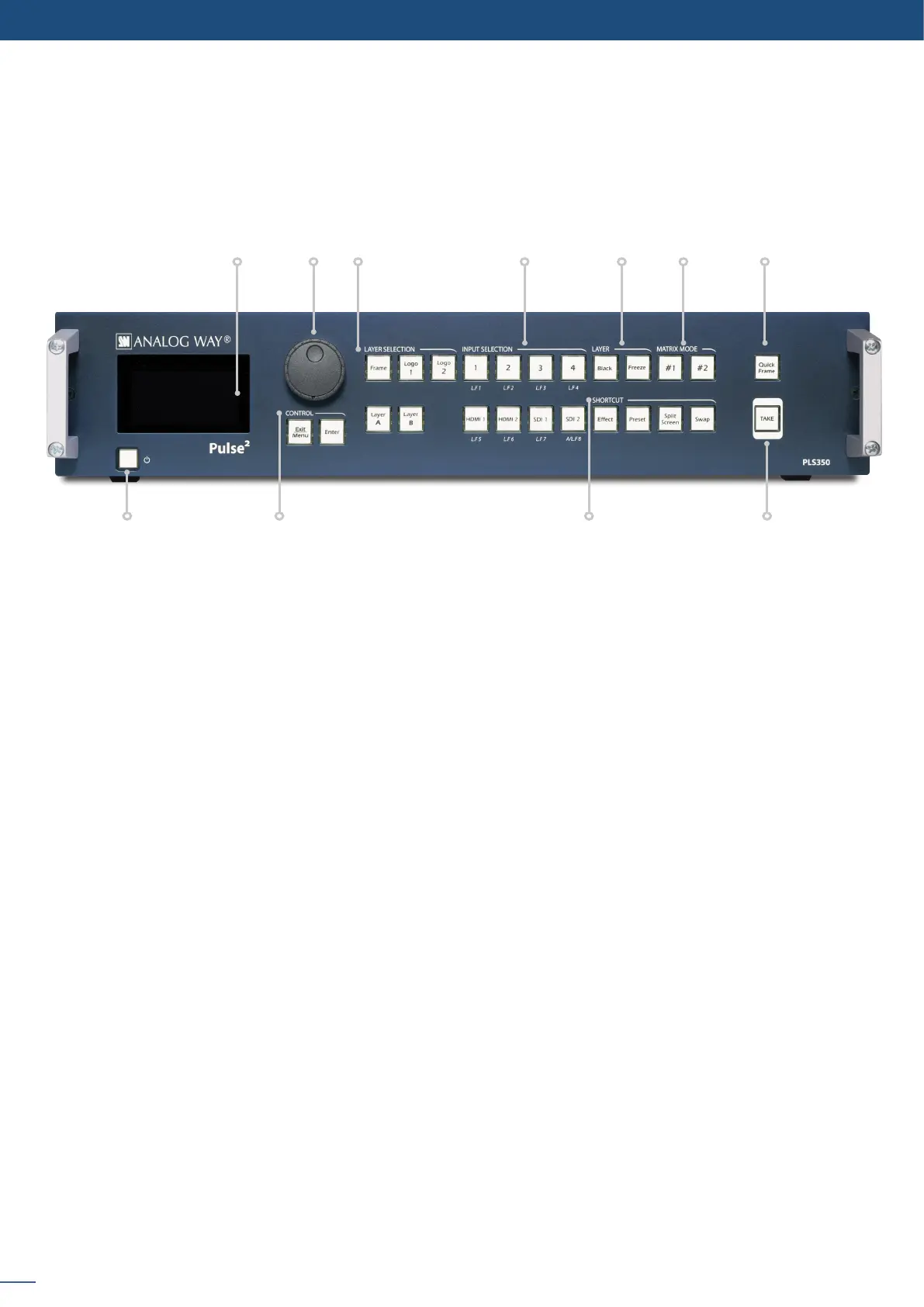
5.1.2 Front panel Pulse
2
- Ref. PLS350
2
- Ref. PLS350
1 2 3 4 5 6
119 108
7
1. 4-line VFD
2.
- un-scaled layer for sll frames
- un-scaled, posionable layer for sll logos
- Layer A/B: scaled posionable layers for live sources
4. - access source 1 to 4, select frame/logo 1 to 4
- HDMI 1/2: access HDMI 1 or HDMI 2, select frame/logo 5 to 6
- access SDI 1 to SDI 2, select frame/logo 7 to 8
5. Layer: - Black: clear the layer
-freeze/unfreeze the input selected in the currently selected layer
6. select the output #1 or #2, a layer and a source, then press TAKE
allows to quickly display a foreground Frame
8. : hold for 3 seconds for stand-by mode
9. Home menu or back one level - Enter: validate the menu or command
shortcut to transion menu
- Preset: recall a custom stored preset
- Split Screen: load a split screen preset
- Swap: exchange sources between layer A and layer B
11. TAKE: transion the pre-selected sources onto the Program output with the selected eects


 To Next Page