14
Service mode has a poll period of 5 minutes, which means that the Smart Connect devices
contacttheSmartConnecteveryfthminute,andthereforeyouwillknowthatanychanges
havebeenupdated/madecorrectlyeveryfthminute.BeforetheinstallationgoesintoService
mode, the system must wake up. It can be seen on the countdown, how long it takes before
Service mode is enabled. Service mode is always activated at the full hour.
When the Smart Connect system is not in Service mode the poll period is 60 minutes.
The Service mode can ONLY be activated via WisePlan Pro or ON SITE on the Smart Connect.
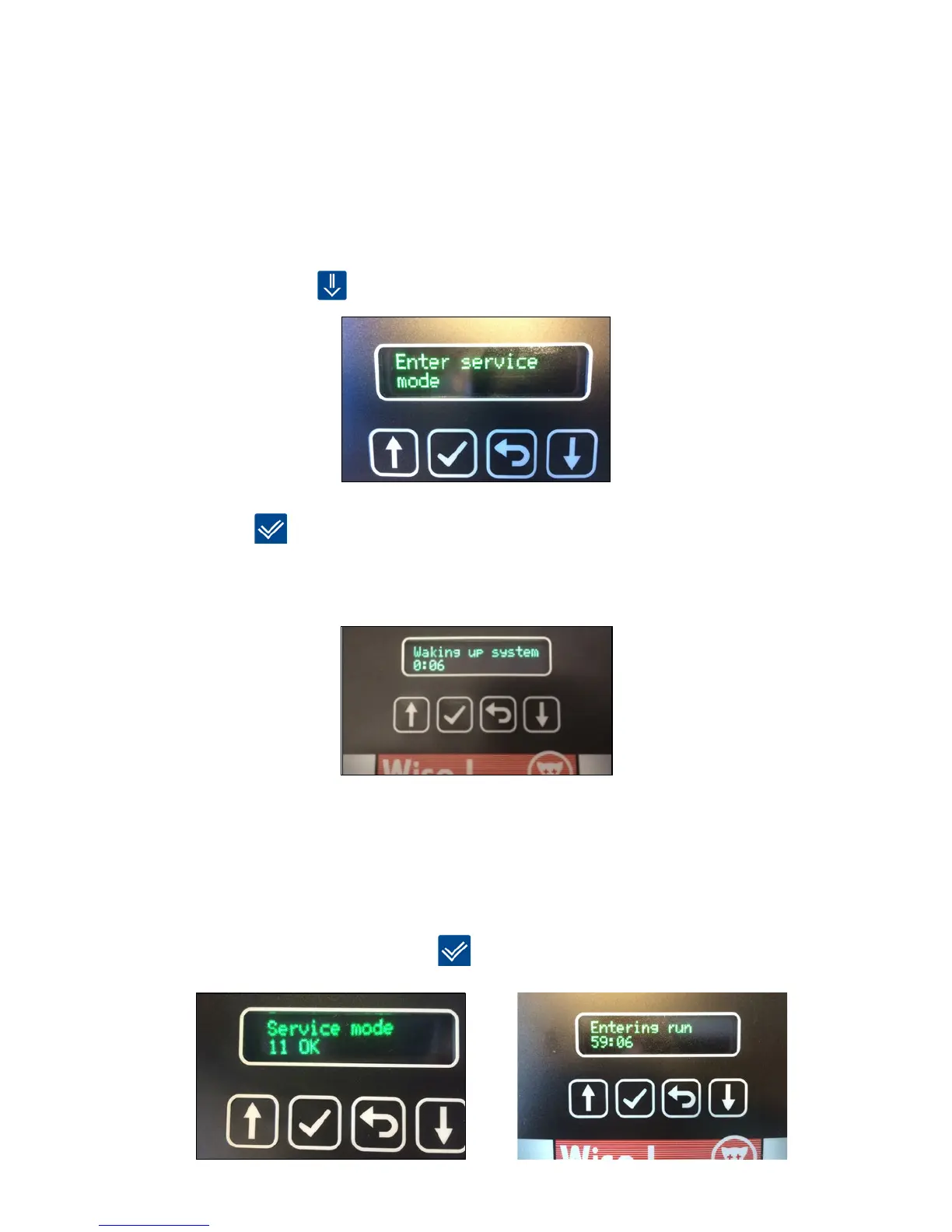
1. Press [down arrow]
until the display shows Service mode.
2. Press [OK]
to activate/enter Service mode.
Before the installation goes into Service mode, the system must wake up. It can be seen on
the countdown, how long it takes before Service mode is enabled. Service mode is always
activated at the full hour.
3. After activating Service mode you can safely start to set up the rest of your Smart Connect
system.
4.AllSmartCatchandSmartEyedeviceswillashwithbriefgreenashesaslongastheyare
in Service mode. That way you know that the Smart Connect device is safe to handle.
5.RemembertoputyoursysteminRunmodewhenyouarenishedworkingwithyour
installation on site. If you forget to put the system in Run mode, it will automatically enter
Run mode after 9 hours. Press [OK]
to put the system in Run mode.



 To Next Page