new information. Click [Save] when ready.
Deletion of festivals or holidays:
Select the festivals or holidays you want to delete, and then click [Delete] to
perform Deletion of festivals or holidays.
4.4.2 Timetable and Shift
The relationship between shift and timetables:
Shift setup should be done in two steps: First, setup necessary timetables. Second,
setup shifts. One or more timetables can be included in one shift.
Timetable is the time period between On-duty and Off-duty required in the
company rule. For instance, the company rule requires the working hours be
08:00-12:00 and 13:00-17:00; so 08:00-12:00 and 13:00-17:00 are two timetables. If
such a shift needs to be setup, these two timetables should be setup first. Here, we use
time table “morning” to indicate “08:00-12:00” and time table “afternoon” to indicate
“13:00-17:00”; so two timetables have been setup. (Please refer to the following chapter
for details of how to add time tables) and then we can add a shift such as “Normal shift”
in which “shift cycle” and “cycle unit” will be setup. Then we should add two timetables -
“morning” and “afternoon” so that a shift setup is completed. Brief introduction is
mentioned here for you to get a general picture of the relationship between timetable
and shift. The details of shift setup will be found in the next two sections.
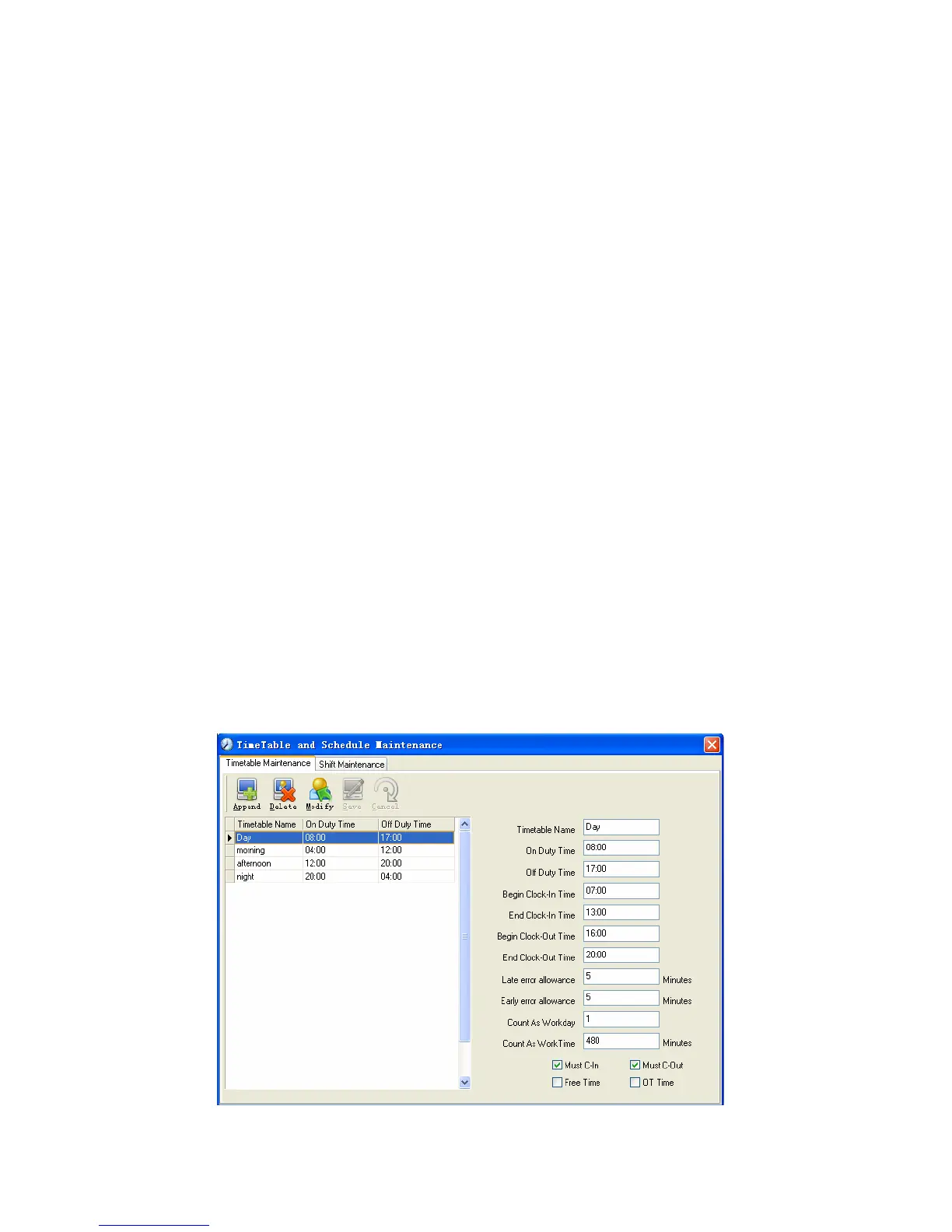
Timetable maintenance:
Click [Timetable and Shift] in [Attendance] menu. The following window appears.
Pic4.2
50


 To Next Page
 Loading...