Legacy AXS API
In this configuration, the Large Fader path will be used to mix the multitrack returns and must be
assigned to a stereo Program Bus for monitoring. Assign the Large Fader path to the desired stereo bus
by engaging the STA, STB, or STC and the PAN buttons in the LG section on the 624 Bus Assignment
module.
Large Fader to Multitrack
If it is preferable to use the Large Fader path as the “Record Path” to route sources to the multitrack
recorder, engage the FLIP button to route the output of the 200 slot preamp to the Large Fader path
input. The Direct Output and Multitrack Bus matrix are fed from the Large Fader by default, so only the
desired multitrack bus/pan-pot assignments need to be made. If odd-even stereo panning is to be
employed, the PAN button in the Large Fader (LG) section of the 624 module must be engaged. If no
console EQ or further gain adjustment is needed, also engaging the DIR PRE only will route the Large
Fader path signal to the Direct Output post-COMP and pre-EQ.
In this configuration, the Small Fader path will be used to mix the multitrack returns and must be
assigned to a stereo Program Bus for monitoring. Assign the Small Fader path to the desired stereo bus
by engaging the STA, STB, or STC and the PAN buttons in the Small Fader (SM) section on the 624
Bus Assignment module.
NOTE: The multitrack recorder may alternately be fed from the Multitrack Buses by patching the
BUS OUTPUT patch points to the MULTITRACK INPUT patch points.
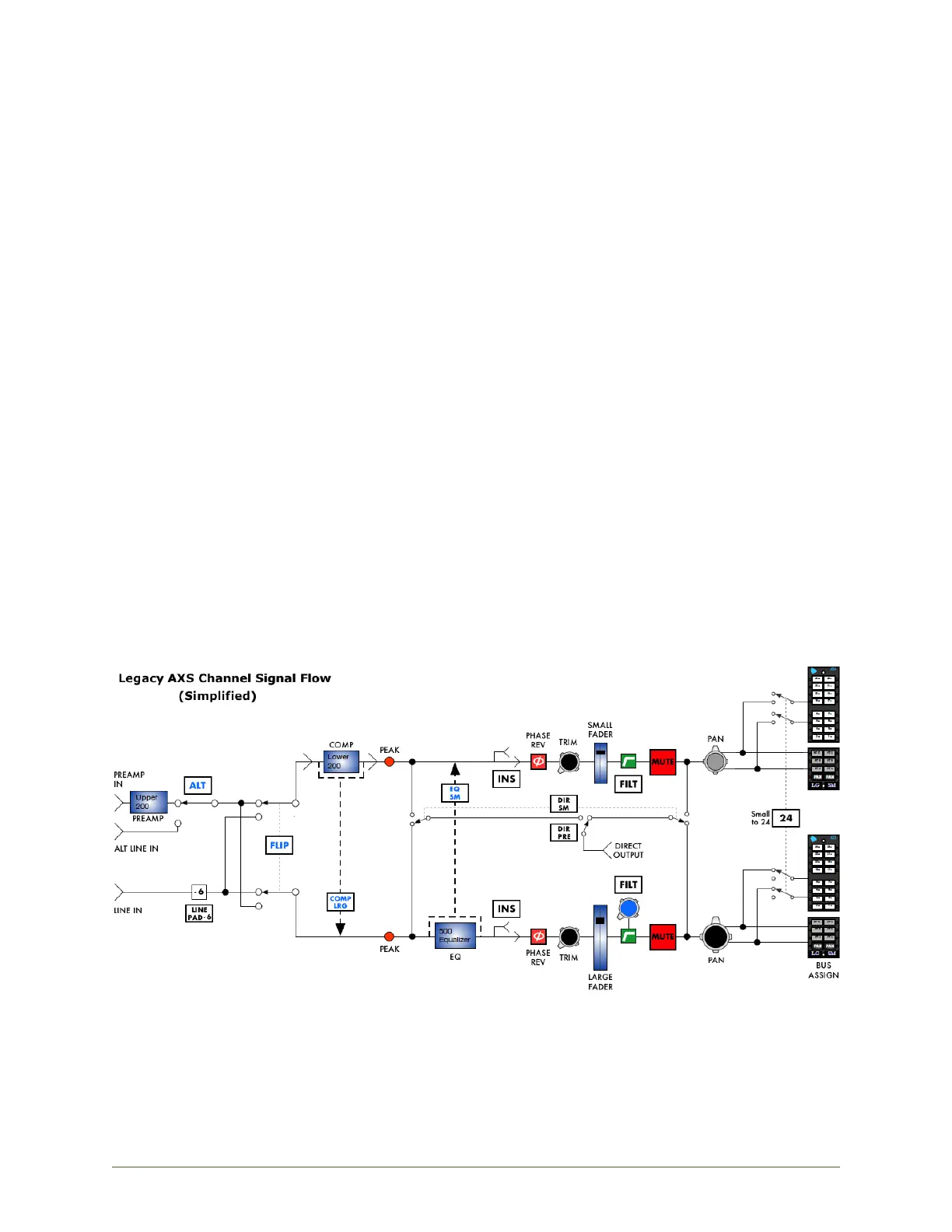
Signal Flow Block Diagram
The block diagram below indicates the signal flow through the Small and Large Fader signal paths. A
more technical and detailed signal flow diagram is available in a separate document in the appendix of
this manual.
The features of each path are shown in the order in which they occur within the path. The diagrams
assume the following:
A 212 Preamp is installed in the upper 200 slot
A 225 Compressor/Limiter is installed in the lower 200 slot
A 550A Equalizer is installed in the 500 Series EQ slot
FLIP, ALT, COMP LRG, EQ SM, DIR SM, and DIR PRE are in default positions (not engaged)
Pan-pots are engaged
Auxiliary Sends, 0dB Fader Bypass, solo sends, and VU meter are not included
Fader Bypass
The faders in both signal paths can be bypassed allowing the audio to pass at unity gain (0dB) when
the console is used with DAW automation and as a control surface. The Fader Bypass for the Large Fader
path is handled via the console automation package. The Fader Bypass for the Small Fader is engaged
globally by engaging the 0dB SM (0dB Small Fader) button in the master section. This option is not
available on individual channels and is not shown in the diagram above.


 To Next Page