Legacy AXS API
Control Room Speaker Selection and Controls
The Legacy AXS console provides support for three (3) control
room monitoring systems, with a main C/R LEVEL control and
independent level trims for ALT1 and ALT2. The Left and Right
MAIN monitors are used primarily for stereo monitoring. However,
the MAIN monitors support a 5.1 monitor system for playback of
surround audio. The Left and Right MAIN monitors are used for
surround monitoring as well.
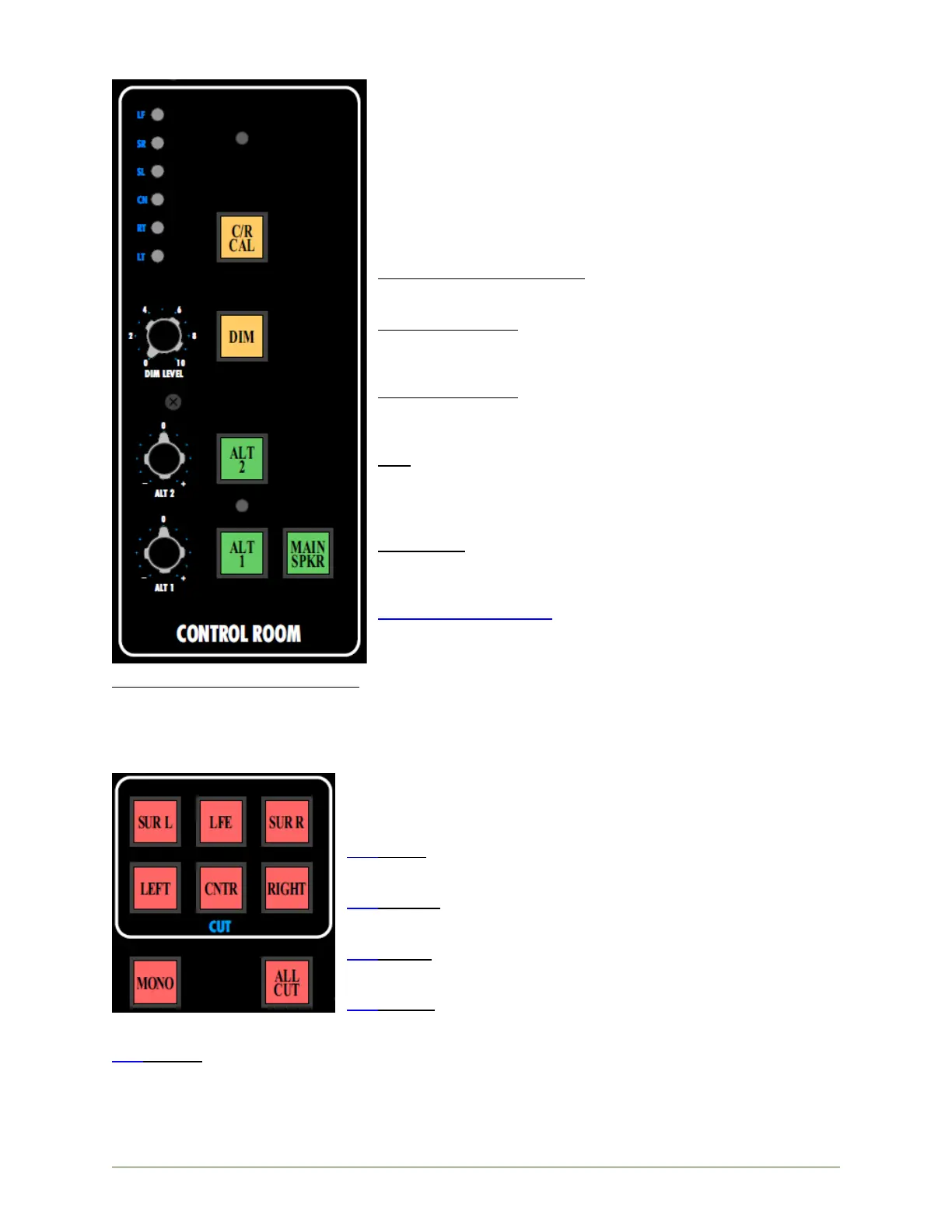
The CONTROL ROOM section of the Master Section contains the
primary controls for the three control room monitor systems:
MAIN SPKR (Main Speakers): Activates the MAIN monitor system
• Illuminates when engaged
ALT 1 (Alternate 1): Activates alternate monitor system #1
• Level trim for system level matching
• Illuminates when engaged
ALT 2 (Alternate 2): Activates alternate monitor system #2
• Level trim for system level matching
• Illuminates when engaged
DIM: Activates the Control Room monitor DIM function
• Attenuates the output to the active control room monitor
system by the amount set with the DIM LEVEL
• Illuminates when engaged
DIM LEVEL: Sets the amount of attenuation applied when the
DIM button is engaged
• -∞dB to 0dB range
LT, RT, CN, SL, SR, LF: 5.1 trim pots for setting the C/R CAL
the control room monitor level
C/R CAL (Control Room Calibrate): Sets the control room monitors to a preset level
• Bypasses the C/R LEVEL pot
• Trim pots for 5.1 monitor system
• Useful for film and other sound-for-picture work
• Illuminates when engaged
Individual CUT switches are included for each monitor output. These
CUT switches support the MAIN, ALT 1, and ALT 2 monitor system and
apply to the currently selected monitor system.
CUT LEFT: Mutes the Left loudspeaker
• Illuminates when engaged
CUT RIGHT: Mutes the Right loudspeaker
• Illuminates when engaged
CUT CNTR: Mutes the Center loudspeaker
• Illuminates when engaged
CUT SUR L: Mutes the Left Surround loudspeaker
• Illuminates when engaged
CUT SUR R: Mutes the Right Surround loudspeaker
• Illuminates when engaged


 To Next Page