5.4. Swing
The Swing setting can shift the timing of the notes in a sequence to lengthen the first note of
a pair and shorten the second note. To affect all three sequencers at the same time, simply
turn the SWING encoder to a value between 50 and 75.
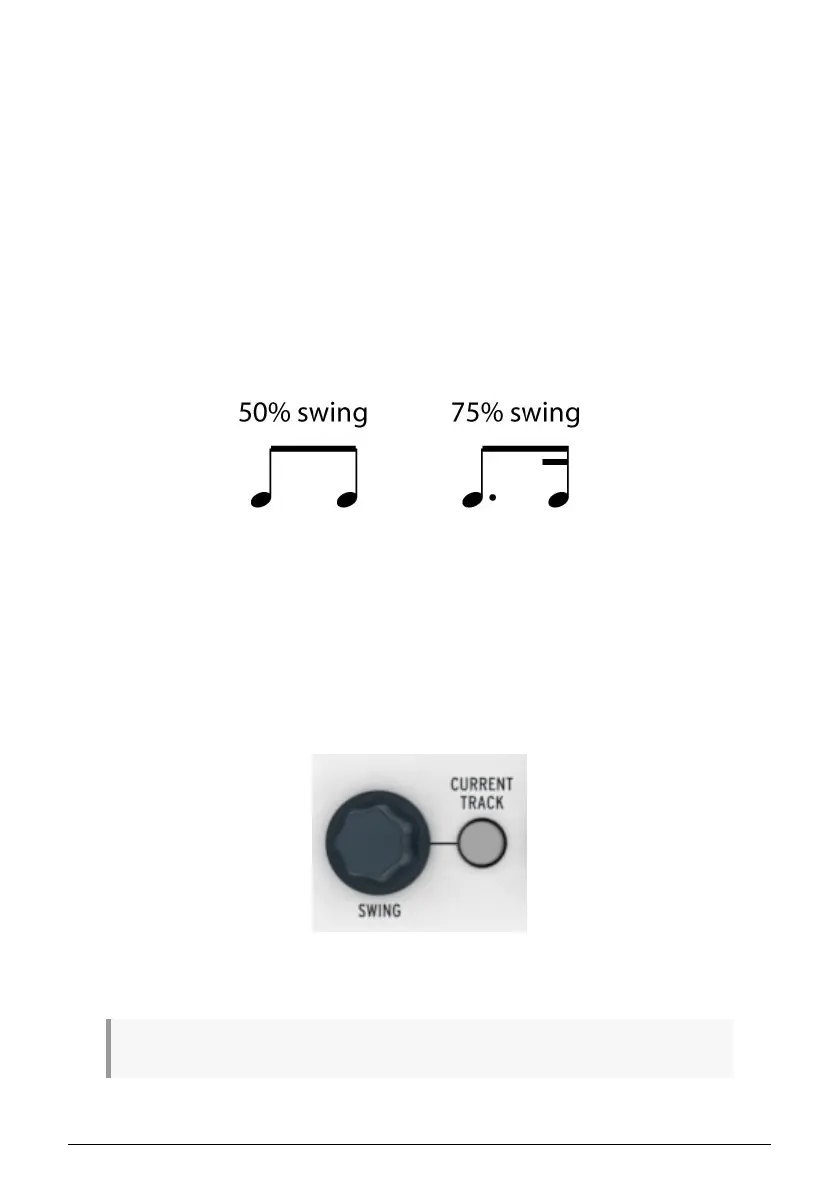
Assuming the time division is set to 1/8, here’s what will happen:
• With Swing set to 50% each note gets ‘equal time’, resulting in a ‘straight 1/8^th^
note’ feel.
• As the Swing value exceeds 50% the first 1/8^th^ note is held longer and the
second is played later and shorter. You’ll notice the sequence starts to ‘shuffle’ a
bit and perhaps sounds less mechanical to your ear.
• The maximum Swing setting is 75%, at which point the 1/8^th^ notes sound more
like a 1/16^th^ note figure than ‘shuffled’ 1/8^th^ notes.
Here’s a graphic showing the minimum and maximum Swing values in musical notation:
The Project swing value will be stored when you save the Project [p.50].
5.4.1. Current Track button (Swing)
The CURRENT TRACK button enables each sequencer to have its own Swing setting. After
you press that button, changes to the swing percentage will affect only the current pattern
on the selected sequencer. Then you can select the other sequencers and edit their Swing
settings also.
To return all three sequencers to the Project's Swing %, toggle the CURRENT TRACK button
off within each sequencer.
♪: The CURRENT TRACK button is disabled in Control Mode [p.79].
51 Arturia - User Manual BeatStep Pro - Projects












 To Next Page