10.4. Store To/Recall From
♪: The Store To/Recall From transfers cannot be performed while the BeatStep Pro is running.
10.4.1. Store a Project to the BeatStep Pro
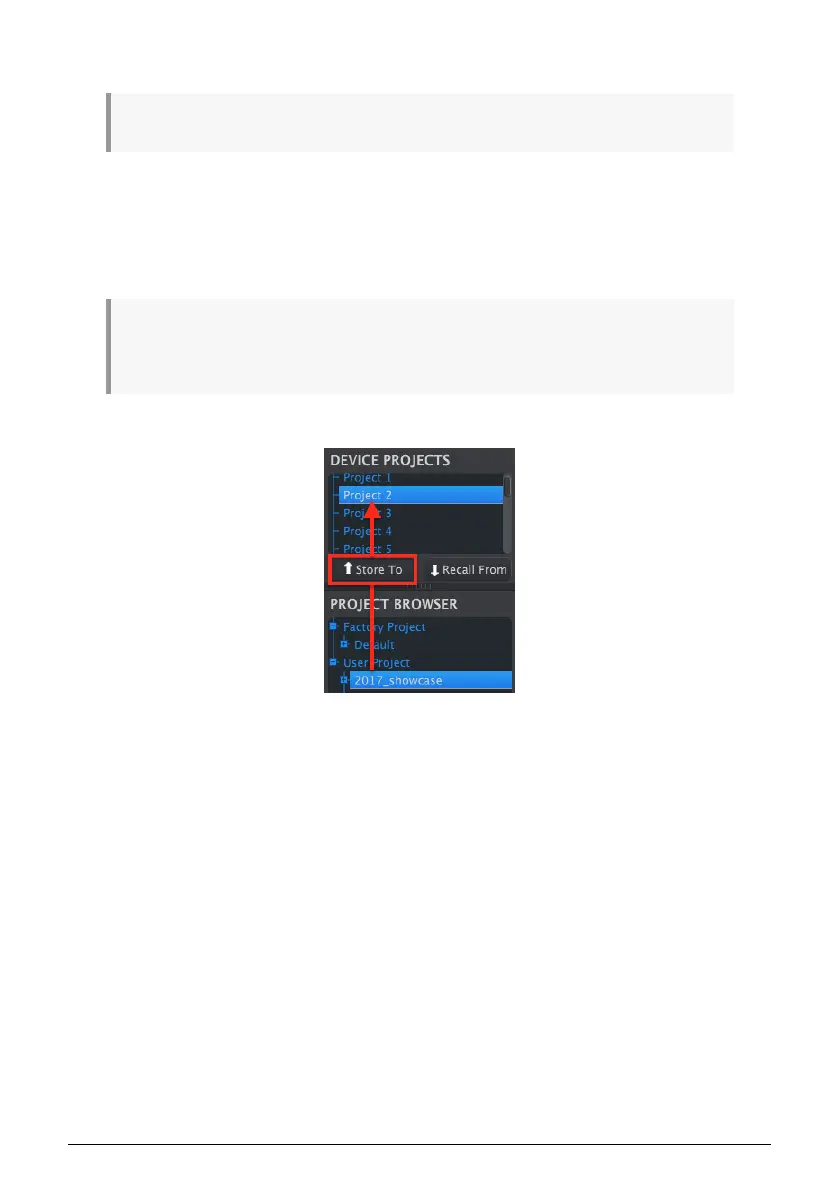
The upper left-hand section of the MIDI Control Center has a button called “Store To”. Right
above that is a list that allows you to specify which of the 16 Projects in the BeatStep Pro
internal memory will receive the User Project you have selected.
!: When you follow the steps below you will overwrite the current Project #2 that resides inside the
BeatStep Pro. Be sure this is what you want to do! If not, please store it to another location inside the
BeatStep Pro.
We’ll assume that Project #2 is available for this example:
1. First, select “Project 2” in the list as pictured above.
2. Select the User Project you would like to store into the BeatStep Pro.
3. Click the Store To button at the bottom of that section.
That’s all there is to it! The settings and sequences of the User Project have been stored as
Project #2 in the BeatStep Pro. Now you can load that Project whenever you want by using
the PROJECT button and Step button 2.
Arturia - User Manual BeatStep Pro - MIDI Control Center 92












 To Next Page