An arpeggiator takes chords played on the keyboard and converts them into arpeggios. An
arpeggiator usually includes controls for Speed, Range (in octaves), Mode (if the pattern
moves up, down, or up/down et cetera), and whether the arpeggio should continue playing
after the keys have been released or not. You can also adjust Swing (how notes are played
between the quarternotes) and Gate (note length).
Arpeggiator information is transmitted as MIDI data over the USB-C port and/or 5-pin MIDI
output.
2.14.1. Using the Arpeggiator
To start the Arpeggiator, simply press the Arp button and play a note or a chord. You will
hear that chord being played note by note. Play another chord, and the pattern repeats itself.
To turn the Arpeggiator off, hit Arp again.
In this mode, the Arpeggiator only runs when you hold down one or several keys. To keep
the Arpeggio playing after you release the keys, press the Hold button on the panel. The
notes will play until you play another chord or hit the Hold button again.
♪ The Arpeggiator is triggered only by the keyboard, not the Pads. Also, when the Arpeggiator is
activated, the Pads can still be used to trigger sounds.
2.14.2. Editing the Arpeggiator
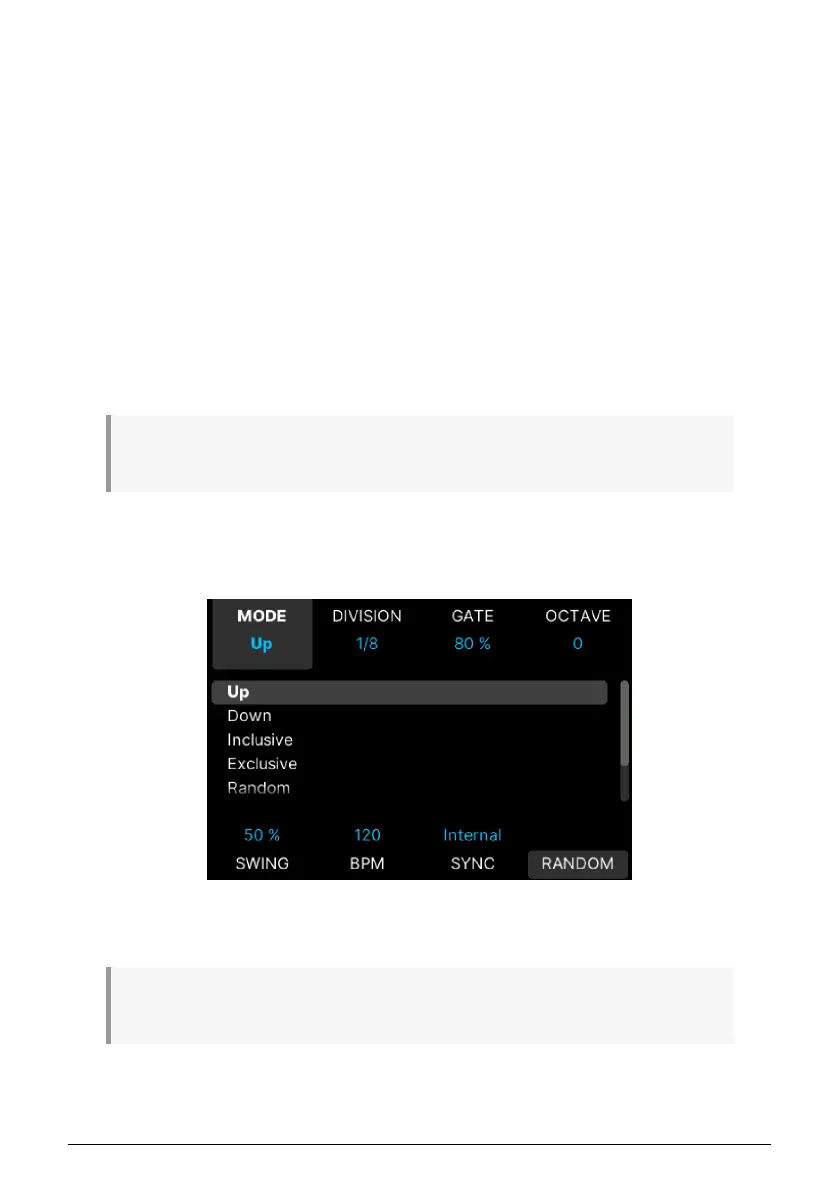
To enter Arpeggiator edit mode, long-press the Arp button.
On this page, you can edit all aspects of an Arpeggiator. The 8 parameters available are
seen on this screen.
♪ To hear your edits in real-time, please make sure that the screen says Arp ON. If it doesn't, press
the Arp button on the panel once.
Arturia - User Manual KeyLab mk3 - Overview 22



 To Next Page