3. ARTURIA PROGRAM
KeyLab mk3 has been designed to shine in many musical environments, and it is perfectly
suited as a controller for the included Analog Lab software and in V Collection. From helping
you select the perfect sound to allowing complete control over that sound, KeyLab mk3 and
Arturia instruments make a powerful combination.
♪ The focus of this chapter will be the features of KeyLab mk3, with occasional explanations of
Analog Lab for your convenience. For in-depth information about Analog Lab, please consult the manual
for that software.
3.1. Connecting to Analog Lab
Analog Lab and V Collection instruments can be used either in standalone mode (as an app)
or within a DAW (Digital Audio Workstation).
Before you can enjoy the close integration of KeyLab mk3 and Analog Lab, there are some
initial conditions that must be met:
• Analog Lab needs to be downloaded, installed, and activated.
• Connect KeyLab mk3 to your computer via USB-C.
• Launch the Analog Lab application.
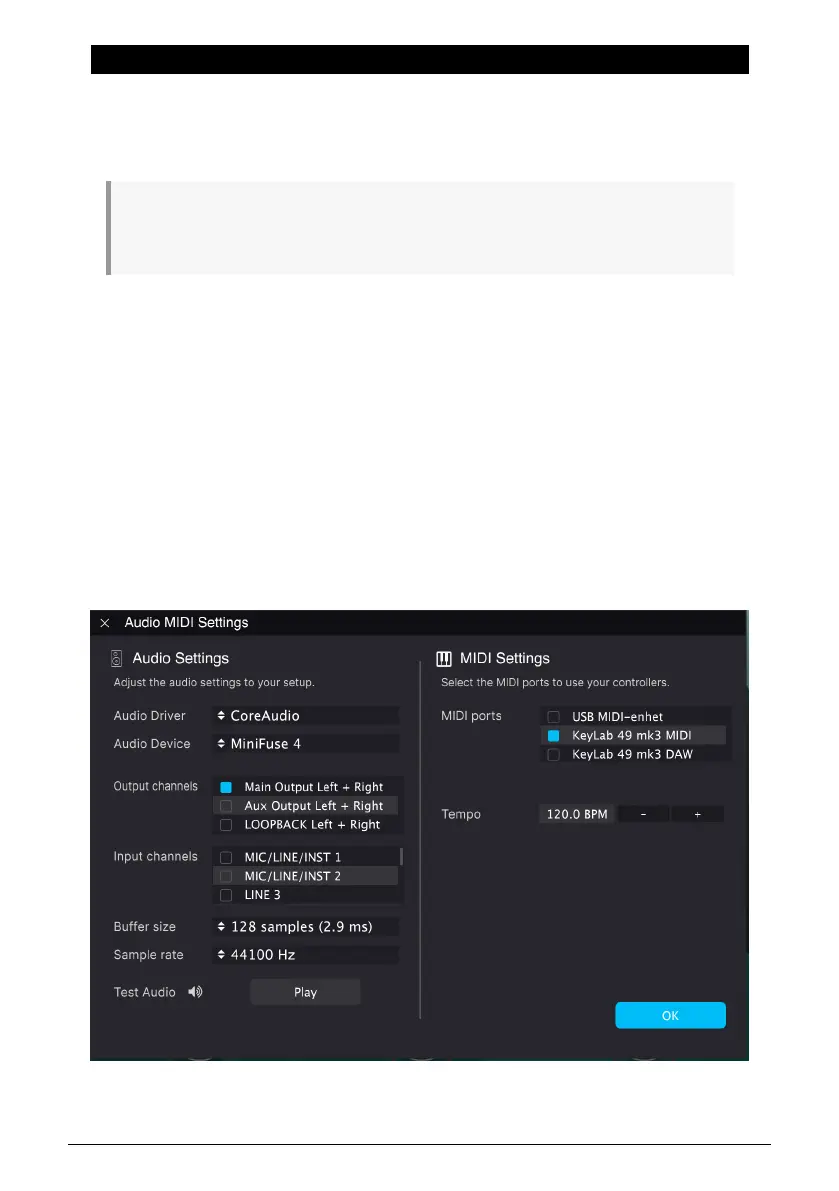
• Press the Prog button on KeyLab mk3 and select Arturia Program mode.
• Play a note on the keyboard. If Analog Lab does not respond, check its
preferences and be sure KeyLab mk3 is selected in the MIDI Devices window as
shown below.
Arturia - User Manual KeyLab mk3 - Arturia Program 32



 To Next Page