Hardware Description
2-13
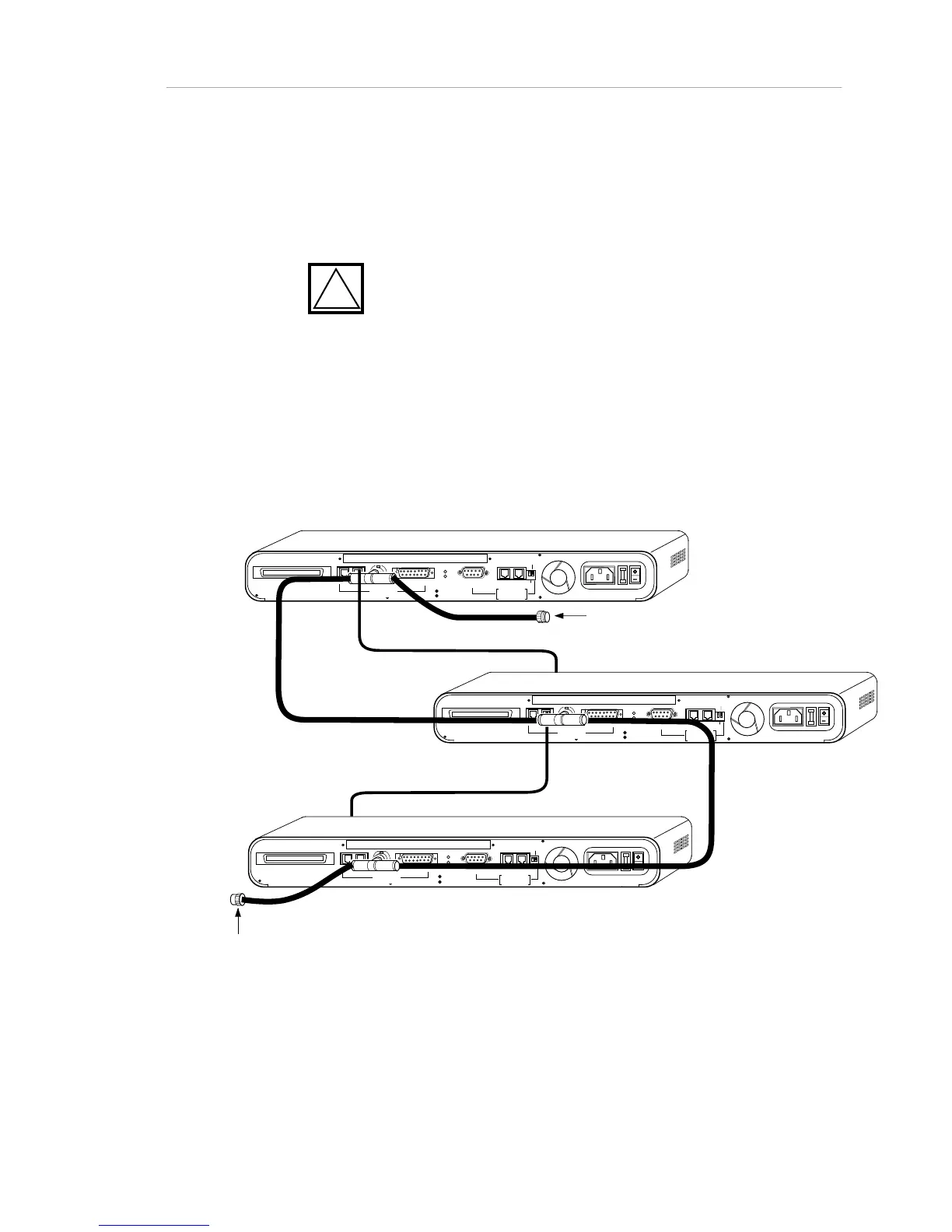
Cabling for Redundant Links
Redundant links may be easily installed. For example, twisted-pair wiring might
be used as a backup to a thin Ethernet backbone, as illustrated below.
!
CAUTION: When using Thin and Thick Ethernet
cabling, make sure that the T-connector on the BNC port does not
touch the AUI connector. Make a firm connection to the BNC port
and ensure that the weight of the cable does not twist the T-
connector into contact with the AUI connector.
The hub automatically senses the presence of physical links. Using its default
setting, it automatically selects a link using the priority sequence: AUI, 10T, BNC.
The hub may also be set in hardware to use AUI only (see “Default Settings” in
this manual). AsantéView’s Port Control window also configures redundant link
settings; see the AsantéView manual for your version of AsantéView.
RJ21 10 BASE-T PORTS
IN or
OUT
AU
I
PARTITION
RS2 3
2
RS48
5
12
THROUGH
AMS
LINK
UP=PC
DOWN=TE RMINAL
END
3-IN-1 UPLINK
BNC
Spare Fuse in Fuse Holder
2A/250V Slow Blow Fuse
Replace Only With Fuse of Same Rating
TRAFFI C
RJ21 10 BASE-T PORTS
IN or
OUT
AU
I
PARTITION
RS23
2
RS48
5
12
THROUGH
AMS
LINK
UP=PC
DOWN=TERMINAL
END
3-IN-1 UPLINK
BNC
Spare Fuse in Fuse Holder
2A/250V Slow Blow Fuse
Replace Only With Fuse of Same Rating
TRAFFI C
RJ21 10 BASE-T PORTS
IN or
OUT
AU
I
PARTITION
RS23
2
RS48
5
12
THROUGH
AMS
LINK
UP=PC
DOWN=TERMINAL
END
3-IN-1 UPLINK
BNC
Spare Fuse in Fuse Holder
2A/250V Slow Blow Fuse
Replace Only With Fuse of Same Rating
TRAFFI C
Terminator
Terminator
Thin Ethernet Backbone
RJ-45 To Front Panel Port
RJ-45 To Rear Panel
RJ-45 In Port
Figure 2-7. Cabling for Redundant Network Links



 To Next Page