3 Overview
10 STERRAD VELOCITY Reader User’s Guide
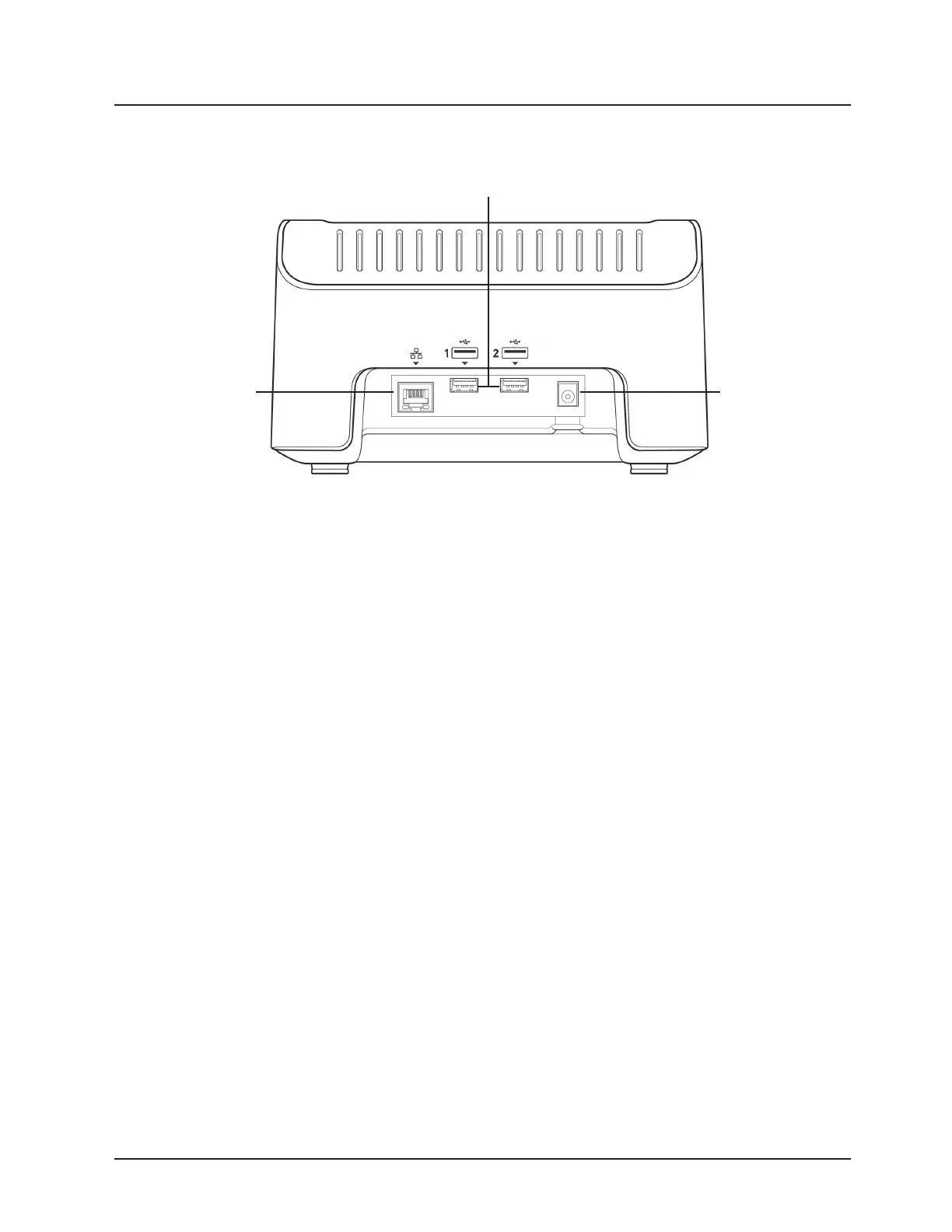
Figure 2. The STERRAD VELOCITY Reader (Back)
The back panel of the reader has four connector ports. The RJ45 connector port
supports a 10/100/1000 Base-T Ethernet connection. The two USB 2.0 ports in the
center allow the user to attach a USB barcode scanner, a printer, or an external hard
drive. The nal port is for connecting the power adapter.
Before You Start
To start, remove the device from its packaging and ensure that all of the following
items are included. The package will include the reader, an AC power adapter, and four
sets of interchangeable prongs which t plug types A, C, G, and I. Attach the set of
prongs which t the plug socket to the AC power adapter. Place the reader on a non-
vibrating level surface which is not exposed to excessive sunlight or articial light.
Attach the power adapter to the back of the reader and then connect it to a power
outlet. Position the reader so that the power connection is accessible. Access is needed
to power the device on and off.
Start and Warm-up
When the reader is rst powered on, it will display a splash screen with a
progress bar as it goes through a diagnostic and warm-up sequence. Warm up time can
take up to 15 minutes. After completing the warm-up sequence, the reader will display
the Status Screen.
Power
Adapter
Ethernet
Adapter
USB Ports



 To Next Page