Appendix E
STERRAD VELOCITY Reader User’s Guide 71
STERRAD Sterilizer Setup
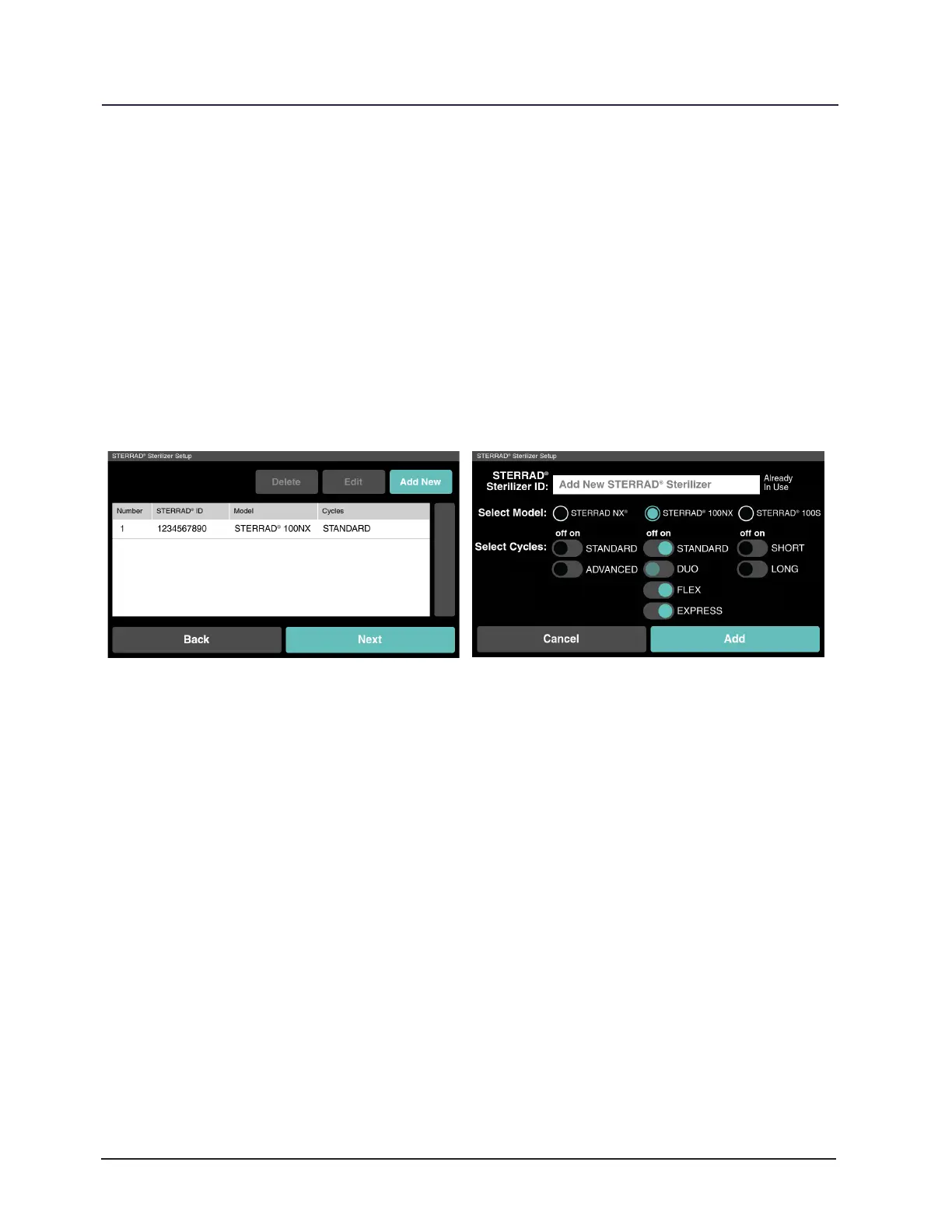
STERRAD Sterilizer Setup adds sterilizers to the system. If the sterilizers
are connected to the network touch No and Next and ASP ACCESS will provide this
information. Otherwise; touch Yes and Next and Add a STERRAD Sterilizer to begin
adding sterilizers. Touch Back to return to the previous screen. Enter the STERRAD
Sterilizer ID, select the Model, select the Cycles, and then touch Add. This information
populates the drop down menus for manual cycle entry. Sterilizers added to the
system appear in a table. Add more sterilizers by touching Add New. To edit or delete
existing sterilizers touch the sterilizer in the list and touch Edit or Delete. Touch Next
to continue or touch Back to return to the previous screen.
Figure 31. STERRAD Sterilizer Setup
Figure 32. Add New Sterilizer Setup
Reader Setup
Identify the reader in Reader Settings with STERRAD VELOCITY Reader ID, Facility
Name, and Department Name. If the reader is connected to the network ASP ACCESS
will provide this information. Touch Next to continue or touch Back to return to the
previous screen.



 To Next Page