TECHNICIANS' manual50 of 104
7.14.4 Automatic steam wand offset
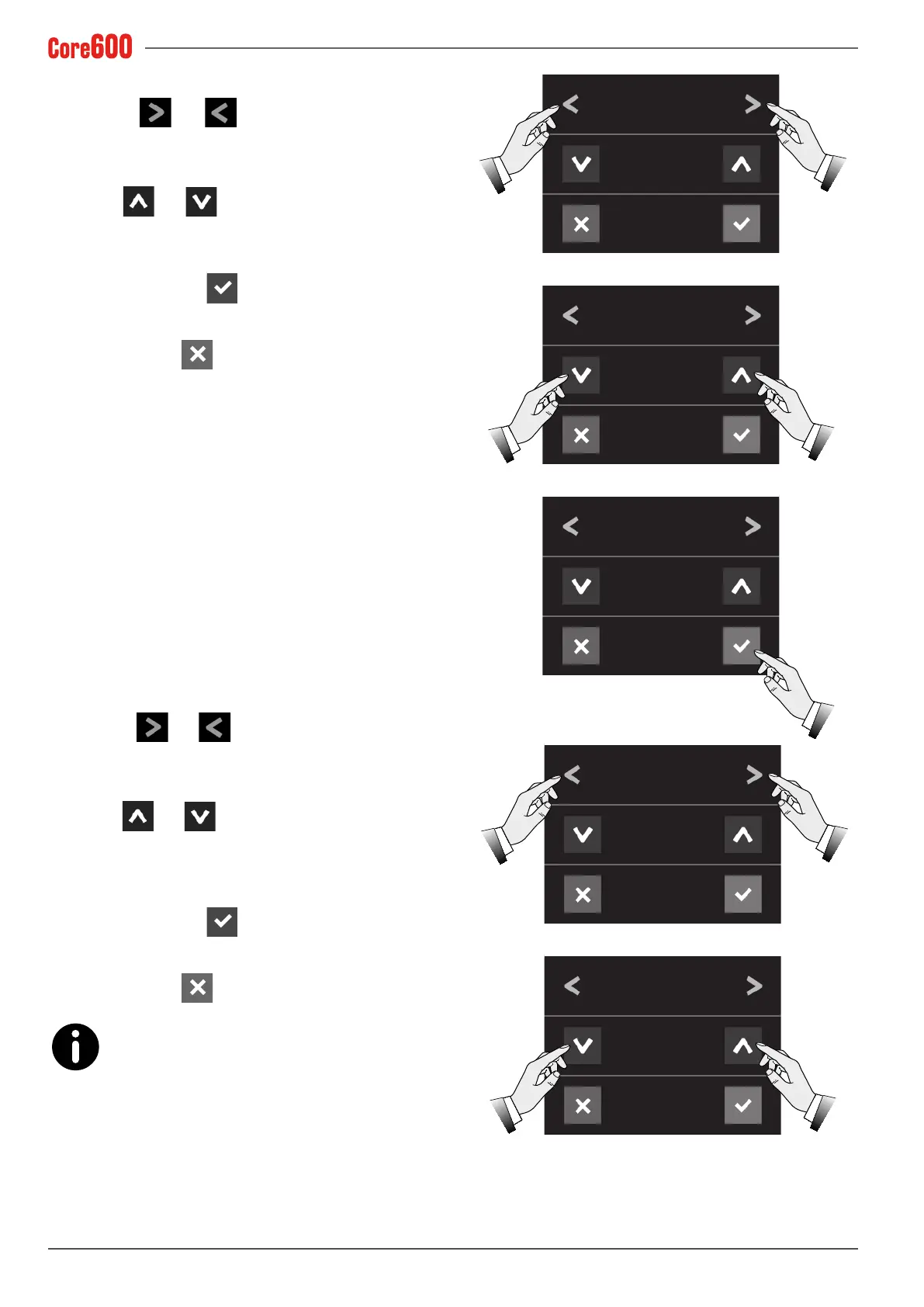
• Select the and arrows until the words "STEAM
WAND OFS." appear on the display;
• Use the and arrows to set the automatic steam
wand offset temperature;
• Toconrm,pressthe
button;
• To exit, press the
button.
7.14.5 Steam nozzle automatic wash
• Select the and arrows until the word "S.N AUTO.
WASH" appears on the display;
• Use the
and arrows to set the automatic activa-
tion time (in minutes) of the steam nozzle wash, after its
last use. If a "0" is entered, this function will be disabled;
• Toconrm,pressthe
button;
• To exit, press the
button.
A few seconds before the automatic steam nozzle
wash starts, 2 sound alerts will go off and then 5
short spurts of steam will be dispensed.
AUTOMATIC STEAM
WAND OFS.
AUTOMATIC STEAM
WAND OFS.
AUTOMATIC STEAM
WAND OFS.
0
2
2
°C
°C
°C
S.N AUTOMATIC WASH
S.N AUTOMATIC WASH
0
10
min
min.









 To Next Page