Sweep Fundamentals
Settings and Readings
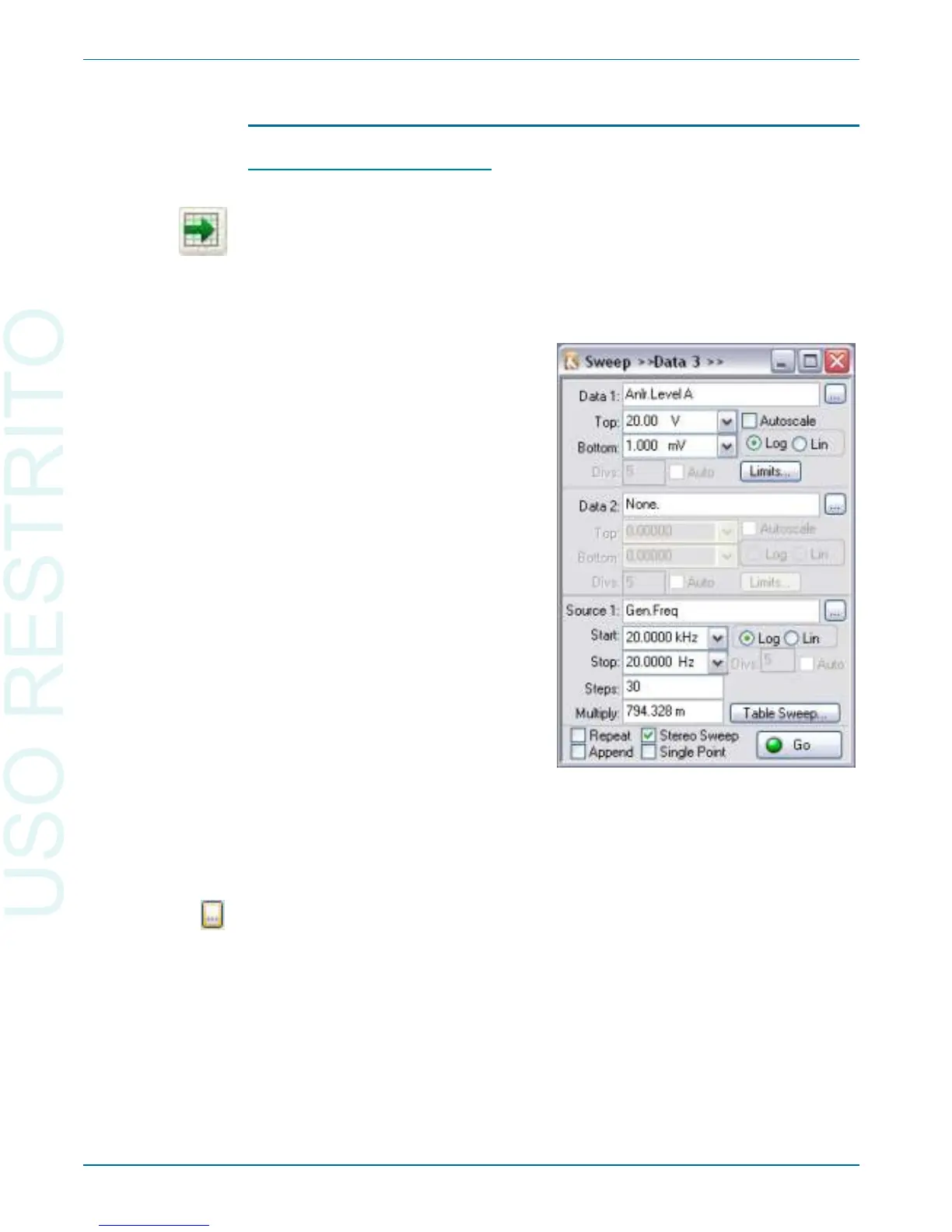
To set up a sweep, open the Sweep panel, ei ther by choos ing
Panels > Sweep, or by click ing on the Sweep but ton. The Sweep panel is di -
vided hor i zon tally into two ma jor ar eas: the Data (read ing) area above, and
the Source (set ting) area be low. Dur ing the sweep, the set ting cho sen in the
Source 1 field is var ied, and the read ings spec i fied in the Data fields are gath -
ered.
To choose the set ting to be var ied, click on the el lip sis but ton to the right of
the Source 1 field. In the browser, choose an in stru ment from the left pane and
a set ting from the right pane. For in stance, if you choose Gen from the in stru -
ment side and Freq from the set ting side, the fre quency of the An a log Gen er a -
tor will be var ied dur ing the sweep. This is shown in the Source 1 field as
Gen.Freq.
Chapter 5: Quick Guides Sweeps
40 Getting Started with Your 2700 Series Instrument
Figure 23. The Sweep panel. This
configuration was used to create the graph
of Figure 22.



 To Next Page