IFD500 Series Pilot Guide
1-28 System Overview
COOL FEATURE
Monitor Standby Com
The IFD will send the first standby communications
frequency audio to the audio panel for monitoring.
This permits the pilot to monitor a second
communications channel (e.g. ATIS) while still
connected to the active communications channel.
Not all audio panels can support this capability.
However, the Avidyne AMX240 and several other
third party panels do offer this feature.
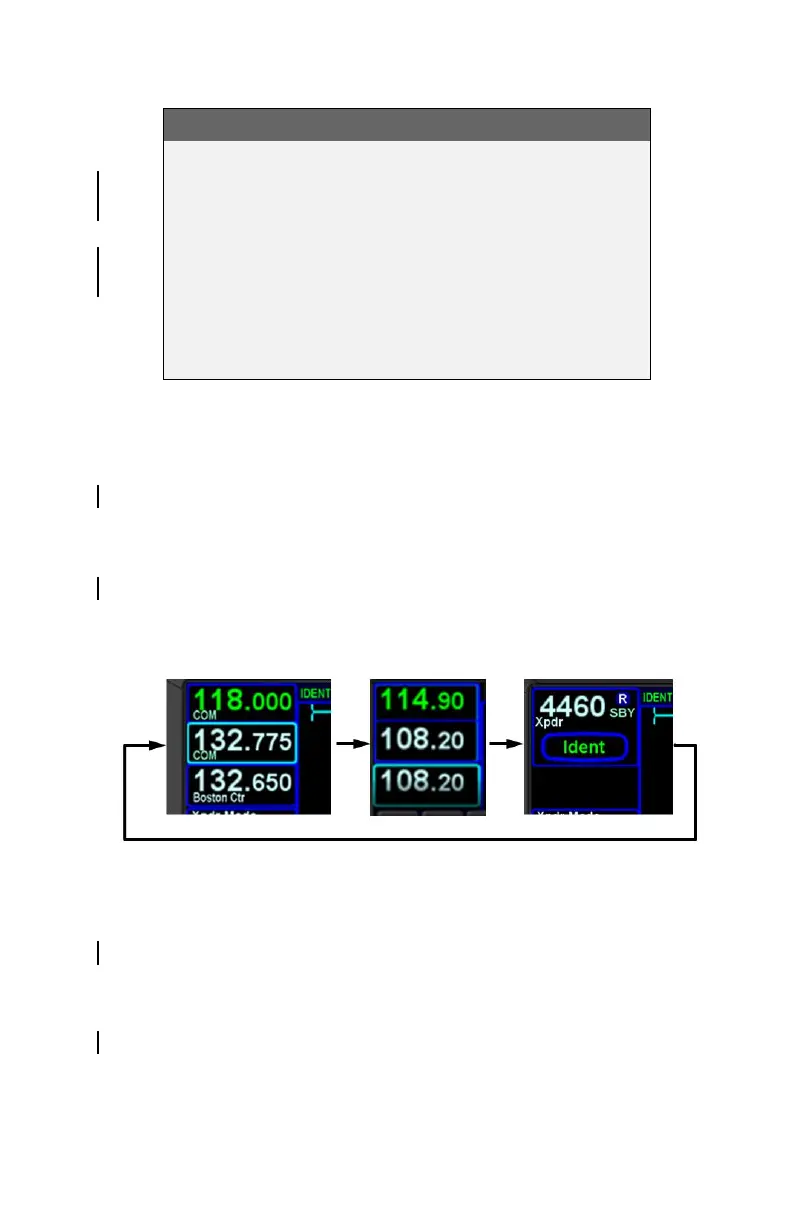
Switching Tuning Controls
The lower left knob is used to switch between display and control
of communications radios, navigation radios, and a remote
transponder (if equipped). To switch between controls, push the
lower left knob. Subsequent tuning operations will be performed
on the displayed transceivers. Following 20 seconds of inactivity,
the system will revert to control and display of communications
radios.
Cycling between Com, Nav, and Transponder Display
Tuning
Radio tuning can be accomplished through several methods.
Regardless of method, it's always the Standby that is tuned and
then that frequency is swapped into the Active by pressing the
bezel Frequency Swap button.
The Standby can be manually tuned by rotating the lower left
knob on the bezel. The outer knob changes the digits to the left
of the decimal point and the inner knob changes the digits to the



 To Next Page