7. Communicator Touch Panel
7.2 Installation of the touch panel interface
Necessary tools
• 17 mm wrench
• 10 mm wrench
How to install the touch panel interface
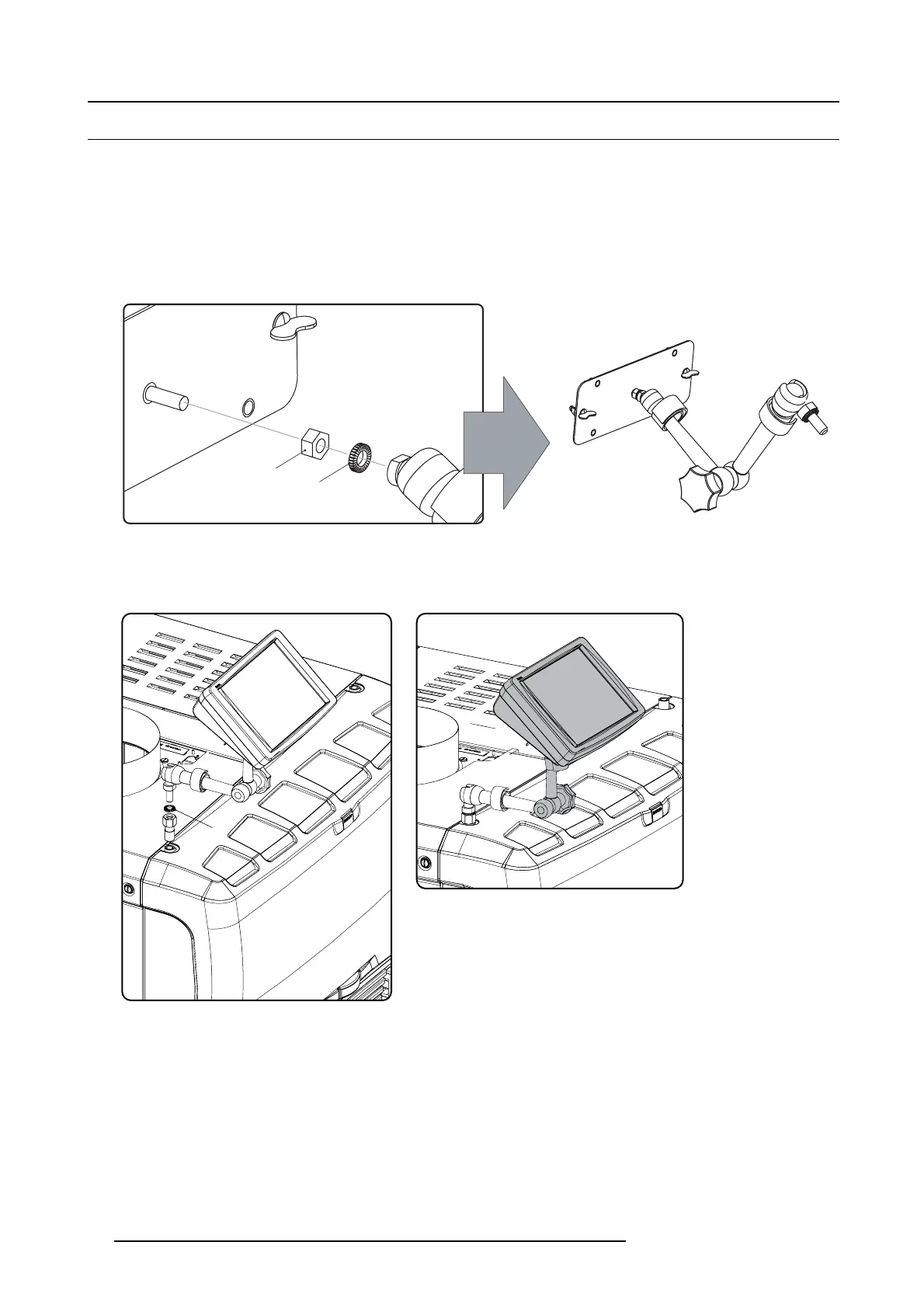
1. Ass emble the mounting plate and the swivel arm together as illustrated. First place the nut (N) upon the rod of the mounting
plate, then add the lock washer (L), then fasten the mounting plate and the swiv el arm together. When the arm i
s mounted, turn
nut (N) against the arm to s ecure the pos ition.
N
L
Image 7-3
Assemble swivel arm
2. Slide a washer (M) over the base of the swivel arm and Insert the base of the sw ivel arm into the mounting hole at the top of the
DP2K-32B projector as illustrated.
M
Image 7-4
Mount touch panel
Image 7-5
Touch panel mounted
3. Place the touch panel interface on the mounting plate of the swivel arm and fasten the two wing nuts (W ) as illustrated.
76
R59770491 DP2K-32B 30/04/2010



 To Next Page