R5912128 /03 SP4K-B66
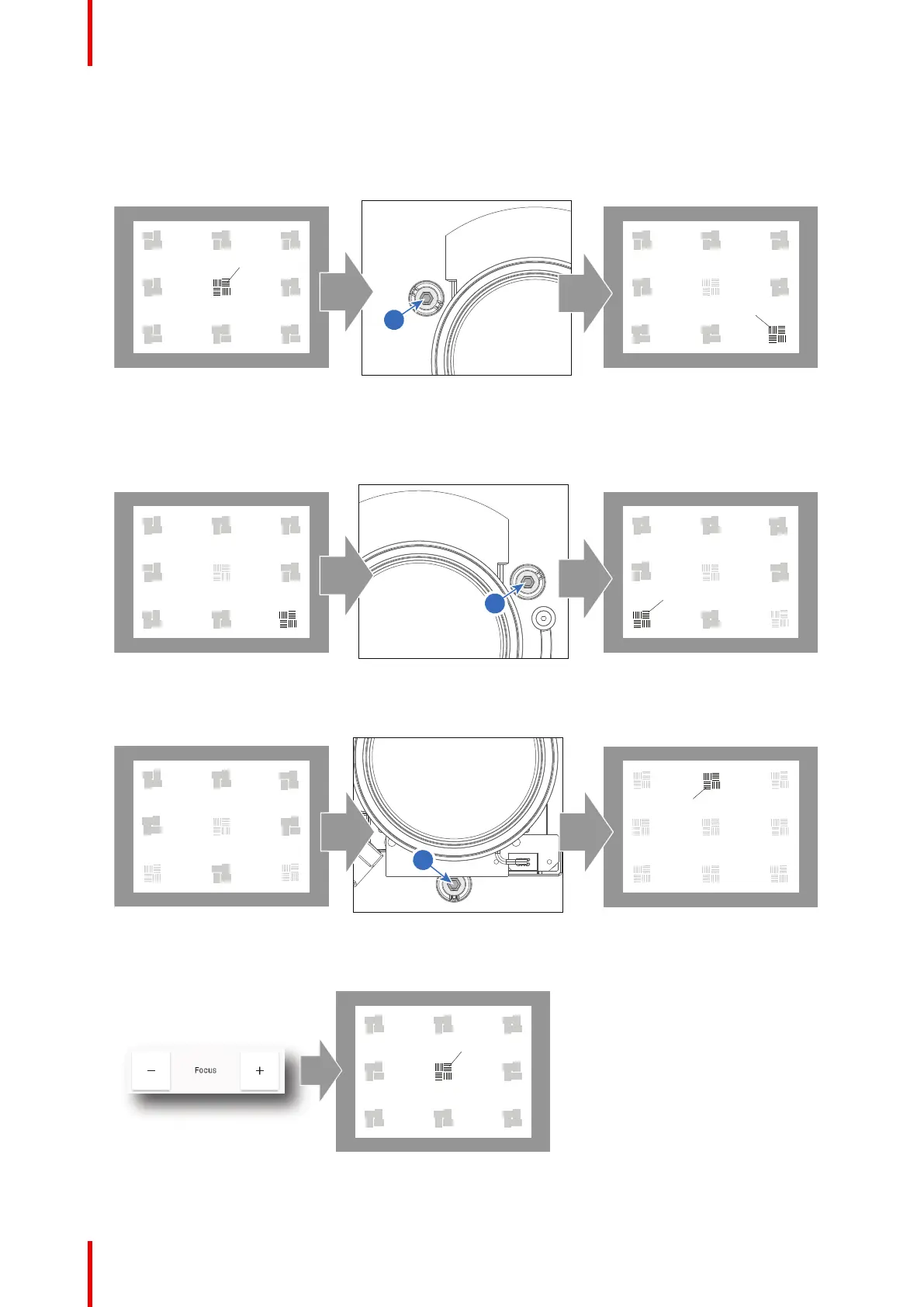
Scheimpflug adjustment steps
1. Sharpen the image at the bottom right corner of the screen by turning the upper left Scheimpflug
adjustment screw either clockwise or counterclockwise (reference 1 Image 5–17). Use a 5 mm Allen
wrench.
Image 5–17 Left bottom focusing
As a result of this action, the focus in the center will fade a bit. This is expected behavior.
2. Sharpen the image at the lower left corner of the screen by turning the upper right Scheimpflug adjustment
screw (reference 2 Image 5–18).
Image 5–18 Right bottom focusing
3. Sharpen the image at the top center of the screen by turning the lower Scheimpflug adjustment screw
(reference 3 Image 5–19).
Image 5–19 Top focusing
4. Optimize the focus of the projected image in the center of the screen using the focus buttons in the
“Control – Light, Dowser, Lens menu”.
Image 5–20
Lenses and Lens holder



 To Next Page