Setup Program
54
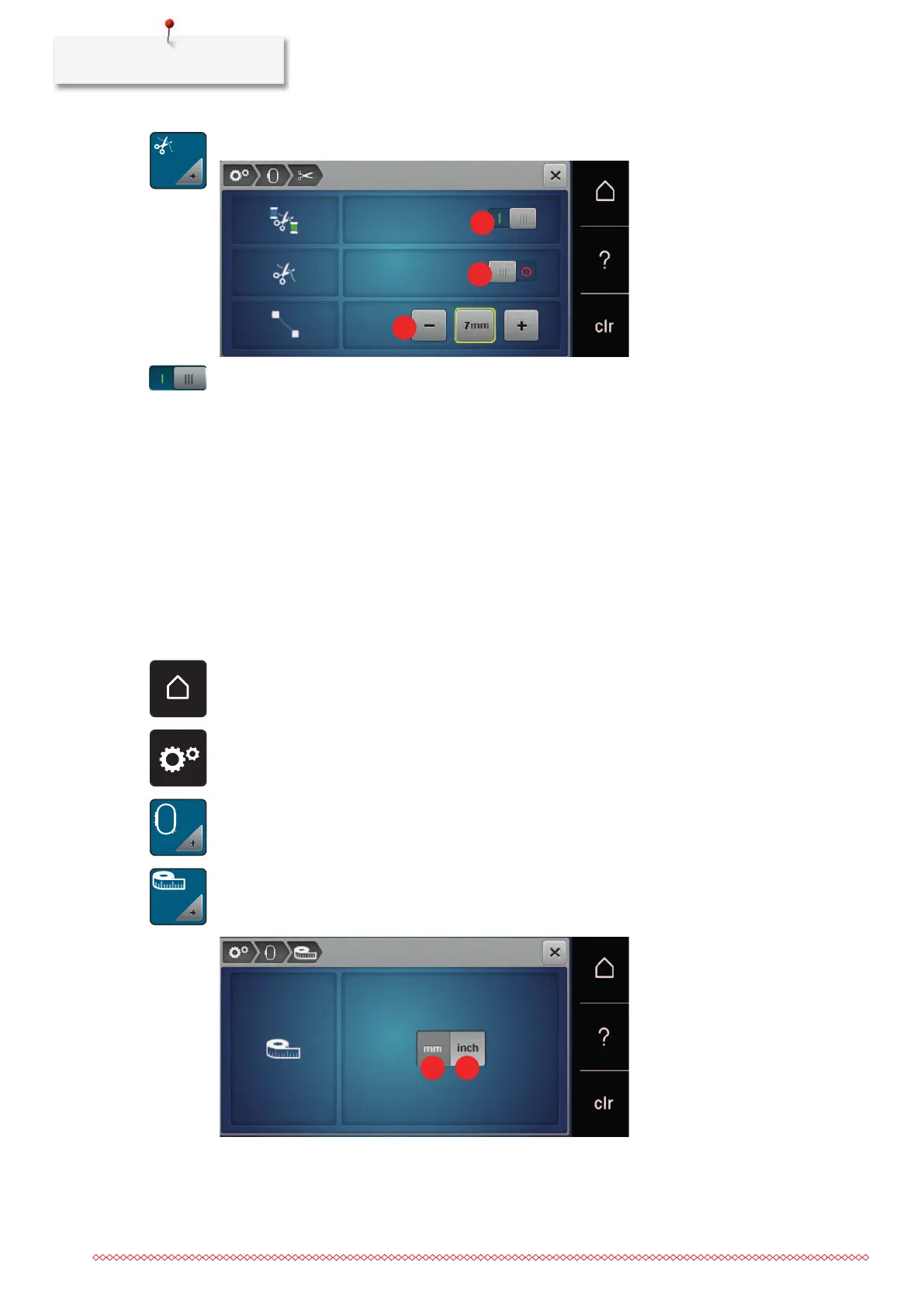
> Touch the icon «Thread cut settings».
> To switch off the automatic thread cut before changing the thread, move the switch in the upper area of
the display (1) to «
0».
> To switch on the automatic thread cut before changing the thread, move the switch in the upper area of
the display (1) to «
I».
> To stop the machine for the manual thread cut, move the switch in the central area of the display (2) to
«
I».
– The machine stops after approx. seven stitches; the thread can be cut by hand.
> To not stop the machine for the manual thread cut, move the switch in the central area of the display (2)
to «
0».
> To set the length from which the connecting stitches are cut, touch the icons «-» or «+» (3).
Changing the measuring unit
The unit of measurement in the embroidery mode can be changed from mm to inches. The default setting is
mm.
> Touch the icon «Home».
> Touch the icon «Setup Program».
> Touch the icon «Embroidery settings».
> Touch the icon «Change measuring unit».
> To change the unit of measurement in embroidery mode to inches, touch the icon «Inch» (1).
> To change the unit of measurement in embroidery mode to mm, touch the icon «mm» (2).



 To Next Page