Setup Program
57
Adjusting the thread cut
> Touch the icon «Setup Program».
> Touch the icon «Embroidery settings».
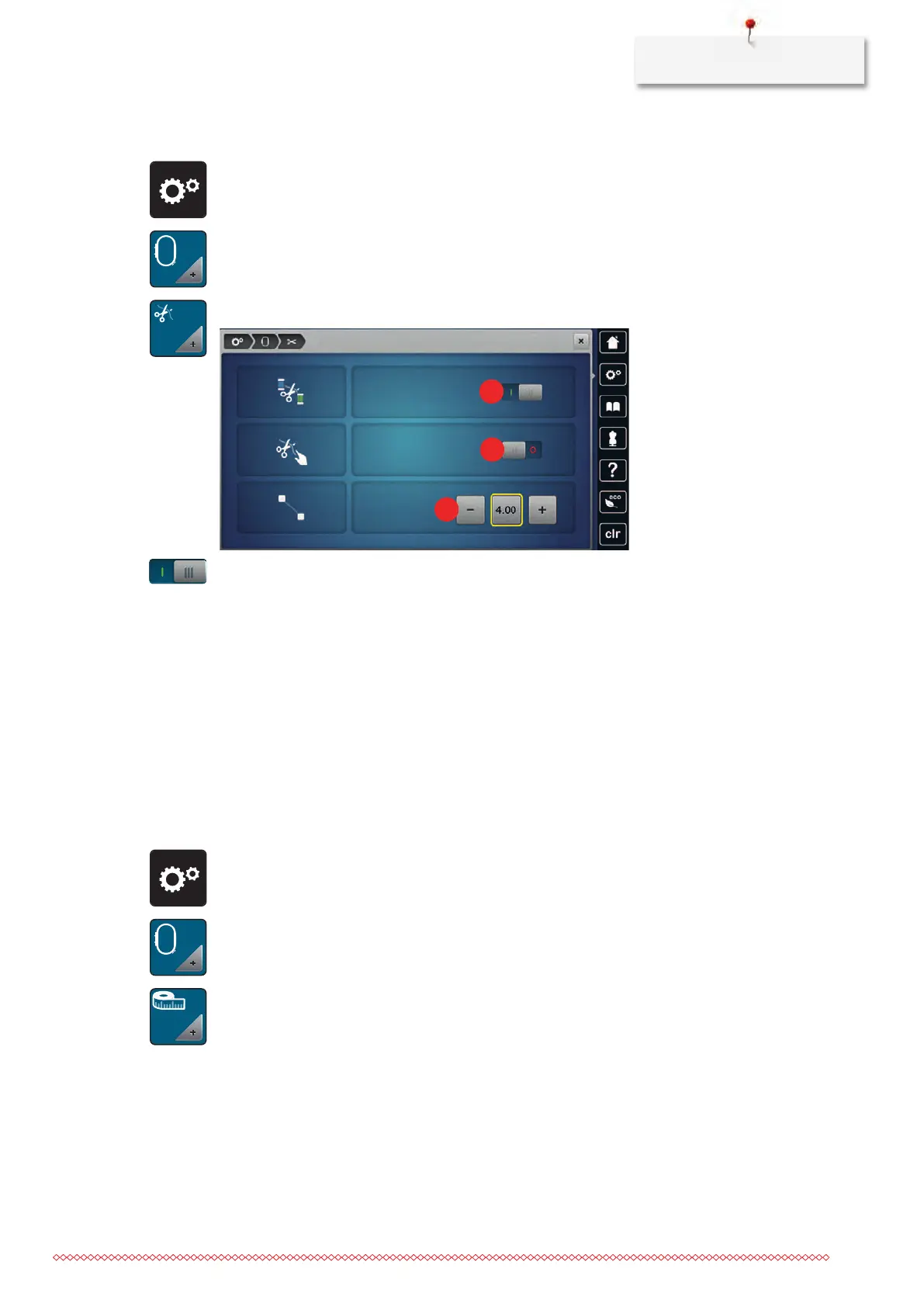
> Touch the icon «Thread cut settings».
> Touch the switch in the upper portion of the display (1) to deactivate the automatic thread cut before the
thread is changed.
> Touch the switch in the upper portion of the display (1) again to activate the automatic thread cut before
the thread is changed.
> Touch the switch in the middle section of the display (2) so that the machine will stop after about 7
stitches and the remaining thread can be cut manually.
> Touch the switch in the middle section of the display (2) again and the machine won't stop for a manual
thread cut.
> Touch the icons «-» or «+» (3) to adjust the length from where the connecting stitches are cut.
> Touch the yellow-framed icon to reset any alterations to default setting.
Changing the measuring unit
The measuring unit in the embroidery mode can be changed from mm to inch. The standard setting is in
mm.
> Touch the icon «Setup Program».
> Touch the icon «Embroidery settings».
> Touch the icon «Change measuring unit».
> Touch the icon «Inch» (2) to change the measuring unit in the embroidery mode to inch.



 To Next Page