Creative embroidering
75
Endless embroidery
When embroidering a border, it is advantageous to use the «Mega-Hoop» (optional accessory) or the «Maxi-
Hoop» (optional accessory). The embroidery project requires less rehooping. We recommend marking
reference lines on the fabric, and using the template when hooping and rehooping. Here, the reference lines
must run parallel to the lines on the template. In the following example, the supplied «Oval-Hoop» is used.
> Select an embroidery motif.
> Touch the icon «i»-Dialog.
> Touch the icon «Endless Embroidery».
– The embroidery motif will be duplicated as many times as possible to fill the hoop.
– The reference points, which are necessary when rehooping the fabric, are added.
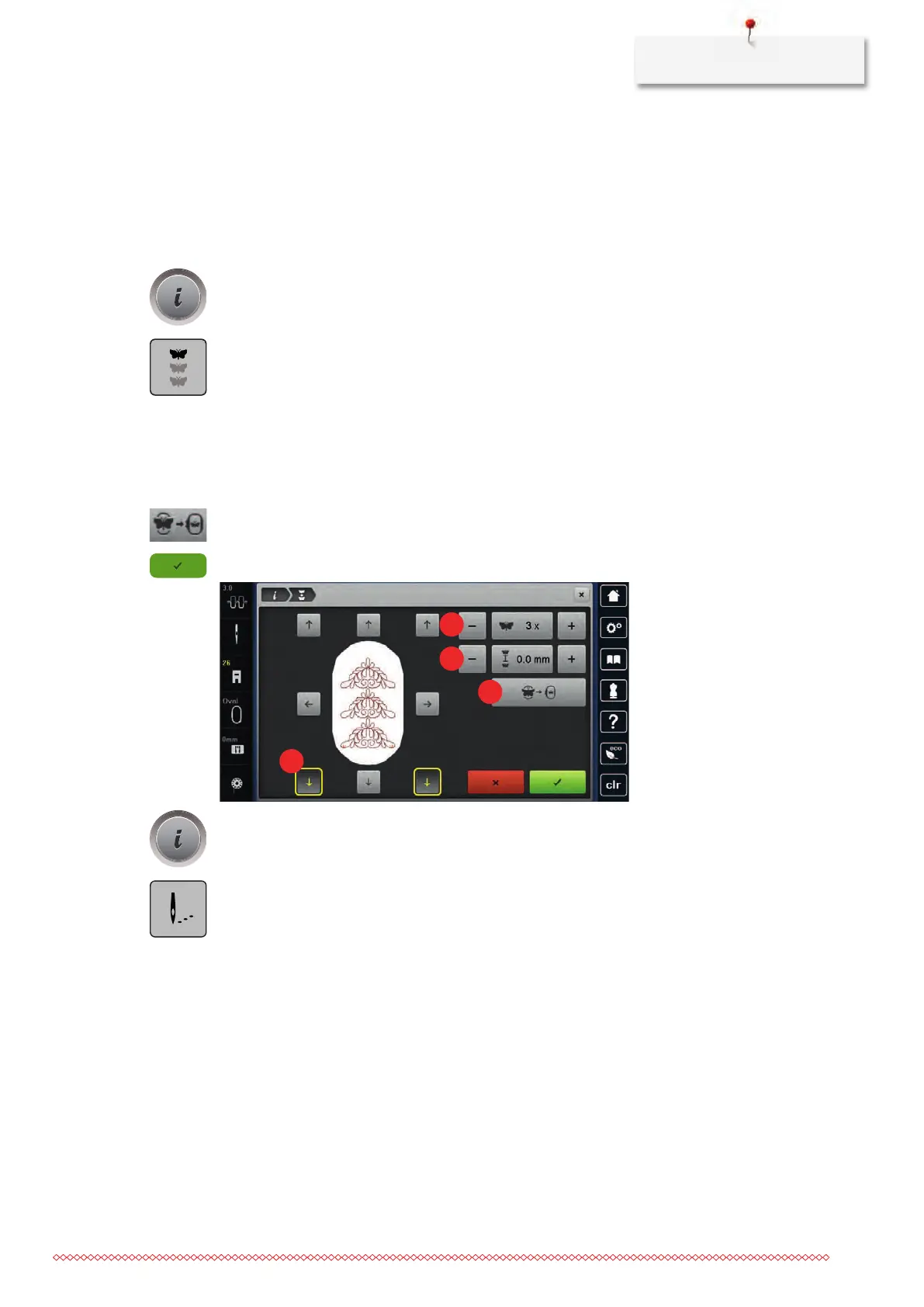
> Add further reference points, if necessary, using the arrow icons (1).
> Turn the «Upper Multifunctional knob» or
> touch the icons «-/+» (2) to enter the number of embroidery motifs.
> Turn the «Lower Multifunctional knob» or
> touch the icons «-/+» (3) to determine the distance between the embroidery motifs.
> Touch the icon «Fit to hoop» (4) to adjust the size of the motifs automatically so they all fit in the hoop.
> Touch the icon «Confirm».
> Touch the icon «i»-Dialog.
> Touch the icon «Embroidering».



 To Next Page