LB 470 Level 7 Main Menu Device Setup
56925BA2 Rev. 03, 11/2017
Adjust: High Level Adjust
Device settings | Setup | Calibration | Adjust
The upper adjustment can only be performed at a level > 50%. The count rate at
0% will be kept fixed, while all other points of the curve will be adjusted according
to the adjusted count rate at the entered level value.
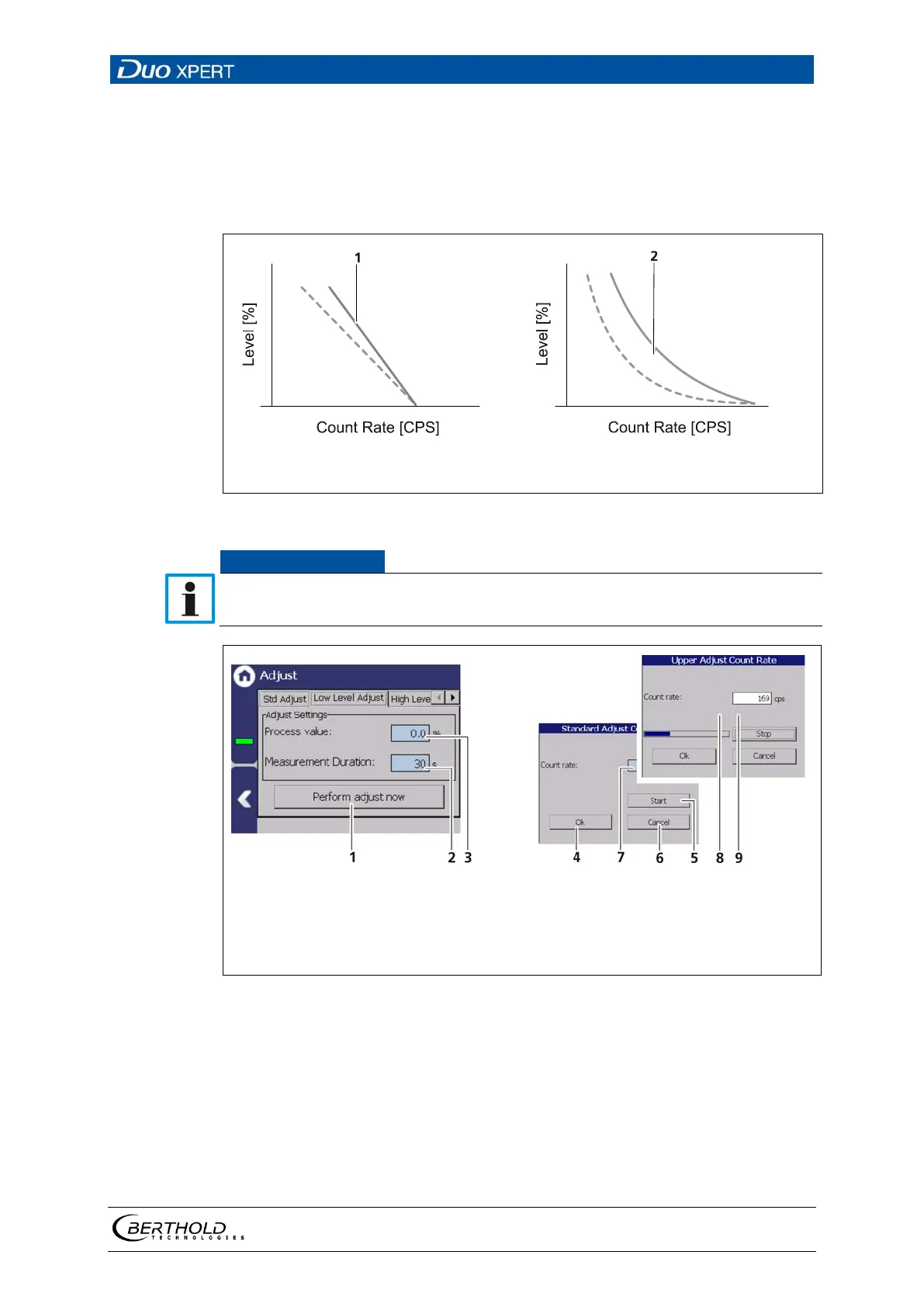
Adjusted curve (linear calibration type)
Adjusted curve (exponential calibration type)
95 Adjusted curves (High Level Adjust)
Make sure that the source is mounted and the beam path is open. The container
must be full during the upper adjustment.
Button < Perform adjustment >
Input field "Process value"
Input field "Measuring time"
Process bar
Button < Ok >
Display field "count rate" [cps]
Button < Cancel >
Button < Start >
Button < Stop >
96 Upper adjustment
1. Click on the field Process value (Fig. 96, item 3) to open the input field.
2. Specify a percentage value for the upper adjustment and confirm with the
Enter key.
3. Click on the "Read-In-Time" field (Fig. 96, item 2) and specify the duration of
measurement in seconds. The higher you set the measurement time, the
more accurate the result.
4. Click on the button <Perform adjust now> (Fig. 96, item 1).



 To Next Page