LB 470 Level 7 Main Menu Device Setup
56925BA2 Rev. 03, 11/2017
Signal processing: Source replacement
Device settings | Setup | Signal Condition | Source replacement
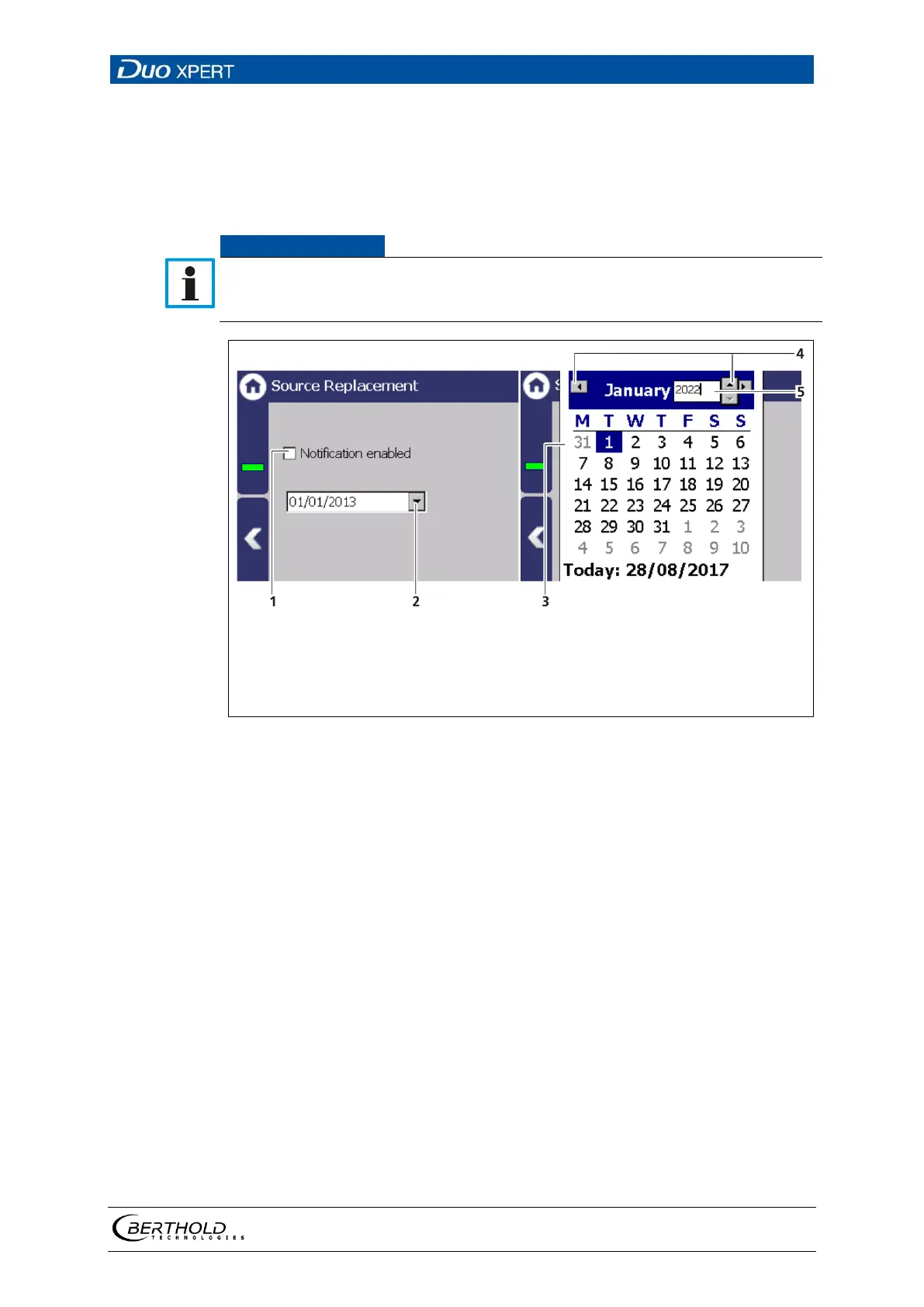
Notification for a source replacement can be activated in this submenu. The
maintenance message ″Replace source″ when this date is reached.
For radiation protection reasons, a source replacement is recommended after 15
years. After a source exchange, a standard adjust must be performed (see
"Standard Adjust" in chapter 7.3.3
Calibration)
″
″
Selection arrow Calendar
Month view Calendar
Selection arrow Month
Input Year number
113 Source replacement
Setting source replacement date
1. Activate the check box (Fig. 113, item 1).
2. Click on the arrow key (Fig. 113, item 2) in order to set the date.
The calendar is opened.
3. Click on the year (Fig. 113, item 5) to select the year with the arrow keys.
4. Set the month and day in the calendar.
The calendar retracts and the notification has been established.



 To Next Page