7 Main Menu Device Setup LB 470 Level
56925BA2 Rev. 03, 11/2017
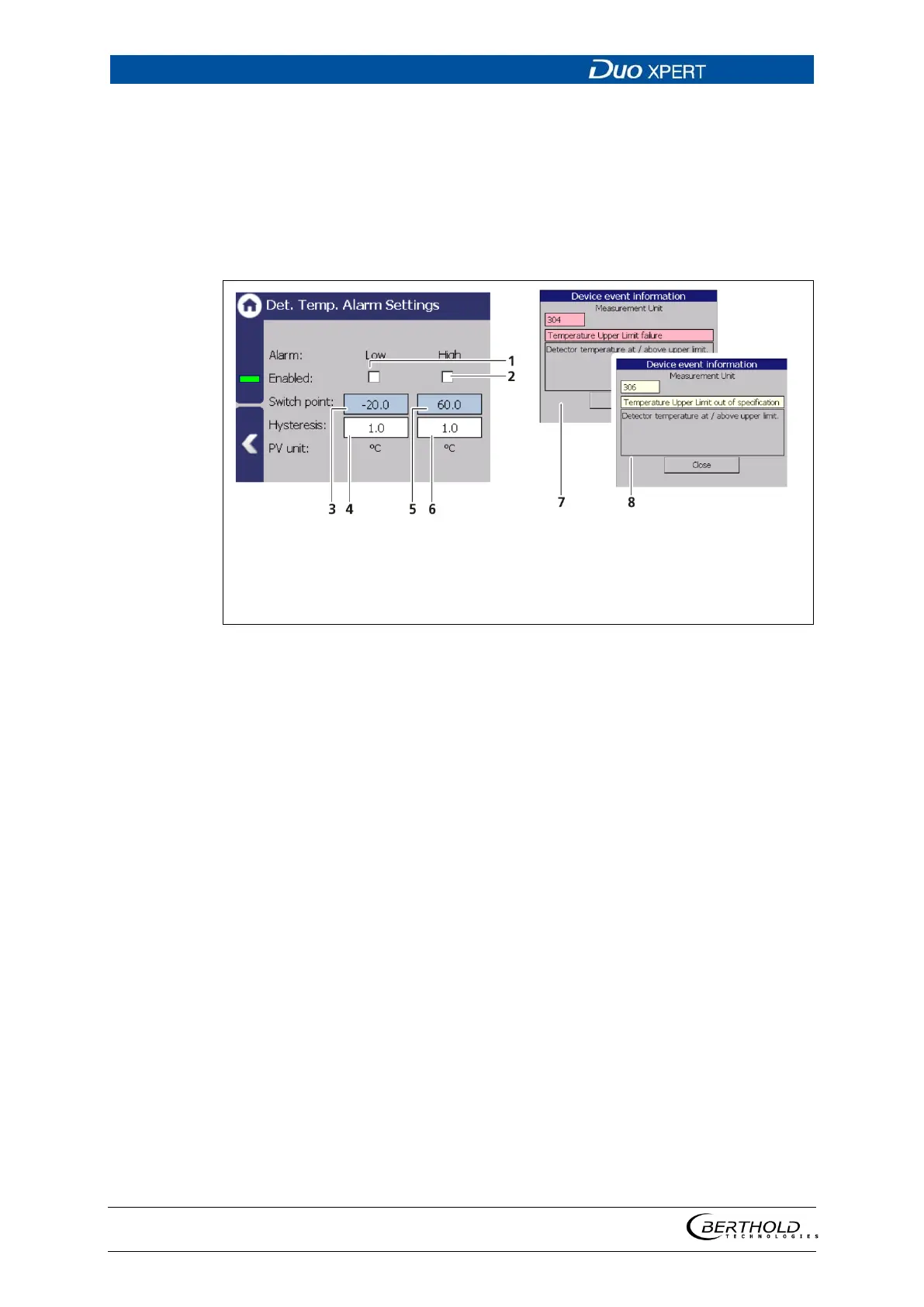
Detector Temperature Alarm Settings
Device settings | Setup | Alarms | Det.-Temp. Alarm Settings
The values for the detector temperature (max. and min.) can be set in the submenu
″PV Det.-Temp. Alarm Settings″.
When there is exceeding or falling below the switching point, an event message
appears in the status display. If a digital output ″Detector temperature alarm″ is
assigned under ″Function″, the relay switches.
Selection box “Min. Active”
Selection box “Max. Active”
Input box “Switch point Min.”
Input box “Hysteresis Min.”
Input box “Switching point Max.”
Input box “Hysteresis Max.”
Event message “Error”
Event message “Outside the specifi-
cation”
129 Det.-Temp Alarm Settings
Setting max. temperature alarm:
1. Activate the check box (Fig. 129, item 1).
1. Click on the input field (Fig. 129, item 2) to enter a switching point.
2. Confirm with the Enter key
The value was changed.
Set min. temperature alarm:
1. Activate the check box (Fig. 129, item 3).
2. Click on the input field (Fig. 129, item 4) to enter a switching point.
3. Confirm with the Enter key
The value was changed.



 To Next Page