LB 470 Level 7 Main Menu Device Setup
56925BA2 Rev. 03, 11/2017
Network
Device Setup | Setup | System | Network
In the Network settings submenu, you can make changes to the network settings.
The information can only be edited in the access level "Standard" (see chap. 7.2
Menu Access).
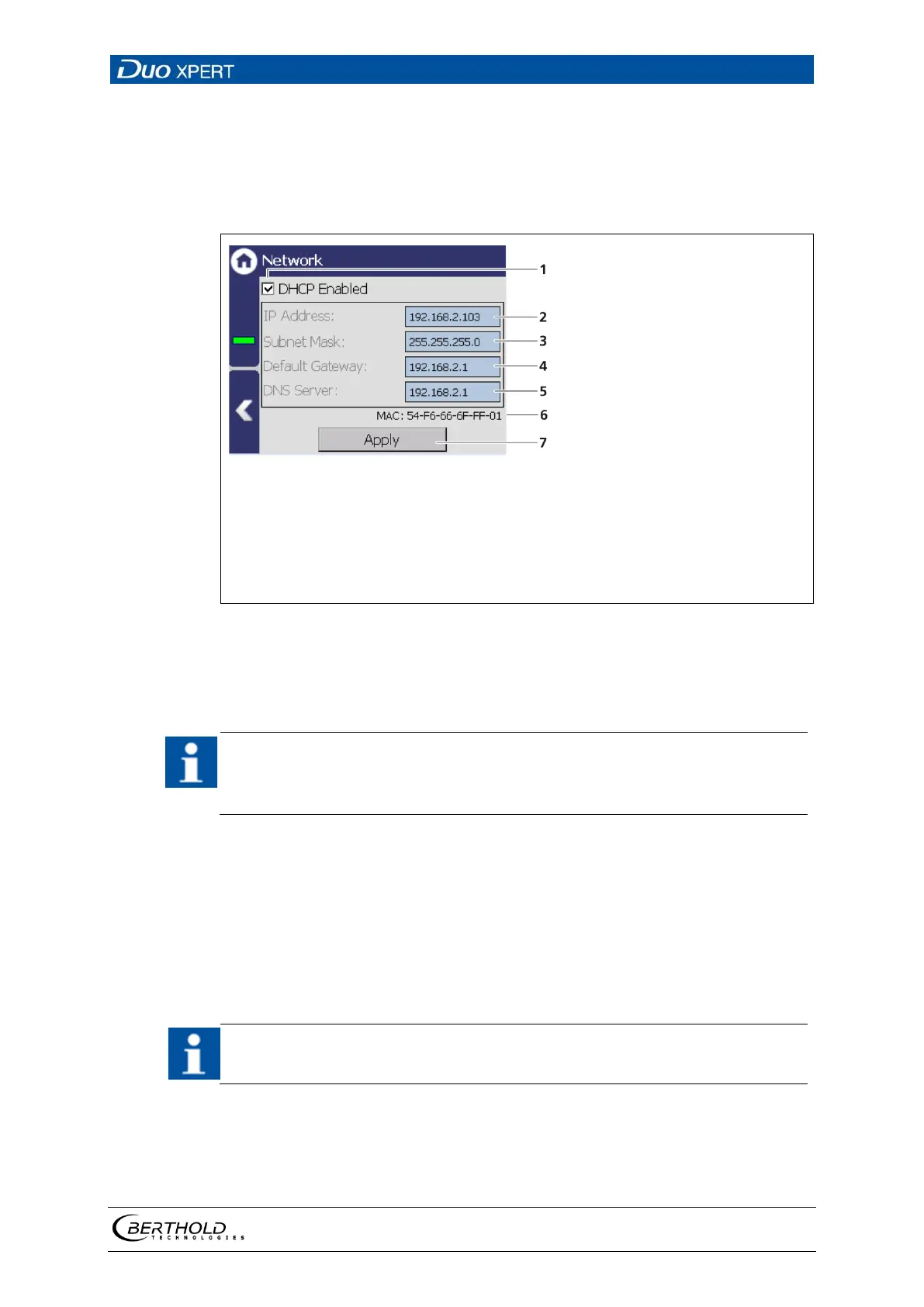
Check box "DHCP active"
IP address
Subnet mask
Standard gateway
DNS server
MAC address
Button <Apply>
55 Network Settings
You can set the network address either manually or using DHCP (automatic assign-
ment). To do this, check the "DHCP active" in the selection field (Fig. 55, item 1).
In the event of an automatic assignment of the IP address by a DHCP server,
you can only look at the given IP address. A modification of the IP address is
not possible. On this side, you can also read the MAC address of the device
(Fig. 55, item 6).
Manual settings:
1. Click on the text field (Fig. 55, item 2 - 5) to open the input field.
2. Enter the appropriate network addresses.
3. Confirm with the Enter key.
4. Click on <Apply> (Fig. 55, item 7) to adopt the network settings.
All settings performed must be confirmed by clicking on <Apply> so that the
settings become real.



 To Next Page