7 Main Menu Device Setup LB 470 Level
56925BA2 Rev. 03, 11/2017
Detector configuration
Device settings | Setup | Sensors | Detector configuration
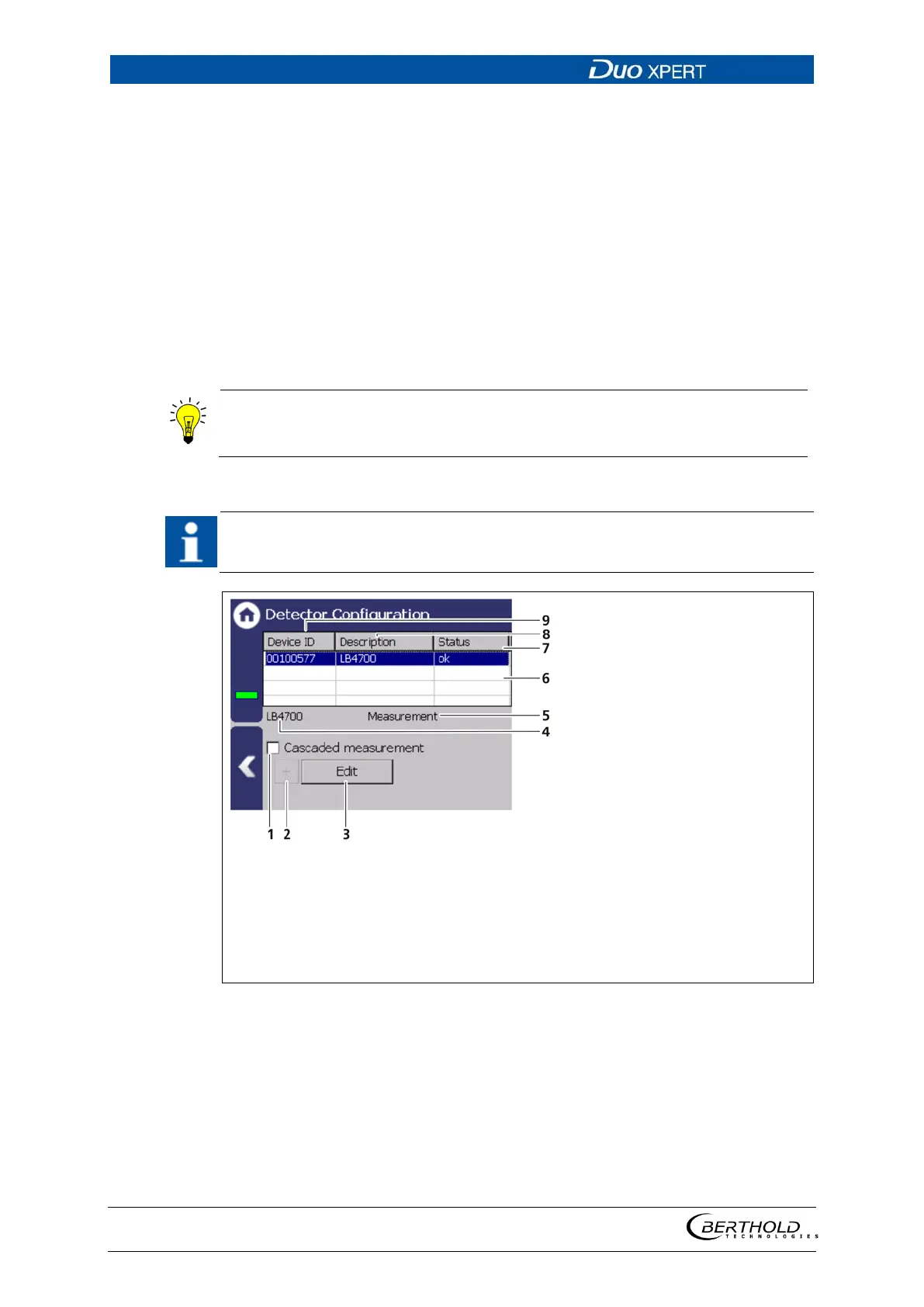
In the sub-menu “Detector configuration” the detectors for the measuring system
are added and configured. Only configured detectors are listed and shown in the
menu (Fig. 58). When a detector is selected (Fig. 59, item 6), the detector type (Fig.
59, item 4) and measuring task (Fig. 59, item 5) are shown.
Clicking the box <Edit> (Fig. 59, item 3) selects the type of detector and changes
the description. The boxes <+> and <-> can be used to add and remove detectors
for cascading measurement.
Evaluation of the measurement data from detectors type LB44xx and LB54xx is only
possible with Master units.
Information and settings for the detector are in the individual detector menu
(
Fig. 62).
In systems with a single detector the device ID is determined automatically and
listed. The description can be edited by clicking on <Edit> (Fig. 59, item 3).
Selection box “Cascaded meas-
urement”
Button < + > to add Detector
Button < Edit >
Type of selected detector
Measuring task for the selected
detector
List of the Detectors
Status of the Detector
Description of the Detector
Device ID of the detector
59 Detector configuration



 To Next Page