LB 470 Level 7 Main Menu Device Setup
56925BA2 Rev. 03, 11/2017
Detector Settings
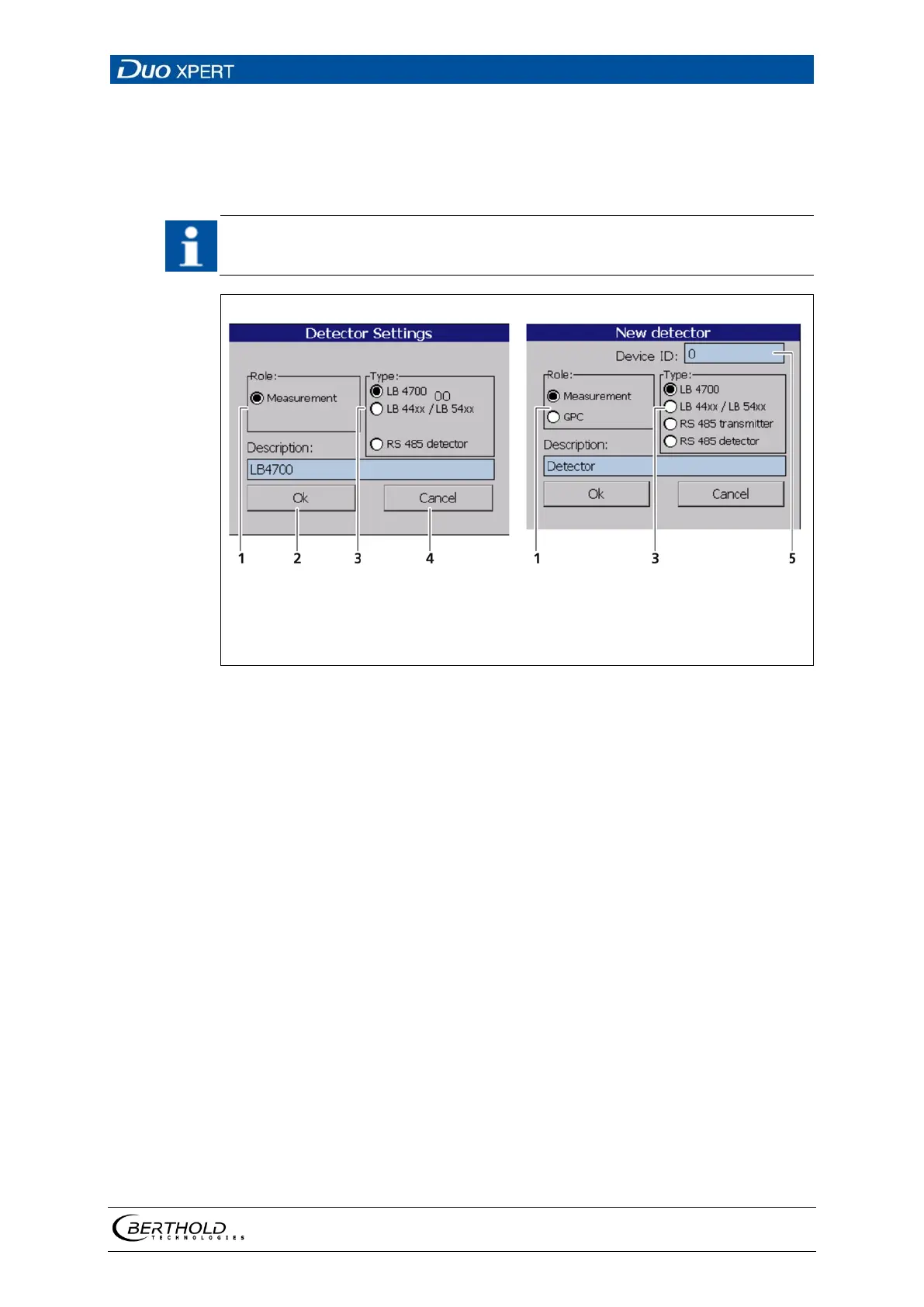
The settings of a configured detector are edited by selecting and clicking on <Edit>
(Fig. 59, item 3).
For systems with a single detector, window A is displayed. For cascaded sys-
tems, window B is displayed.
Field "Role"
Button <Ok>
Field "Type"
Button <Cancel>
Input field Device (Unit ID)
60 Detector Settings
The selection "Measurement" determines the
level of the container.
The selection "GPC" (Gas Properties Compensa-
tion) determines the gas density in order to
compensate these for a precise measurements.
Detector of type LB4700 (A LB 4700 detector can
be connected either to the master unit itself or
to a slave module).
Detector of the type LB44xx and LB54xx (no de-
vice ID; can capture measurement data only with
master EVU)
By selecting "RS 485 transmitter", other LB 470
master units can be used to perform cascaded
measurements. This way multiple detectors of
different designs can be integrated into a meas-
urement system. Please refer to the instructions
in the following chapters.
With the selection “RS 485 detector” it is possi-
ble to connect a specific detector via the RS 485
interface.
Detector description. Also used for error mes-
sages, logs and in the menu structure (Fig. 58).



 To Next Page