USER MANUAL
TD069-O&M-001
REVISION 6
Page 34 of 80
By opening the front access window the chamber
will no longer be aseptic and a decontamination cycle will need
to be run to re-establish aseptic conditions.
attempt to close the front access window
by pushing on the sides of the window as this could cause
damage.
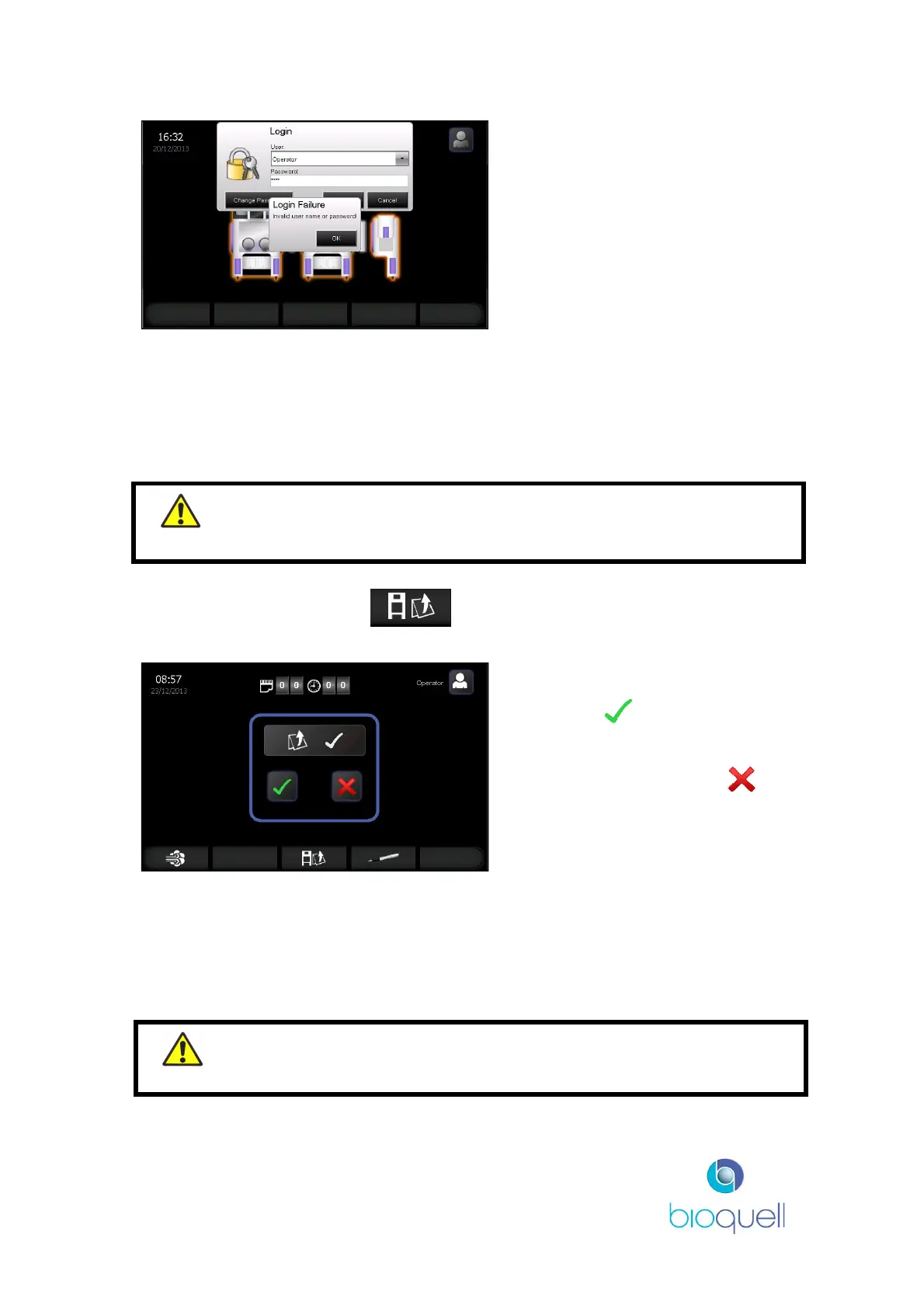
If details have been entered
incorrectly the “Login Failure” box
will be displayed.
Click OK to return to the Login
screen.
For more details on password management refer to Section 5.4.3.
4.2.1Loading the QHPV chamber
This section outlines how to use the control panel to open the QHPV front access
window.
On the Home Page press the button. This button is only visible if the
front access window can be opened (unlocked).
Press green to confirm that
you want to open the window.
Alternatively, press the red to
cancel the request.
Once the seal is deflated, as indicated by the chamber lights turning off, gently
push the front window for it to release, and then allow it to open up.
The load can then be placed within the QUBE. The front access window is shut by
pushing on the glove ports until closed. The seal will automatically re-inflate once
the front access window is closed.


 To Next Page