USER MANUAL
TD069-O&M-001
REVISION 6
Page 51 of 80
5.2 OPERATOR editable functions
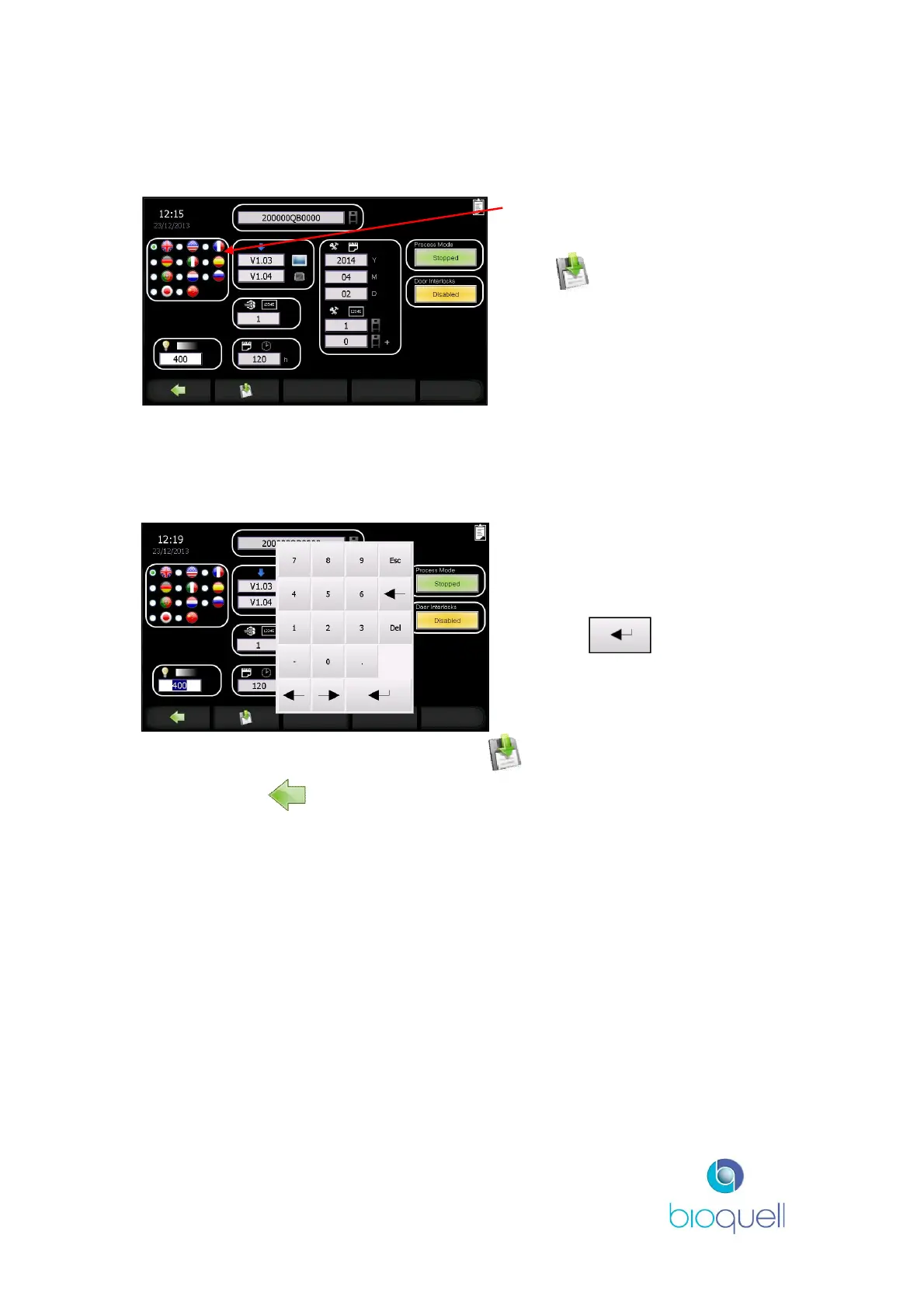
5.2.1Set Language
Press the applicable radio button
for the required screen language.
Press to make changes
permanent.
5.2.2Adjust Chamber light intensity
Any user may adjust the white light intensity for ease of use for the whole
system.
A standard numerical keypad is
displayed.
Enter a value between 0 and 400
and press to accept.
When the light level is acceptable press the button to make the change
permanent and to return to the Home Page.
5.3 SUPERVISOR editable functions
The following functions are editable by those with SUPERVISOR access rights.
5.3.1Suspending Processing Mode - system use not required
If the QUBE is not required to be used for a prolonged period, and thus the fans
need not run, it is recommended that the QUBE is turned off at the power button
on the back of the unit when it is in Process Mode.
If the QUBE is ducted and extract out of the room must be maintained, then an
administrator can switch the processing mode status button to ‘Stopped’, (see
following screen). Then all internal doors must be left open, to do this first disable


 To Next Page