USER MANUAL
TD069-O&M-001
REVISION 6
Page 45 of 80
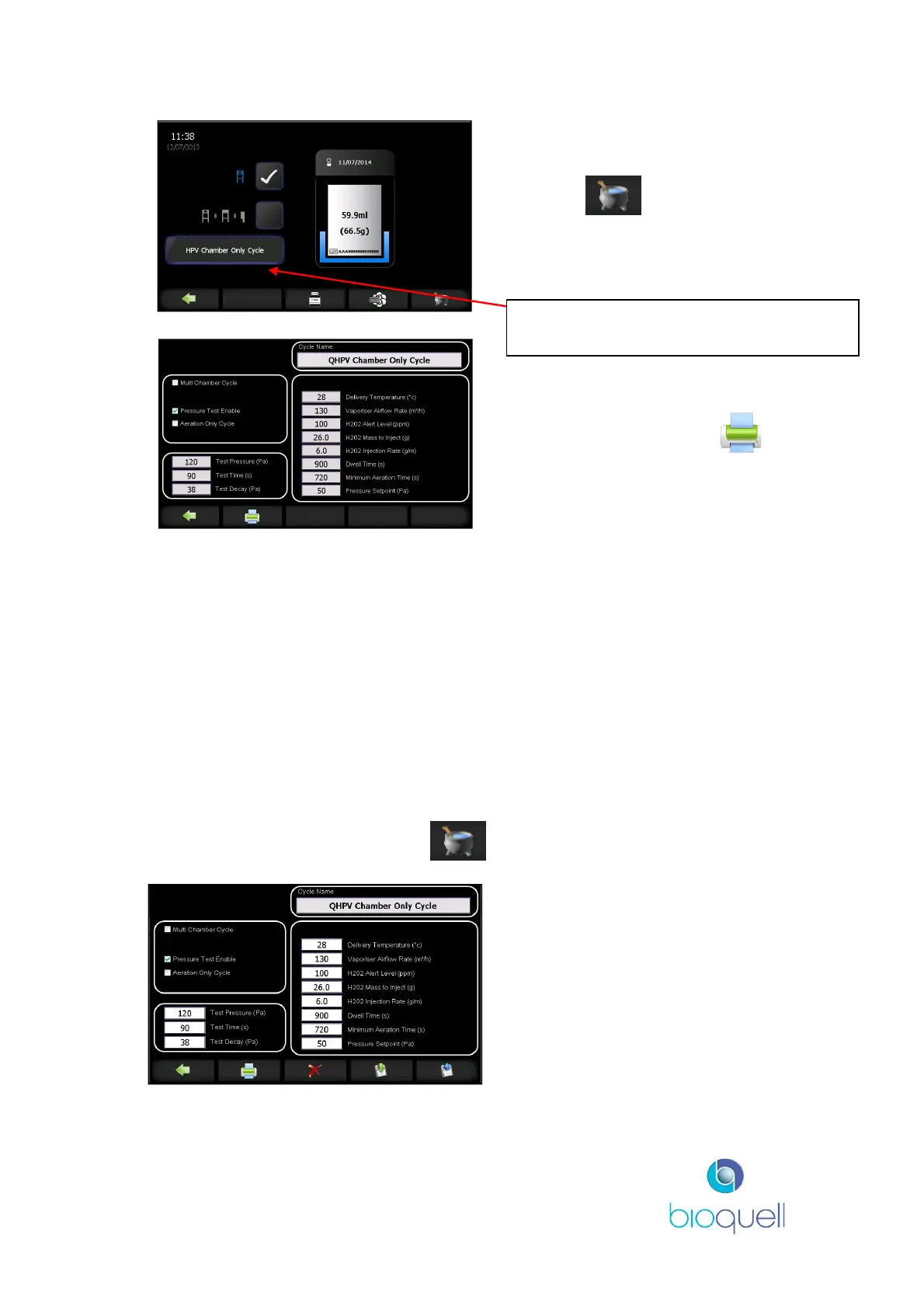
Select the recipe as described in
4.3.1.
Press the to view the
stored parameters for the selected
recipe.
This list of recipe parameters can
also be printed by pressing .
4.4.2Pre-Loaded Recipes
The Qube comes with four pre-programmed QHPV and system cycles:
1. Aeration only – This runs Aeration only for one hour, and is for use after
an alarm
2. Pre validated cycle – QHPV Loaded Cycle, standard pre-validated cycle
for a typical QHPV load. System Empty Cycle, standard pre-validated
cycle for an empty system to start aseptic hold.
3. Engineering Cycle – This cycle is for the Service technician to use when
checking the unit.
4. P. Test Positive – This is the standard 1% positive pressure decay test
4.4.3Creation and Editing Recipes
From the Cycle Start Page press the to view the parameters of the loaded
recipe.
Those with ADMINISTRATOR
access may edit the stored recipe
parameters and create new
recipes.
Press this button to view the list of stored
cycle recipes.


 To Next Page