USER MANUAL
TD069-O&M-001
REVISION 6
Page 61 of 80
7 TROUBLESHOOTING
7.1 Alarms & Warnings
If there is an active alarm the is visible and an audible warning is given. If
there is an active unacknowledged alarm then it will flash. The associated alarm
reference number is displayed on screen and also printed.
7.1.1Alarm Screen
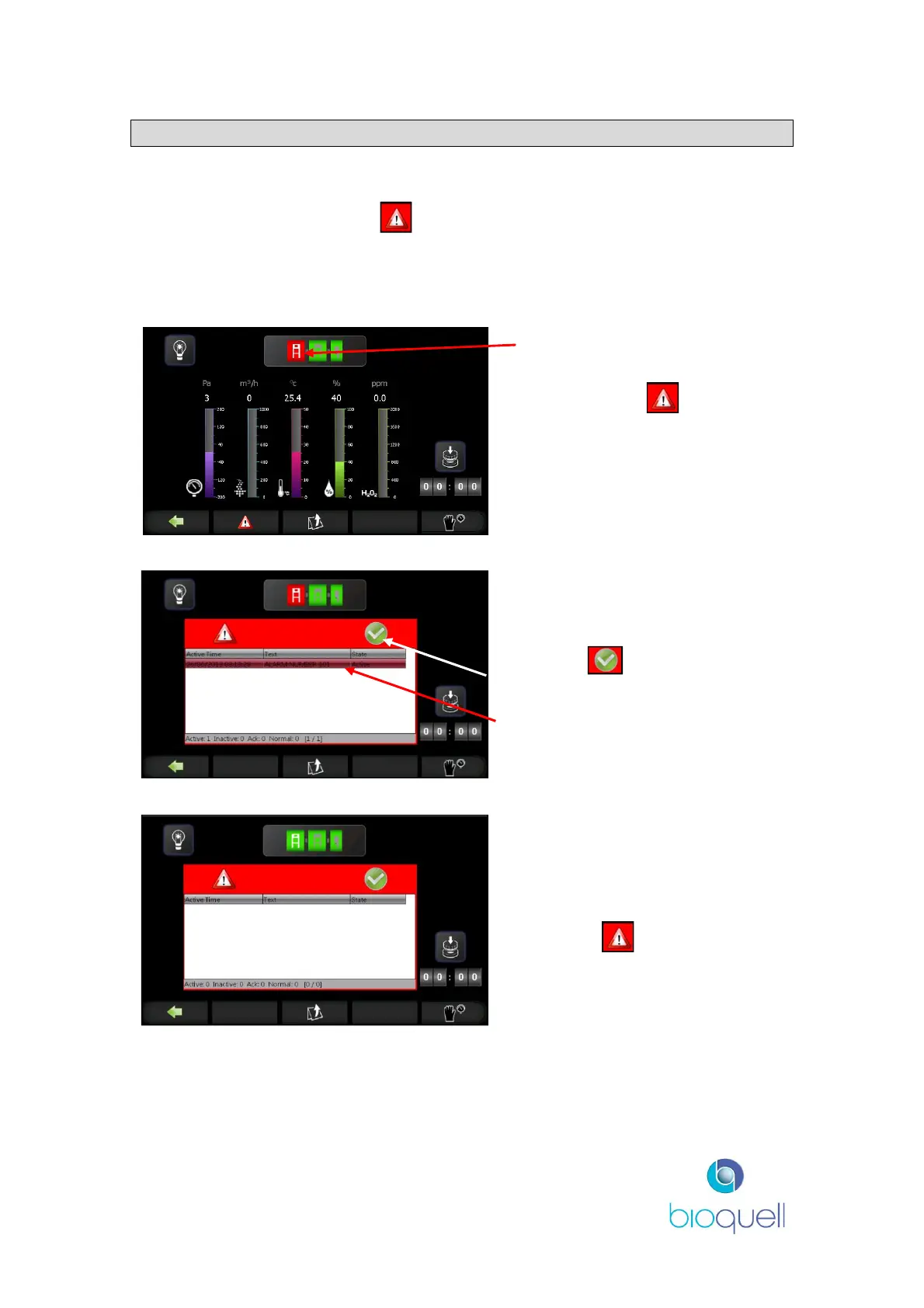
The module with the active
alarm will be coloured red.
Depressing the button
toggles the alarm view.
The screen will display the alarm
number and the associated module
(via the red icon).
When the button is depressed
the alarm is acknowledged.
The alarm number.
The alarm will only be removed if
the alarm condition is not
present.
Press the button to hide the
alarm screen.
If a cycle aborts during a decontamination cycle, run an ‘Aeration Only’ cycle to
remove the HPV, see section 4.3.4.5.
The number of potential alarms is dependent upon the configuration installed.


 To Next Page