
 To Next Page
L
Linda ThomasJul 31, 2025
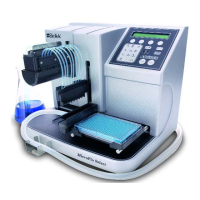
What to do if Biotek MicroFlo select is skipping columns?
- PpamelamunozJul 31, 2025
If the Biotek Dispenser is skipping columns, check or define the Plate Map (uPlate).

What to do if Biotek MicroFlo select is skipping columns?
If the Biotek Dispenser is skipping columns, check or define the Plate Map (uPlate).
Why is my Biotek MicroFlo select dispensing unevenly?
If you're experiencing uneven dispensing with your Biotek Dispenser, ensure all cassette components are properly seated. If the issue persists, it might be due to clogged tips, so refer to the Preventive Maintenance chapter for instructions on unclogging them. As an alternative, recalibrate the cassette or consider replacing the tubing.
How to prevent Biotek MicroFlo select tips from clogging?
If the Biotek Dispenser tips are clogging, filter the dispense fluid to 50 microns before dispensing. Replacing the tubing can also help.
Why is fluid splashing out of the wells of Biotek Dispenser?
If fluid is splashing out of the wells when using the Biotek Dispenser, select the correct Plate Type. You may also need to reduce the Flow Rate, if defining a Protocol, and/or lower the Dispense Height.
What to do if I cannot communicate with computer using Biotek MicroFlo select?
If you cannot communicate with the computer when using the Biotek Dispenser, check the cabling. Select the correct COM Port and turn on the dispenser to display the Main Menu.
Why is the fluid stream missing wells in Biotek Dispenser?
If the fluid stream is missing wells when using the Biotek Dispenser, check the Tip Holder to ensure it is properly seated in the Dispense Arm. Also, select the correct Plate Type. If the issue continues, the tips may be clogged; see the Preventive Maintenance chapter for instructions on unclogging tips.
How to stop viscous fluids sticking to tips on Biotek MicroFlo select?
If viscous fluids are sticking to the tips of your Biotek Dispenser, vary the Flow Rate to find the optimal setting for forcing fluid to break from the tip. You can also clean the Tips (See the Preventive Maintenance chapter).
Provides critical safety warnings for operating the instrument safely.
Instructions for safely unpacking and inspecting the instrument for damage.
Detailed instructions for installing essential components like tubing cassette and tubes.
Provides best practices for achieving optimal performance and reagent preservation.
Procedure for priming the tubing to remove air bubbles before dispensing.
A schedule outlining daily, monthly, and as-needed maintenance tasks.
Instructions on how to regularly verify the dispenser's performance.
Procedure for clearing clogs from the dispense tips.
Schedule for performing IQ, OQ, and PQ tests to ensure instrument performance.
Detailed procedures for testing dispense precision and accuracy.
Step-by-step guide to conduct precision and accuracy tests.
Common performance problems and their suggested solutions.
Explanation of common error codes and steps for resolution.
Information for contacting BioTek support for unresolved technical issues.
List of instrument-generated error codes and their brief descriptions.
Detailed procedure for gravimetrically calibrating the tubing cassette.
 General
| Type | Microplate Dispenser |
|---|---|
| Volume Range | 1 µL to 10 mL |
| Number of Channels | 8 or 16 |
| Power Requirements | 100-240 VAC, 50/60 Hz |
| Dispensing Technology | Peristaltic |
| Plate Compatibility | 6- to 384-well microplates |
| Dispensing Precision | <5% CV at 1 µL |
| Accuracy | ± 2% |
| Software Compatibility | Windows-based |